

Every day, millions of laser printers hum quietly in offices, schools, and homes, producing crisp text at remarkable speeds. But have you ever wondered how does a laser printer work to transform digital files into physical pages in seconds? The answer lies in a fascinating blend of static electricity, light, and heat. Unlike inkjet printers that spray liquid droplets, laser printers use a precise beam of light to draw images onto a charged drum, then fuse powdered toner permanently onto paper. This electrostatic process, called xerography, is the same technology found in office photocopiers. By the end of this guide, you’ll understand every step of the journey from your document file to the finished page, plus common issues and how this technology has evolved over decades.
The Core Technology Behind Laser Printing
Xerography and Electrophotography
Laser printing relies on xerography, also known as electrophotography (EP). This process forms the foundation for both laser printers and digital copiers. The key distinction is the input source. Copiers scan existing documents, while laser printers receive electronic data directly from your computer. At the center of this system sits the photosensitive drum, a cylinder coated with a special material that holds an electrical charge in darkness but loses it when exposed to light. This light-sensitive property allows the printer to create invisible electrostatic images that attract toner powder.
Essential Components and Their Functions
A laser printer contains several interconnected parts that work in sequence:
- Laser assembly: Projects a focused beam to write images on the drum
- Photosensitive drum: Holds the electrostatic image before transfer
- Toner cartridge: Stores fine, negatively charged plastic powder
- Developer roll: Carries toner to the drum surface
- Primary charge roller: Applies a uniform negative charge to the drum
- Transfer roller: Pulls toner from the drum onto paper
- Fuser assembly: Uses heat and pressure to bond toner permanently
- Wiper blade: Cleans leftover toner after each print cycle
- Raster Image Processor (RIP): Converts digital documents into printable dot patterns
Each component must function correctly. If even one fails, print quality suffers or the process stops entirely.
The Step-by-Step Printing Process
1. Raster Image Processing
Your document first needs translation into a language the printer understands. The Raster Image Processor (RIP) takes page data encoded in formats like PostScript, PCL, or OpenXPS and converts it into a bitmap of tiny dots. This bitmap is stored in the printer’s memory and guides the laser throughout the printing cycle.
Memory plays a critical role here. A single monochrome page at 600 dpi requires approximately 4 megabytes of memory, while a color page at the same resolution needs around 16 megabytes to handle all four CMYK layers. Insufficient memory causes a “buffer underrun,” where the laser runs out of data mid-page. Modern host-based printers offload this processing to your computer, reducing hardware costs but potentially slowing other tasks.
2. Charging the Photosensitive Drum
The physical printing begins when the primary charge roller applies a uniform negative electrostatic charge across the rotating drum. An AC bias voltage first neutralizes any residual charge from previous prints, then a DC bias ensures the entire surface holds an even negative charge. Older models used a corona wire for this step, but modern rollers offer improved safety and reliability.
3. Laser Writing and Image Formation
Here is where precision engineering shines. A laser beam, reflected off a rotating polygonal mirror and guided through a series of lenses, scans across the drum line by line. Where the laser strikes, the drum becomes conductive and loses its negative charge. Unaffected areas keep their charge, creating a latent electrostatic image invisible to the naked eye.
This writing happens at extraordinary speeds. The laser can write pixels at rates up to 65 million times per second. Some printers use LED arrays instead of lasers, but the result is similar. The resolution, typically 600 or 1200 dpi, determines the sharpness of your final output.
4. Developing the Image with Toner
Next, the developer roll rotates near the drum, carrying a thin 15-micron layer of negatively charged toner. Because opposite charges attract and like charges repel, the toner particles stick only to the discharged areas where the laser previously hit. Toner itself consists of fine plastic powder mixed with carbon black (for black toner) or colorants (for colored toner). After this step, the drum displays a visible powder image matching your document exactly.
5. Transferring Toner to Paper
A sheet of paper enters the printer and passes beneath the drum. A transfer roller behind the paper applies a positive charge, which pulls the negatively charged toner from the drum onto the paper surface. The transfer is precise but delicate. The toner particles have a weaker bond to the drum than to the paper, so they make the jump cleanly.
In color laser printers, a transfer belt plays a crucial role. This large rotating belt passes in front of all four toner cartridges (cyan, magenta, yellow, and black), collecting each color layer precisely before applying all four to the paper in a single step. This method dramatically improves registration accuracy and prevents color misalignment.
6. Fusing Toner Permanently
At this point, toner sits loosely on the paper’s surface. The fuser assembly makes it permanent. The paper passes between two rollers: a heat roller (a hollow tube with an internal infrared lamp) and a pressure roller (rubber-backed). Temperatures reach up to 427°C (801°F), melting the toner plastic and pressing it into the paper fibers.
If the fuser runs too cold, toner flakes off after printing. If too hot, toner smears or soaks through the paper. High-speed printers use hotter fusers for quick melting, while slower models operate at lower temperatures for energy efficiency. Some modern designs use thin metal foil rollers that warm up faster, reducing wait times for your first page.
7. Cleaning and Resetting the Drum
After transfer completes, a small amount of toner remains on the drum. A wiper blade, made of soft, electrically neutral plastic, scrapes this residue into a waste reservoir. The charge roller then re-applies a fresh negative charge, resetting the drum for the next page. The entire cycle can complete in less than one second, enabling speeds exceeding 200 pages per minute in industrial models.
How Color Laser Printing Works
The CMYK Toner System
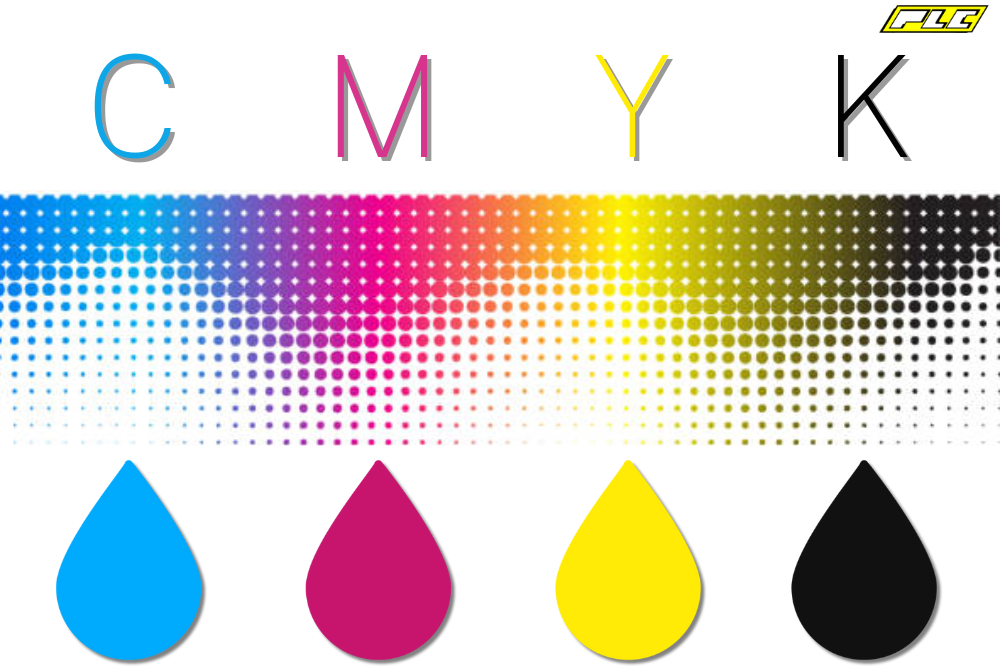
Color laser printers use four separate toner cartridges containing cyan, magenta, yellow, and black (CMYK). By layering these colors in varying combinations, they can reproduce millions of hues. Each color gets applied sequentially, either directly to the paper or onto a transfer belt for better alignment. Monochrome printers use just one laser scanner assembly, while color models often employ two or more to handle the additional complexity.
Registration and Alignment Challenges
Even microscopic misalignment between color layers causes color fringing or blurring along edges. High-end printers combat this through precision sensors, real-time calibration, and transfer belt technology. Despite these advances, color laser printers typically have a higher cost per page than monochrome models, even when printing black-only documents.
Liquid Electrophotography (LEP)
HP Indigo presses use a variation called Liquid Electrophotography (LEP). Instead of dry toner, they use electrostatically charged liquid ink that melts before transfer. This produces smoother gradients and photo-like quality, making LEP ideal for commercial printing applications.
Common Problems and How to Fix Them

Diagnosing Print Quality Issues
| Symptom | Likely Cause | Solution |
|---|---|---|
| White vertical streaks | Obstruction blocking the laser path | Inspect and clear the laser window |
| Smears repeating every drum revolution | Wiper blade not cleaning properly | Replace the drum unit or clean the blade |
| Faint duplicate image down the page | Charge roller damaged or weak | Replace the charge roller or drum assembly |
| White streaks in fixed locations | Toner doctor blade removing too much toner | Clean or replace the developer roll |
| Dark vertical bands with soft edges | Excessive toner on the developer roll | Replace the toner cartridge or doctor blade |
Toner Adhesion Problems
- Toner flakes off easily: The fuser is too cold, or humidity is too high
- Text looks wet or smudged: The fuser is too hot, causing plastic to smear
- Melted toner bleeds through to the back of paper: Severe overheating requires fuser cleaning or roller replacement
Always use manufacturer-recommended toner. Third-party cartridges may not charge or fuse correctly, leading to poor quality or even printer damage.
Performance, Speed, and Cost Considerations
Print Speed Capabilities
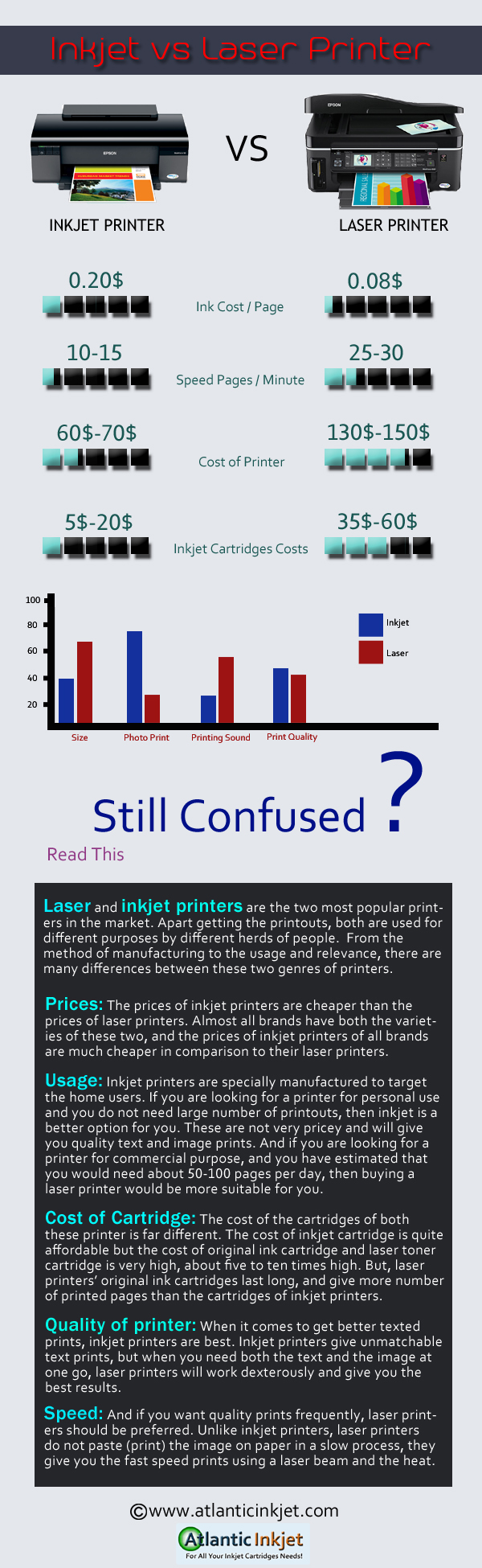
Laser printer speed varies dramatically by model. The fastest monochrome printers exceed 200 pages per minute (ppm), while top-tier color models reach over 100 ppm. Even budget home units manage 20 to 30 ppm, far outpacing most inkjets for text-heavy documents. This speed advantage makes laser printers ideal for invoices, reports, and mass mailings.
Cost Per Page Analysis
- Toner yield: 2,000 to 10,000+ pages per cartridge
- Black cost per page: Approximately 2 to 5 cents
- Color cost per page: Approximately 10 to 15 cents
While laser printers cost more upfront, they save money over time. Inkjet cartridges typically yield only 150 to 500 pages and cost 7 to 15 cents per black page. For high-volume printing, laser technology delivers significant savings.
Duplex and Paper Handling
Most modern office laser printers support duplex printing (both sides), cutting paper use in half. Standard trays hold 250 to 500 sheets, and many include automatic document feeders (ADFs) for scanning. Always use laser-rated paper for specialty media like labels, cardstock, or glossy brochures to prevent jams and ensure proper fusing.
Safety, Health, and Environmental Concerns
Ozone and Air Quality
High-voltage components generate small amounts of ozone through corona discharge. Home printers emit negligible amounts, but large office models may require activated carbon filters to maintain air quality. In poorly ventilated spaces, ozone can cause throat irritation or coughing. Ensure adequate airflow around your printer.
Particle Emissions
A 2012 Queensland University of Technology study found that some printers emit ultrafine particles comparable to a burning cigarette. While health risks are considered low, sensitive individuals might prefer filtered models or avoid close proximity during long print jobs. Filters can reduce emissions from fan vents, though paper output trays cannot be filtered.
Safe Toner Cleanup
Never vacuum toner with a regular household vacuum. Toner particles are electrostatic and can ignite from static discharge or blow through standard filters back into the air. Use an ESD-safe vacuum with a conductive hose and HEPA filter. For minor spills, wipe gently with a damp cloth, never a dry one.
Air Travel Restrictions
Following a 2010 security incident involving explosive-filled toner cartridges, the TSA prohibits toner and ink cartridges over 1 pound (0.45 kg) on inbound international flights. Most consumer cartridges fall under this limit, but commercial users should verify weights before flying.
Laser vs. Inkjet: Choosing the Right Technology
Key Differences
| Feature | Laser Printer | Inkjet Printer |
|---|---|---|
| Best for | Text, documents, high volume | Photos, graphics, home use |
| Print speed | Fast (20 to 200+ ppm) | Slower (5 to 20 ppm) |
| Cost per page | Low | Higher |
| Upfront cost | Higher | Lower |
| Photo quality | Moderate | Excellent |
| Physical size | Larger | Compact |
Choose laser if you print lots of text, need speed, and want lower running costs. Choose inkjet if you print photos, print infrequently, or need a compact device for limited space.
Anti-Counterfeiting Tracking and Smart Chips
Hidden Machine Identification Codes
Many color laser printers embed nearly invisible yellow dots (about 0.1 mm in size) in a grid pattern across every page. These Machine Identification Codes (MICs) encode the printer’s serial number and the print date and time. Originally designed to track counterfeiters, these codes sparked privacy concerns, especially after they helped identify whistleblower Reality Winner in 2017.
Smart Chip Limitations
Some toner cartridges include smart chips that track page counts and limit usage even when toner remains. This practice increases costs and waste. Workarounds include chip resetters and refilling kits, though these carry some risk and may void warranties.
Frequently Asked Questions About Laser Printers
What is the difference between a laser printer and an inkjet printer?
Laser printers use toner (dry plastic powder) fused onto paper with heat and pressure, while inkjet printers spray liquid ink through tiny nozzles. Laser printers excel at fast, high-volume text printing with lower per-page costs. Inkjet printers produce better photo quality and cost less upfront.
How long does a laser printer drum last?
A typical photosensitive drum lasts between 10,000 and 50,000 pages, depending on the model and usage. Many modern printers combine the drum with the toner cartridge, so replacing the cartridge also replaces the drum. Avoid exposing the drum to direct sunlight for extended periods, as light degrades the photosensitive coating.
Can laser printers print on glossy photo paper?
Yes, but you must use paper specifically rated for laser printers. Standard inkjet glossy paper can melt, warp, or damage the fuser due to incompatible coatings. Laser-rated glossy paper withstands the high fuser temperatures and produces vibrant results.
Why does my laser printer smell like ozone?
The smell comes from ozone generated by corona discharge during the charging process. This is normal in small amounts, especially in older printers with corona wires. If the odor is strong, improve ventilation or check for a failing component. Newer printers with primary charge rollers produce significantly less ozone.
Are laser printers safe to use at home?
Yes, laser printers are generally safe for home use. Modern models emit minimal ozone and ultrafine particles. To reduce exposure, keep your printer in a well-ventilated area, avoid placing it directly beside your desk, and consider models with built-in filters if you have respiratory sensitivities.
Why are toner cartridges so expensive?
Toner cartridge pricing reflects several factors: research and development, precise manufacturing of fine plastic particles, built-in smart chips, and the business model where printers are sold cheaply while supplies generate ongoing revenue. Compatible third-party cartridges offer savings but may compromise quality or damage your printer.
Final Takeaways on How Laser Printers Work
Understanding how a laser printer works reveals an elegant combination of physics and engineering. The process transforms digital data into physical documents through seven distinct steps: raster processing, drum charging, laser writing, toner development, transfer, fusing, and cleaning. Each step relies on precise electrostatic principles that have remained largely unchanged since Gary Starkweather invented the technology at Xerox in 1971.
Key Advantages to Remember
- Speed: Ideal for high-volume printing at 20 to 200+ pages per minute
- Precision: Sharp text and clean lines at 600 to 1200 dpi
- Cost efficiency: Lower cost per page over the printer’s lifetime
- Durability: Built for demanding office environments
Maintenance Recommendations
- Replace drums and fusers according to manufacturer guidelines
- Use genuine or high-quality compatible toner
- Keep your printer clean and well-ventilated
- Protect the drum from prolonged light exposure
Whether you manage an office fleet or select a home printer, this knowledge helps you make informed decisions. Start by evaluating your monthly print volume and document types. If you print mostly text and need speed, a monochrome laser printer offers the best value. For color documents and marketing materials, invest in a color laser model with a transfer belt for superior alignment.


