

You have a 3D printer and filament, but your prints often fail or look weak. The secret to success lies in learning how to design 3D printer projects that account for real-world physics and printer limitations. Without a solid plan, even expensive equipment produces warped or unusable results.
This guide teaches you to choose the right software, apply critical design principles, and optimize files for strength. You will discover how to prevent common errors like overhangs and tolerance issues before they waste your time. Follow this process to turn your ideas into durable, functional objects.
Start with a Clear Purpose for Your Design
Defining the goal of your project is the first step before opening any software. A successful design begins with intention rather than random inspiration. You must decide if the object is decorative, mechanical, or meant to bear heavy loads.
Skipping this step often leads to mismatched tolerances or over-engineered parts that fail in use. A camera mount needs precision while a cosplay prop requires surface detail. Your specific answer shapes every subsequent decision in the modeling process.
Define Function and Use Case
List the core requirements your object must meet to function correctly. Ask if it will bear weight, move, or resist heat and impact.
- Will the part snap, slide, or rotate during operation?
- Does it need to survive moisture or high temperatures?
- What specific material properties does the job require?
For instance, a car phone holder must flex slightly to grip yet resist warping in sunlight. These needs dictate your choice between materials like ABS or PLA and influence joint designs.
Set Size and Fit Constraints
Measure the environment where your part will live using calipers or digital references. You must capture exact dimensions to ensure the final print fits its intended space. Include tolerance zones of ±0.2 mm if the part connects to other objects like motor shafts.
Sketch rough dimensions on paper or digitally to visualize the footprint. This prevents creating oversized models that exceed your build volume or undersized parts that float loosely.
Choose the Right Design Software
Your choice of 3D modeling tool affects workflow speed, precision, and export quality. Not all software handles printable designs equally well. You must pick a program that matches your skill level and specific project needs.
Use CAD for Functional Parts
Parametric CAD software is essential for mechanical, interlocking, or dimensionally accurate parts. These programs allow you to define exact measurements and constraints that are easy to edit later.
Top options include:
* Fusion 360: Best for beginners and pros with cloud-based simulation tools.
* SolidWorks: The industry standard for engineering-grade components.
* Onshape: A fully browser-based option ideal for collaboration.
* FreeCAD: A powerful open-source tool with a steeper learning curve.
These tools let you modify hole sizes or add fillets without rebuilding the entire model from scratch.
Try Mesh Modeling for Artistic Shapes
Mesh-based software offers more artistic freedom for organic forms, sculptures, or character models. These tools focus on vertex manipulation rather than mathematical constraints.
Recommended tools include:
* Blender: Free and powerful for sculpting and animation.
* ZBrush: Professional-grade digital sculpting software.
* Tinkercad: A web-based option perfect for simple shapes.
Note that mesh models often require cleanup before printing. Use repair tools like Meshmixer to fix non-manifold edges or holes.
Apply 3D Printing Design Principles
Even a beautiful model can fail if it ignores the realities of fused deposition modeling. Good design anticipates how the printer builds layer by layer to avoid common pitfalls. Applying these core principles ensures your project survives the printing process.
Avoid Overhangs Beyond 45 Degrees
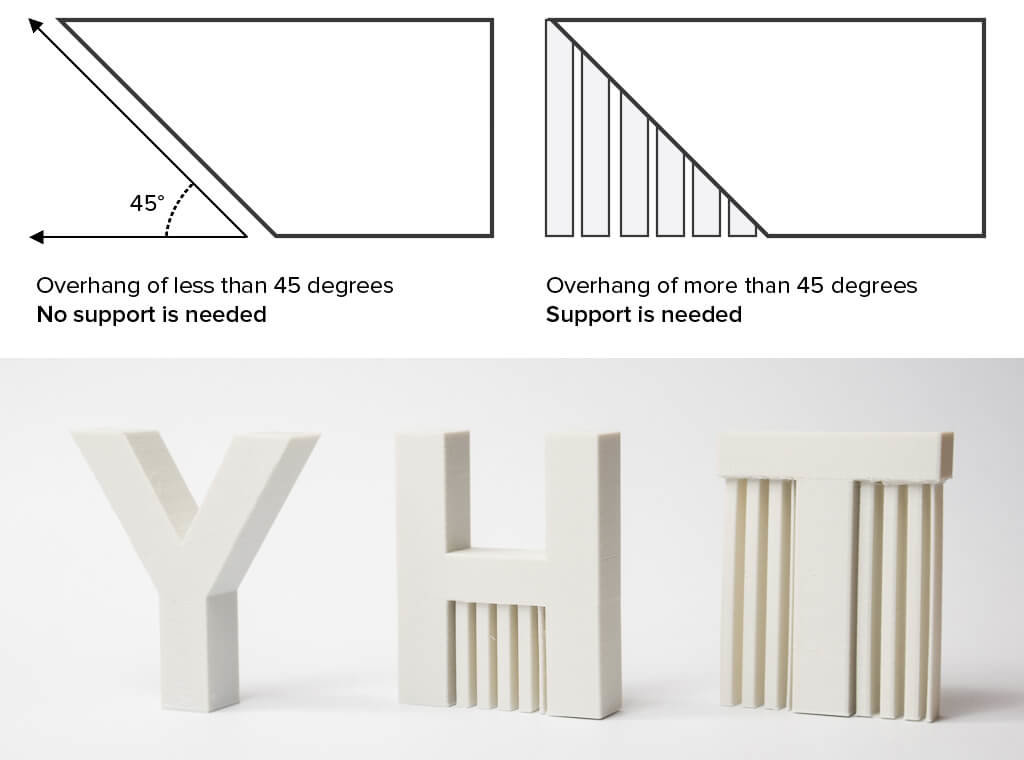
Printers struggle with horizontal protrusions because they lack support underneath. As a rule, no face should angle more than 45° from vertical to prevent sagging.
To fix this issue:
* Redesign with chamfers or gradual slopes.
* Split large overhangs into separate printable sections.
* Use supports only when necessary to save time and material.
For example, a pyramid roof prints fine, but a flat extending shelf needs bracing or a redesign.
Maintain Consistent Wall Thickness

Thin walls crack easily while thick walls waste material and warp during cooling. You should aim for a minimum wall thickness of 1.2 mm for PLA and similar materials.
Guidelines by material include:
* PLA: 1.2 to 2 mm
* ABS: 1.5 to 2.5 mm
* PETG: 1.5 to 2 mm
* Flexible TPU: 2 to 3 mm
Use your software’s shell or offset tool to ensure uniform walls instead of relying on visual estimation.
Design With Tolerances in Mind
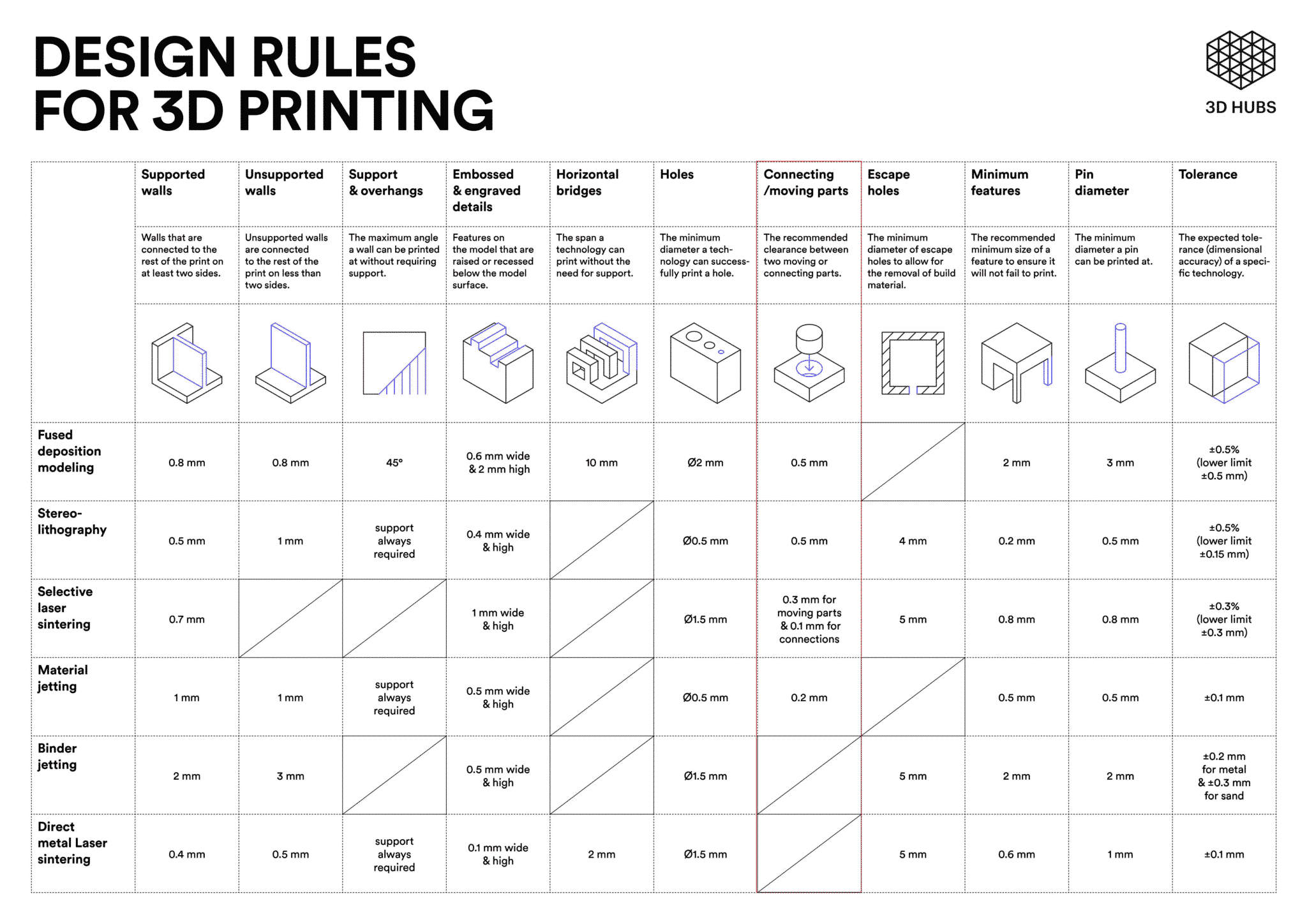
Parts that fit together need specific space to assemble correctly. Too tight and they will not fit, while too loose causes them to rattle or fail.
Standard clearance values include:
* Press fit: 0.0 mm to -0.1 mm for a snap fit.
* Friction fit: +0.1 mm to +0.2 mm for a removable snug fit.
* Free-moving: +0.3 mm to +0.5 mm for rotating parts.
Always test these values with a calibration cube or tolerance test model before printing the final assembly.
Optimize for Strength and Stability
A 3D-printed object is not solid steel and requires smart design to maximize strength. You can achieve durability without adding unnecessary bulk to your project.
Use Ribs and Gussets for Support
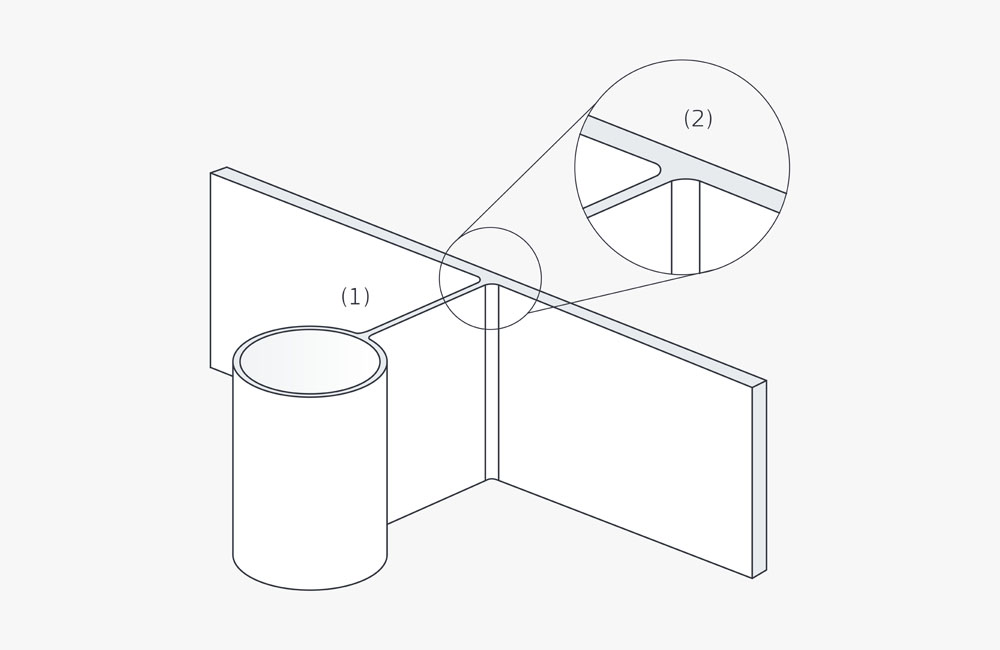
Add ribs or gussets instead of thickening entire sections of your model. These internal supports distribute stress and prevent bending under load.
For example, a motor mount stays lightweight with triangular gussets at stress points. A shelf bracket gains rigidity with vertical ribs along its back panel.
Orient Parts to Maximize Layer Bonding
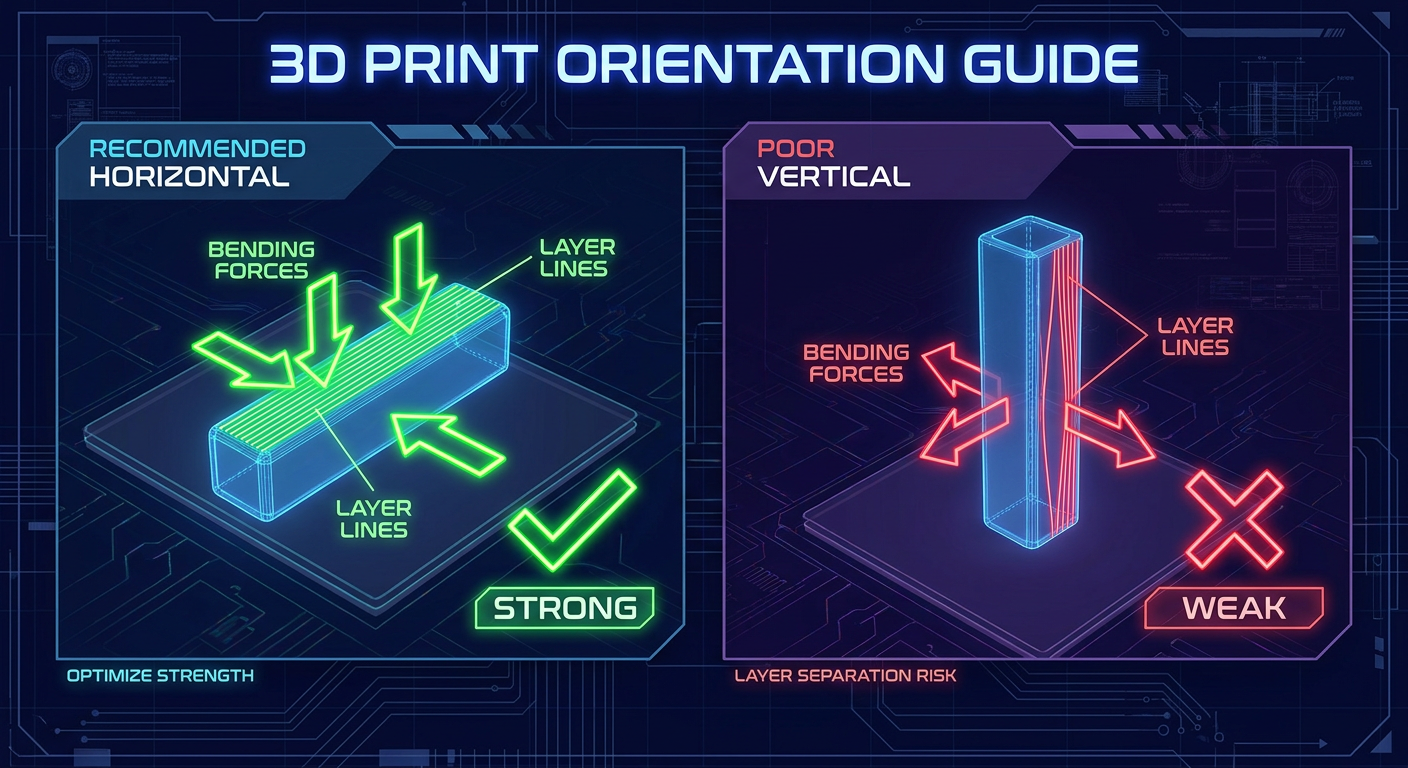
Strength varies significantly by print direction because layers bond well horizontally but delaminate under vertical shear. When designing, consider how force will act on the finished part.
A hook should be printed so the load pulls along the layers rather than across them. Adjust your design or slicing orientation to align with these force vectors.
Add Fillets and Chamfers
Sharp inside corners create stress concentrations that lead to cracking. Fillets and chamfers reduce this risk and improve material flow during printing.
Aim for fillet radii of at least 0.5 mm on internal corners. Larger radii of 1 to 2 mm increase durability in high-stress areas significantly.
Prepare Files for Printing
A finished model is not ready to print until you export and validate it properly. This step ensures compatibility with your slicer and accuracy in the final output.
Export as STL or 3MF
Most slicers accept STL or 3MF formats for processing. Choose the format that best preserves your design data.
Recommendations for export:
* Use 3MF if supported to preserve color and metadata.
* Use STL for universal compatibility across all slicers.
* Set resolution to “fine” or “high” to avoid faceted curves.
Avoid OBJ or PLY formats unless necessary as they are less reliable for print preparation.
Check for Manifold Errors
A watertight mesh has no holes, duplicates, or flipped normals. Non-manifold geometry causes failed slices or weak prints that break easily.
Fix issues using tools like:
* Meshmixer: Detects and repairs holes and thin walls.
* Netfabb Basic: Auto-repairs common mesh problems.
* PrusaSlicer or Cura: Built-in error detection during import.
Always run a mesh analysis before slicing to ensure a successful print.
Test and Iterate Your Design
First prints are rarely perfect, so treat design as an iterative process. Build, test, and improve your model based on real-world performance.
Print a Prototype First
Use cheap filament like PLA to print a draft version of your project. Check if it fits with other components and if moving parts operate smoothly.
Make all adjustments in your CAD file rather than trying to fix the physical part. This ensures your digital master file remains accurate for future prints.
Refine Based on Real-World Feedback
Analyze why a part failed, such as a hinge cracking after three bends. Increase the radius or switch to flexible filament to solve the issue. If a lid is too tight, adjust clearance by +0.1 mm and reprint.
Keep version numbers in your file names to track progress. This avoids confusion between different iterations of your design.
Scale and Customize for Users
Once your design works, make it adaptable for others to use. The best 3D printer projects solve problems for a wide audience, not just you.
Use Parametric Variables
Define dimensions as parameters in software like Fusion 360 or FreeCAD. Users can change values like shaft diameter, and the model updates automatically.
This approach is ideal for:
* Gear systems with varying tooth counts.
* Mount adapters for different devices.
* Enclosures with modular inserts.
Share these parametric files on platforms like Thingiverse or Printables.
Offer Multiple Sizes
A phone case or tool holder may need variants to suit different users. Design one master version, then scale or adjust key dimensions for specific needs.
Use clear naming conventions like “Wall_Mount_v2_small” or “Wall_Mount_v2_large.” Alternatively, create a customizable template with clear instructions for end users.
Maintain Design Files and Documentation
Good design does not end at the print bed. Organize your work so you and others can reuse it effectively in the future.
Label and Organize Files Clearly
Use consistent naming conventions for all your project files. Store source CAD files, exported STLs, and photos in labeled folders.
Examples of good naming include:
* ProjectName_Version_Material.stl
* ProjectName_CAD.f3d
This organization saves time when you need to modify or reprint a project later.
Share Instructions and Notes
If sharing online, include required print settings like infill and layer height. List assembly steps and compatible printers to reduce user errors.
Providing this information builds trust in your designs and helps others succeed. It transforms a simple file into a complete, usable solution.
Frequently Asked Questions About Designing 3D Printer Projects
What is the minimum wall thickness for 3D printing?
You should aim for a minimum wall thickness of 1.2 mm for PLA. Other materials like ABS or PETG may require 1.5 mm or more to prevent cracking and ensure structural integrity during printing.
How much clearance do I need for moving parts?
For parts that need to rotate or slide freely, provide a clearance of +0.3 mm to +0.5 mm. Tighter fits of +0.1 mm work for friction fits, while press fits require zero or negative clearance.
Which software is best for beginners designing functional parts?
Fusion 360 is often the best choice for beginners because it combines parametric modeling with cloud-based tools. Tinkercad is also excellent for very simple shapes and absolute beginners.
Why do my overhangs fail during printing?
Overhangs fail when they exceed 45 degrees from vertical because there is no support underneath. You should redesign with chamfers, split the part, or add support structures to fix this.
Should I use STL or 3MF files for printing?
Use 3MF files if your slicer supports them because they preserve color and metadata. Use STL for universal compatibility if you are unsure about slicer support or sharing with others.
Key Takeaways for Designing Successful 3D Printer Projects
.jpg)
Designing effective 3D printer projects requires blending creativity with engineering constraints. You must start with a clear purpose, choose the right software, and apply specific rules for tolerances and wall thickness. Iterating on prototypes and organizing your files ensures long-term success and reusability.
Start your next project by defining its function before modeling a single line. Apply these principles to create durable, functional objects that print perfectly the first time.


