

Your old printer sits in a corner taking up space, yet tossing it in the trash is often illegal and harmful. These devices contain hazardous materials like mercury alongside valuable rare earth metals that demand proper handling.
You can safely recycle, donate, or sell your unit while protecting your personal data from theft. This guide details every legal disposal method, fee structure, and security step you need to clear your closet responsibly.
Secure Your Personal Data Before Disposal
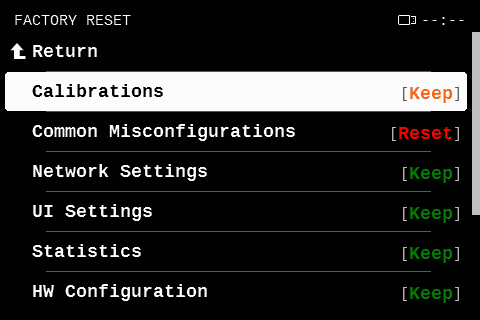
Modern printers store network passwords, scanned documents, and fax logs in their internal memory. Ignoring this digital footprint leaves your sensitive information vulnerable to theft when the device changes hands.
Perform a Factory Reset to Wipe Memory
You must erase all stored data before the printer leaves your home.
1. Access the Settings menu on your printer control panel.
2. Navigate to Maintenance or Tools.
3. Select Restore Factory Settings or Wipe All Data.
4. Wait for the confirmation message indicating the process is complete.
Consult your specific user manual for brand navigation paths if these options differ. Skipping this step on Wi-Fi models is a critical security risk you cannot afford.
Remove Ink and Toner Cartridges First
Ink and toner cartridges contain chemicals that leak into soil and water if placed in landfills. You must remove these components before recycling the main printer unit.
Recycle Cartridges Through Specialized Channels
Do not bundle cartridges with the printer body during drop-off.
* Mail-in Programs: Services like Recycle4Charity provide free pre-paid envelopes to support nonprofits.
* Retail Drop-offs: Stores like Staples and Office Depot accept used cartridges for recycling credits.
* Manufacturer Take-Back: Brands like HP and Canon offer free mail-back labels for their specific cartridges.
Removing these items makes the printer lighter and prevents messy leaks during transport to recycling centers.
Donate or Sell Working Printers
If your device still prints clearly, keeping it in use is the most environmentally friendly option available. Many organizations actively seek functional office equipment to support their missions.
Identify Suitable Donation Recipients
Local groups often accept working printers to help students or administrative staff.
* Schools and Libraries: Often need hardware for computer labs or student projects.
* Nonprofits: Shelters and charities use printers for daily administrative tasks.
* Community Centers: Local hubs frequently welcome technology donations.
Call ahead to verify current needs and ask if they provide tax deduction receipts for your records.
Sell Functional Units Online
You can recover some costs by selling high-end or multifunction models on platforms like eBay or Facebook Marketplace. Ensure your listing clearly states the device has been factory reset and includes photos of its condition.
Utilize Retailer Recycling Programs

Major electronics retailers offer structured drop-off programs for non-working printers regardless of brand. These programs ensure hazardous materials are processed correctly rather than ending up in landfills.
Best Buy Recycling Policies and Fees
Best Buy accepts desktop printers and all-in-one units under their computing equipment category.
* Daily Limit: Households can drop off up to three items per day.
* Residency Rule: Programs are designed for residents, not commercial businesses.
* Safety: Items presenting health hazards may be rejected.
Understand State-Specific Fee Structures
Recycling costs vary significantly based on your location and local laws.
| State Group | Cost to You | Details |
|---|---|---|
| CA, CT, HI, NJ, NY | Free | State laws prohibit charging consumers. |
| PA, WI, MI | $0 Net Cost | Pay $29.99 fee, receive $30 gift card. |
| Most Other States | $29.99 | Standard fee for computing equipment. |
Visit the customer service desk with your bagged printer to initiate the recycling process.
Leverage State Mandated E-Waste Laws
Many states enforce Extended Producer Responsibility laws requiring manufacturers to fund collection systems. These mandates often provide free recycling opportunities for residents in specific regions.
Free State Collection Programs
Several states have established robust networks for free e-waste disposal.
* New Jersey: Free pickup available for bulky items via MRM for those unable to visit sites.
* Oregon: Call the Oregon E-Cycles hotline at 1-888-532-9253 for drop-off locations.
* Texas: The Computer Equipment Recycling Act mandates free collection events and centers.
* West Virginia: A landfill ban on electronics has been in place since 2011.
Use tools like Earth911 to locate official state e-cycle drop-off points near your home.
Schedule Haul-Away Services for Convenience
Transporting heavy electronics can be difficult for those without vehicles or with mobility issues. Retailers and third-party services offer pickup solutions for a fee.
Best Buy Haul-Away Options
You can schedule removal services through Geek Squad or delivery teams.
* With New Purchase: Costs $49.99 to remove your old unit during new product delivery.
* Standalone Service: Costs $199.99 to remove up to two large items plus unlimited small electronics.
These services ensure certified partners handle the responsible recycling of your old equipment.
Recycle Components Separately for Maximum Impact

Certain parts of your printer require specialized handling to ensure no hazardous material is wasted. Separating these components maximizes environmental benefits.
Handle Batteries and Cables Correctly
Not every part of your printer goes into the same bin.
* Batteries: Removable printer batteries must go to battery-specific recyclers like Call2Recycle.
* Cables: Power cords and USB cables should be recycled separately at e-waste bins.
* Paper Manuals: Shred any documents containing personal info before recycling as paper.
Separating these items streamlines the processing workflow at recycling facilities.
Avoid Common Disposal Mistakes
Understanding what not to do saves you time, money, and potential legal trouble. Many users make avoidable errors when discarding electronics.
Know What Retailers Reject
Retailers have strict exclusions to ensure safety and compliance.
* Office Furniture: Desks and chairs are not accepted.
* Software: Physical discs and license keys cannot be recycled here.
* Business Equipment: Commercial entities usually cannot use resident drop-off programs.
Prevent Legal and Safety Issues
Throwing cartridges in the trash causes environmental harm and misses out on reward programs. Assuming all recycling is free can lead to surprise fees in non-exempt states. Always verify state laws since places like West Virginia ban e-waste from landfills entirely.
Follow This Step-by-Step Disposal Checklist
Use this workflow to ensure you dispose of your printer correctly and securely.
- Assess Functionality: Decide if the unit is worth repairing, donating, or selling.
- Wipe Data: Perform a factory reset on any network-capable device.
- Remove Components: Take out ink cartridges, toner, and memory cards.
- Bag the Unit: Secure the printer and cables to prevent damage during transport.
- Choose Method: Select free state programs, retailer drop-offs, or paid haul-away.
- Recycle Parts: Send cartridges to charity or retail programs separately.
- Keep Records: Save receipts for tax deductions or compliance documentation.
Following these steps guarantees a responsible and secure disposal process.
Frequently Asked Questions About Printer Disposal
Is it illegal to throw a printer in the trash?
In many states like West Virginia and Wisconsin, dumping electronics in landfills is illegal due to toxic materials. Even where legal, it is highly discouraged due to environmental hazards.
Do I get paid for recycling my old printer?
You typically do not get cash, but some programs offer store credit for cartridges. In states like Pennsylvania, you pay a fee but receive a gift card that effectively makes the transaction free.
Can businesses use resident recycling drop-off programs?
Generally no, as most retailer and state programs are designed strictly for residential consumers. Businesses must usually hire licensed commercial e-waste disposal vendors.
How do I ensure my printed documents are not recovered?
Performing a factory reset wipes the internal memory buffer where scans and logs are stored. You must complete this step before handing over any Wi-Fi enabled or all-in-one printer.
What happens to the printer after I drop it off?
Certified partners dismantle the device to recover precious metals, plastics, and rare earth elements. These materials are sent to end markets to be repurposed into new products.
Key Takeaways for Disposing of Your Old Printer
Disposing of an old printer requires careful attention to data security and local regulations. Always perform a factory reset to protect your private information before the device leaves your possession.
Choose the most sustainable path by donating working units or utilizing free state-mandated recycling programs available in many regions. By separating cartridges and following proper disposal channels, you protect both your privacy and the environment.
Next Step: Check your state’s specific e-waste laws or visit a local electronics retailer today to begin the responsible disposal process.


