Upgrading your home office or clearing out old electronics? That outdated Epson printer sitting in your closet deserves better than a trip to the landfill. Epson offers a free recycling program that handles hardware, ink cartridges, and packaging through mail-back options, retail drop-offs, and donation partnerships. Whether you’re an individual with a single device or a business retiring multiple units, there is a zero-cost path to responsible disposal.
This guide covers every Epson printer recycling option available, including how to mail back hardware, recycle used ink, donate working devices, and follow state-specific e-waste rules. You will also learn about partner programs that expand access and help communities in need.
Donate Working Printers to Those in Need
Epson partners with Digitunity to give functional printers a second life. If your device still operates, donating it helps people with disabilities or financial challenges access essential technology.
How the Donation Process Works
- Digitunity connects with nonprofit organizations nationwide to distribute donated equipment.
- Eligible devices are cleaned, configured, and delivered to schools, job centers, and community hubs.
- Free pickup is available through participating local organizations.
Donating instead of recycling extends your printer’s lifespan and supports digital equity, making it the most sustainable choice for functional hardware.
Drop Off Printers at Retail Locations Near You
Many electronics and office supply stores accept Epson products for recycling, giving you a quick in-person option without shipping anything.
Participating Retailers
Stores that commonly accept Epson products include:
- Office Depot
- Staples
- Best Buy (local policies vary)
These locations typically accept:
- Entire printers (with ink removed)
- Used ink cartridges
- Packaging materials
Use Epson’s drop-off locator tool to find the nearest retailer and confirm accepted items. This option works well if you prefer not to package and ship your device.
Mail Back Your Printer for Free
Epson provides a free mail-in recycling program for all branded hardware, regardless of condition. Every Epson printer, scanner, and projector qualifies, and no purchase is necessary.
Steps to Mail a Printer
- Generate a prepaid shipping label. Visit Epson’s recycling portal and print a free FedEx label.
- Pack your printer securely. Use a sturdy box with cushioning to prevent transit damage. Remove ink cartridges and paper trays before packing.
- Affix the label and ship. Tape the label to the outside of the box, then drop it at any FedEx location or schedule a pickup.
Pro Tip: New York residents can request free packaging supplies by calling 1-866-922-8252.
This program covers all Epson printers, scanners, and projectors at zero cost to you.
Recycle Ink Cartridges and Supplies

Used ink cartridges contribute significantly to plastic waste, but Epson makes responsible disposal simple through dedicated mail-back options.
Mail-In Option for Individuals
You can send back used ink, toner, and packaging directly to Epson:
- Place items in a sealed box or envelope to prevent leaks.
- Ship to:
Epson America, Inc.
Attn: Recycling Center
2350 Stafford Road, Suite 101
Plainfield, IN 46168
No label or form is required for small quantities of ink.
Free Ink Recycling Kit for Businesses
Businesses using Epson WorkForce Enterprise printers can order a free recycling kit through the Business Inkjet Environmental Pursuit Partners initiative.
What is included:
- Prepaid bubble mailer (holds up to 2 ink containers)
- FedEx return shipping label
How to order:
- Click “Order Now” on Epson’s recycling page.
- Add the kit to your cart and complete checkout.
- Receive your mailer and start recycling.
Request a Recycling Kit Online
Getting started takes just a few minutes through Epson’s online portal.
Steps to Order a Kit
- Go to Epson’s recycling portal.
- Select “Order Now” for the ink recycling kit.
- Complete the brief form and submit.
You will receive your prepaid mailer within 7–10 business days. Once filled, seal and drop it in the mail with no extra postage needed.
Note: Kits are intended primarily for business customers but may be available to individuals depending on supply.
Check State-Specific Recycling Rules
Some states have mandatory electronics recycling laws and offer additional programs that affect how you dispose of e-waste.
States with Special E-Waste Programs
The following states have additional electronics recycling regulations:
- Connecticut
- District of Columbia
- Hawaii
- Illinois
- Maine
- Michigan
- New Jersey
- New York
- North Carolina
- Oregon
- South Carolina
- Utah
- Vermont
- Washington
- Wisconsin
These programs may include:
- Free municipal e-waste drop-off events
- Extended producer responsibility (EPR) laws
- Required retailer take-back programs
Always check your state’s official environmental website for the latest guidelines before disposing of your device.
Use Partner Programs for Broader Recycling Access
Epson works with certified partners to expand recycling options and ensure safe, ethical processing of specialized materials.
Call2Recycle for Rechargeable Batteries
Epson products with rechargeable batteries, including portable printers and scanners, can be recycled through Call2Recycle.
- Drop off batteries at designated locations nationwide.
- No cost to consumers or businesses.
- Batteries are processed to recover cobalt, lithium, and other valuable metals.
Sims Lifecycle Services for Enterprise Hardware
For large-scale or corporate recycling needs, Epson partners with Sims Lifecycle Services, a global leader in IT asset disposition.
Services include:
- Secure data destruction
- Full hardware recycling
- Compliance reporting
- Chain-of-custody tracking
This program suits businesses retiring multiple printers or needing audit-ready documentation for regulatory compliance.
Prepare Your Printer for Recycling
Taking a few minutes to prepare your device ensures a smooth recycling process and protects your personal information.
What to Remove Before Shipping
- Ink cartridges: Recycle separately or return through the ink program.
- Paper trays and output bins: Remove these components before packing.
- USB or Ethernet cables: Reuse or recycle through local e-waste programs.
- Memory cards or USB drives: Always remove any personal data storage.
Wipe Personal Information
While most Epson printers do not store sensitive data, some network-connected models may retain IP settings or job logs. To protect your privacy:
- Disconnect from Wi-Fi.
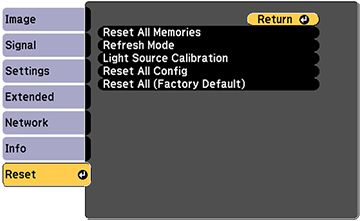
- Perform a factory reset through Settings > Reset.
- Power off and unplug before packing.
These steps protect your privacy and prepare the device for reuse or recycling.
Why Choose Epson’s Official Recycling Program
Selecting Epson’s official channels offers advantages you will not get from third-party disposal or landfill dumping.
Environmental Benefits
- Reduces e-waste堆积 in landfills
- Recovers metals, plastics, and circuitry for reuse
- Lowers the carbon footprint of new product manufacturing
Social Impact
- Working printers reach people who need them
- Supports digital inclusion through Digitunity partnerships
- Promotes circular economy principles
Convenience and Cost Savings
- Free shipping labels with no out-of-pocket fees
- Multiple options for both home and business users
- Simple online ordering for recycling kits
Epson’s program is designed to be accessible, responsible, and hassle-free for everyone.
Avoid Common Recycling Mistakes
Even with an excellent program, simple mistakes can delay recycling or create safety hazards.
What Not to Do
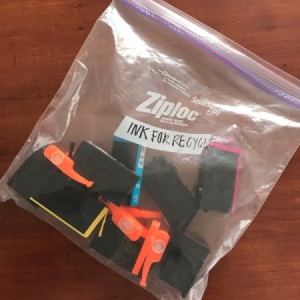
- Do not ship leaking ink. Wrap cartridges in plastic and seal them in a leak-proof container.
- Do not include non-Epson products, as they may not be accepted.
- Do not forget to remove personal accessories and wipe data from network-connected models.
- Do not use damaged or flimsy boxes, since FedEx may reject them.
Pro Tip: Print the confirmation page after generating your shipping label. It contains tracking and reference details you may need later.
Frequently Asked Questions About Epson Printer Recycling
Is Epson printer recycling really free?
Yes. Every option in Epson’s recycling program is free for U.S. customers, including mail-back labels, retail drop-offs, and business recycling kits. You do not need to make a purchase to qualify.
Can I recycle any Epson printer, even if it no longer works?
Yes. Epson accepts all branded hardware for recycling regardless of condition. Working printers can be donated through Digitunity, while non-working devices can be mailed back for free.
Where do I send used Epson ink cartridges?
Individuals can mail used ink, toner, and packaging to Epson America, Inc., Attn: Recycling Center, 2350 Stafford Road, Suite 101, Plainfield, IN 46168. No label is required for small quantities.
How do I get a free recycling kit for my business?
Visit Epson’s recycling portal, click “Order Now” for the Business Inkjet Environmental Pursuit Partners kit, add it to your cart, and check out. Each kit includes a prepaid bubble mailer and FedEx return label for up to 2 ink containers.
Do I need to remove ink cartridges before recycling my printer?
Yes. Epson recommends removing all ink cartridges before recycling the printer hardware. Cartridges should be recycled separately through the ink mail-back program or a recycling kit.
What states have special e-waste recycling rules?
Connecticut, Hawaii, Illinois, Maine, Michigan, New Jersey, New York, North Carolina, Oregon, South Carolina, Utah, Vermont, Washington, Wisconsin, and the District of Columbia all have additional electronics recycling regulations. Check your state’s environmental agency for specific requirements.
Key Takeaways for Responsible Epson Printer Recycling
Epson’s recycling program makes it easy to dispose of printers, ink, and packaging without harming the environment. You have multiple free options including retail drop-offs, mail-back hardware recycling, and ink cartridge return programs. Working devices can be donated through Digitunity to support digital equity, while broken units can be shipped at no cost using a prepaid FedEx label. Businesses benefit from specialized kits and enterprise partnerships through Call2Recycle and Sims Lifecycle Services.
Your next step is simple: visit Epson’s official recycling page today to generate a shipping label, order a recycling kit, or find the nearest drop-off location. Every device you recycle helps conserve resources, reduce pollution, and support communities in need.