

You have probably watched a label printer produce perfect barcodes and addresses in seconds, yet the technology behind it remains a mystery. Unlike standard office printers that spray ink or fuse toner, label printers use specialized methods to create durable marks on adhesive materials. Understanding how does a label printer work starts with recognizing that these devices are built for speed, precision, and longevity in demanding environments.
This guide explains the core technologies inside these machines, from thermal printing mechanisms to media handling and connectivity. You will learn what makes direct thermal and thermal transfer different, how the print head creates images, and which type fits your specific labeling needs. By the end, you will have the knowledge to choose, operate, and maintain a label printer with confidence.
Thermal Printing Technologies
The vast majority of label printers rely on heat to create images. This approach eliminates messy ink cartridges and enables fast, consistent output. Two primary methods exist, each with unique characteristics and applications.
Direct Thermal vs Thermal Transfer
Direct thermal printing uses label paper coated with a heat-sensitive chemical layer. When the print head applies heat, the coating darkens to form text, barcodes, and graphics. No ribbon, toner, or ink is involved, which simplifies operation and reduces consumable costs.
The trade-off appears over time. Direct thermal labels are susceptible to fading when exposed to sunlight, heat, or certain chemicals. They work perfectly for shipping labels, receipts, and temporary identification where a lifespan of several months is acceptable.
Thermal transfer printing takes a different approach. A ribbon coated with wax, resin, or a combination sits between the print head and the label. Heat melts the ribbon’s ink onto the label surface, creating a permanent bond. This method produces labels that resist smudging, moisture, and abrasion.
Thermal transfer excels in industrial settings where labels must endure harsh conditions. Asset tags, chemical container labels, and outdoor equipment markings typically use this technology because the prints remain legible for years.
How the Print Head Works
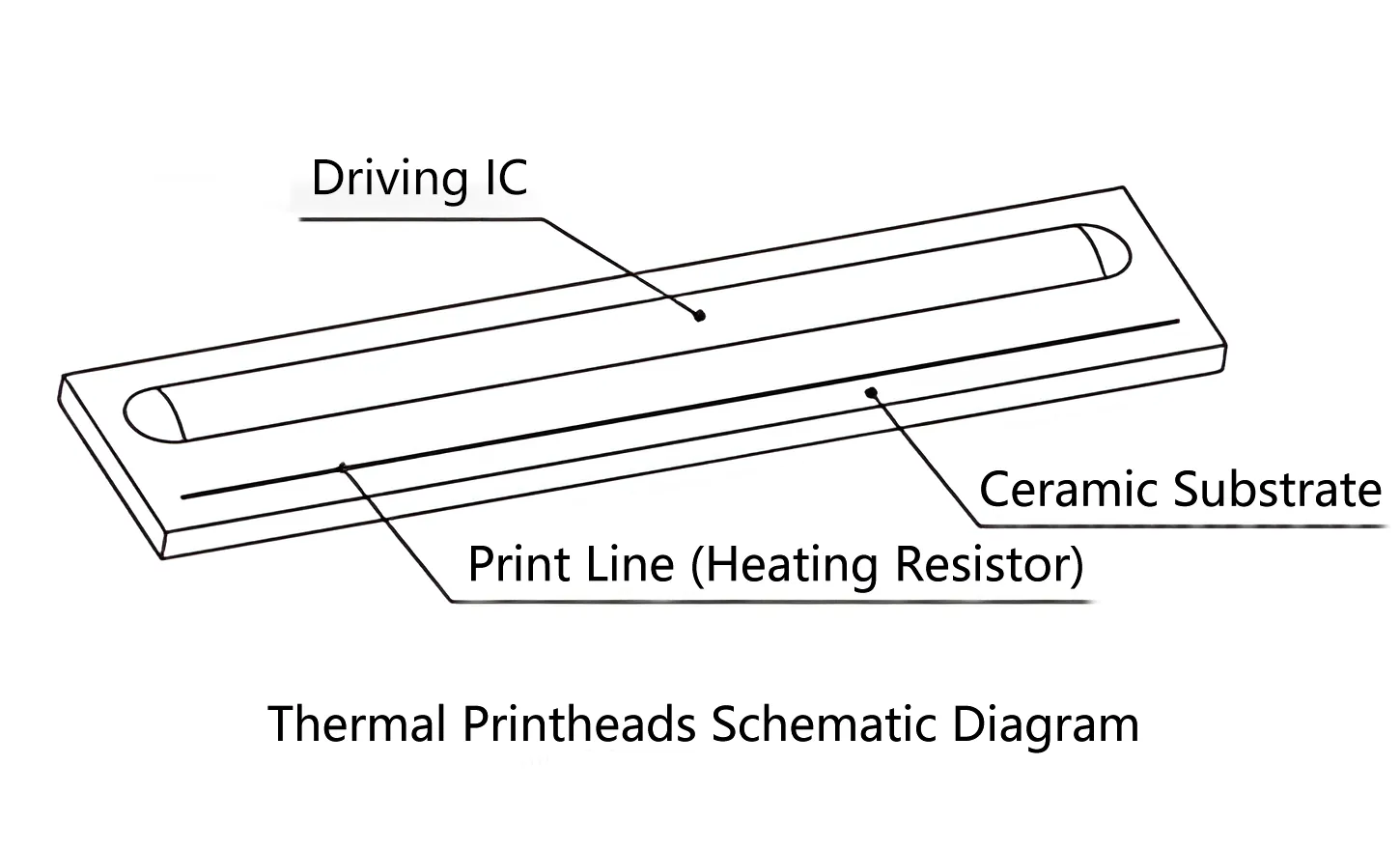
The print head contains hundreds of tiny heating elements arranged in a precise line. Each element corresponds to a single dot on the label, and the printer activates them individually based on the digital image being printed.
When printing begins, the elements heat and cool rapidly as the label moves past. This creates a dot matrix pattern that forms characters, barcodes, and graphics. The resolution, measured in dots per inch (DPI), depends on how densely the elements are packed. Common resolutions include 203 DPI for standard labels, 300 DPI for smaller text, and 600 DPI for high-density barcodes.
Print heads require regular cleaning because dust, adhesive residue, and ribbon debris can accumulate on the surface. A dirty print head produces faded or streaked output. Most manufacturers recommend wiping the head with a lint-free cloth and isopropyl alcohol after every few rolls of labels.
Label Media and Roll Mechanics
Label printers use a fundamentally different media system than standard printers. Instead of individual sheets, they process continuous rolls of label stock, which enables high-volume printing with minimal operator intervention.
Types of Label Materials
The label substrate you choose affects both print quality and durability:
- Paper labels provide an economical option for indoor applications like shipping, pricing, and file organization.
- Polyester labels resist water, chemicals, and tearing, making them suitable for laboratory and industrial use.
- Polypropylene labels offer flexibility and moisture resistance for product packaging.
- Vinyl labels withstand outdoor conditions and extreme temperatures, ideal for equipment identification.
- Fabric tags work for clothing labels and textile applications.
Each material interacts differently with heat and ink. Direct thermal paper must be matched to the printer’s heat settings, while thermal transfer requires selecting the appropriate ribbon type for the substrate.
Loading Rolls and Sensor Alignment
Loading a label roll is straightforward. You place the roll on the spindle, feed the leading edge through the guide rollers, and close the print head mechanism. The printer then takes over, using sensors to track label position.
The media sensor is a small optical device that detects gaps between labels, black marks on the backing, or notches in continuous stock. This detection tells the printer exactly where each label begins and ends. Accurate sensor alignment prevents misprints and ensures clean cutting or peeling.
Sensor issues cause common problems like labels printing off-center or multiple labels receiving one image. Keeping the sensor clean and selecting media with proper gap or mark indicators resolves most alignment difficulties.
Internal Components and Operation Flow
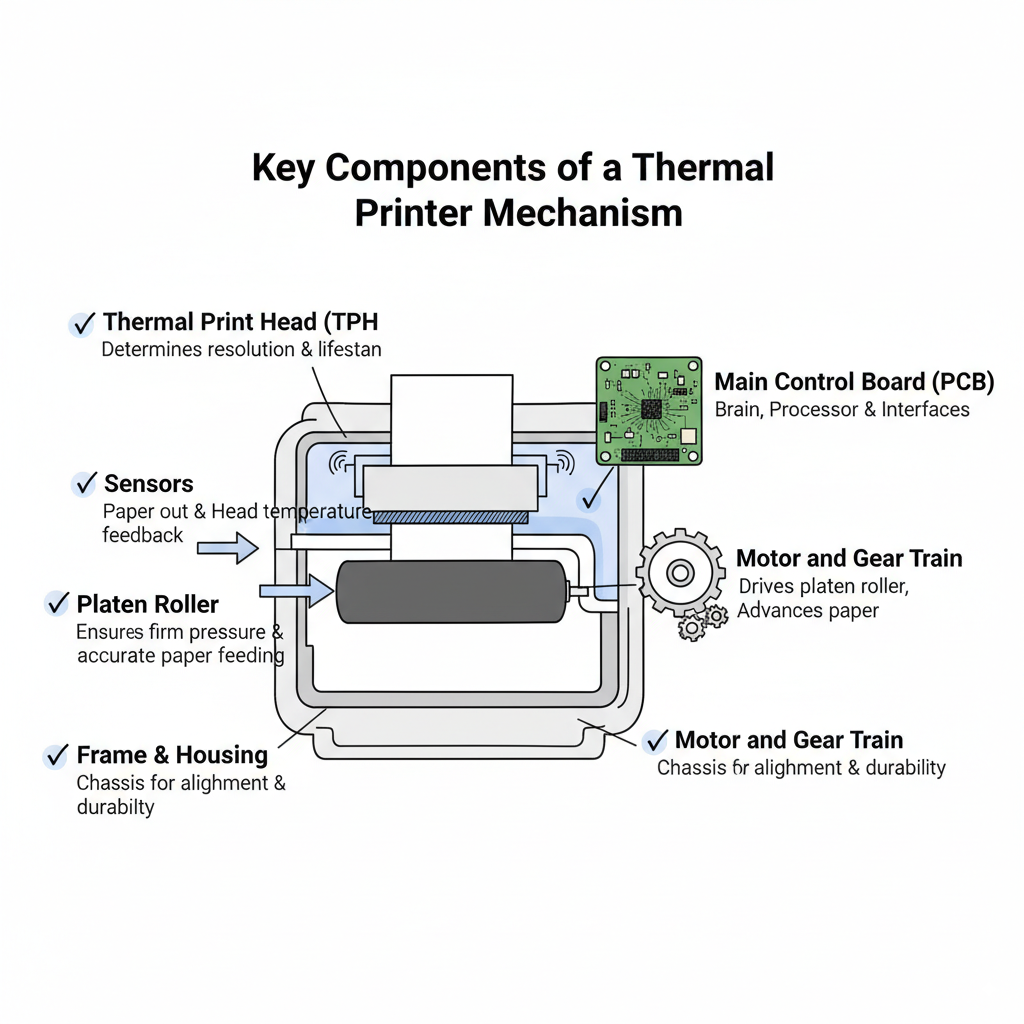
A label printer looks simple from the outside, but several precision components work together during every print job. Understanding these parts helps you diagnose problems and appreciate the engineering involved.
Key Hardware Inside the Printer
- Control board: Processes incoming data and coordinates all mechanical actions.
- Memory: Stores fonts, graphics, and label formats for quick recall.
- Stepper motor: Provides precise, incremental movement of the label roll.
- Platen roller: A rubber-coated cylinder that presses the label against the print head.
- Ribbon take-up spindle: Winding mechanism for used ribbon in thermal transfer models.
These components synchronize within milliseconds to produce sharp, correctly positioned output every time.
Step-by-Step Print Process
A typical print job follows this sequence:
- Data transmission: The printer receives label design data from a computer, mobile device, or network.
- Image processing: The control board converts the design into a dot pattern for the print head.
- Media detection: The sensor locates the start of the next label.
- Heating activation: The print head heats specific elements according to the dot pattern.
- Label advancement: The stepper motor rotates the platen roller, moving the label past the print head.
- Output completion: The finished label exits the printer, ready for peeling or automatic application.
The entire process takes just a few seconds per label, enabling throughput of several inches per second.
Connectivity and Control Options
Modern label printers offer flexible connectivity to fit various workflows, from standalone desktop use to enterprise network integration.
Wired and Wireless Interfaces
The most common connection methods include:
- USB: Direct connection to a single computer or point-of-sale system.
- Ethernet: Network connection for shared use across multiple workstations.
- Bluetooth: Wireless printing from smartphones and tablets.
- Wi-Fi: Network access with support for cloud-based printing solutions.
- Serial ports: Legacy connectivity for industrial equipment integration.
Many portable models include Bluetooth as standard, allowing field workers to print labels from mobile devices without carrying a laptop.
Software and Driver Integration
Label design software transforms raw data into print-ready formats. Popular options include:
- Zebra Designer for general business labeling
- DYMO Label Software for small office applications
- Brother P-Touch Editor for flexible template creation
- BarTender and NiceLabel for enterprise-scale operations
These programs support barcode generation, database connections, and variable data printing. You can import spreadsheets, automatically generate serial numbers, and design templates that pull information from external systems.
Common Use Cases and Applications
Different industries leverage label printers in distinct ways, selecting models based on volume, environmental conditions, and integration requirements.
Shipping and Logistics
E-commerce operations depend on label printers for address labels, tracking barcodes, and customs documentation. Direct thermal printers dominate this space because they produce high-quality output quickly and require minimal maintenance.
Portable label printers enable delivery drivers to print labels at the point of pickup or drop-off. Desktop models handle batch printing for outgoing shipments, connecting directly to shipping platforms like UPS WorldShip or FedEx Ship Manager.
Retail and Inventory Management
Retailers use label printers for price tags, shelf labels, and bin identification. Thermal transfer printers provide the durability needed for product labels that withstand handling and storage conditions.
Integration with inventory management systems allows automatic label generation when stock levels change. Scanning an item can trigger a reprint of its label with updated pricing or location information.
Healthcare and Laboratories
Medical facilities require labels that resist chemicals, moisture, and sterilization processes. Specimen containers, patient wristbands, and medication packaging all demand precise, durable printing.
Printers in healthcare settings often feature compact designs and quiet operation. Some models comply with regulatory standards for data security and traceability, ensuring patient information remains protected.
Choosing the Right Label Printer
Selecting the appropriate label printer requires evaluating your specific needs across several dimensions.
Match Technology to Lifespan Needs
Consider how long your labels must remain legible:
- Direct thermal suits labels with a lifespan under six months, such as shipping labels and receipts.
- Thermal transfer works for permanent labels like asset tags, nameplates, and outdoor signage.
If you are unsure, choose thermal transfer for maximum flexibility, since it can handle both temporary and permanent applications.
Evaluate Speed and Volume
Print speed, measured in inches per second (ips), determines throughput. Entry-level desktop printers operate at 2 to 4 ips, while industrial models reach 12 ips or higher.
For high-volume operations, look for printers with larger memory, faster processors, and network connectivity. These features prevent bottlenecks when printing hundreds of labels per hour.
Consider Portability and Power
Field workers benefit from battery-powered portable printers that connect via Bluetooth. These compact devices fit in a hand or tool bag, enabling on-the-spot labeling without a power outlet.
Desktop models offer greater media capacity and faster printing but require a fixed location. Choose based on whether your labeling tasks happen at a desk or in the field.
Maintenance and Troubleshooting Tips
Regular maintenance keeps your label printer performing reliably and extends its operational life.
Clean Print Head and Sensors
Turn off the printer and open the print head mechanism. Use a lint-free swab moistened with isopropyl alcohol to gently clean the print head surface and the media sensor. Allow everything to dry completely before closing.
Perform this cleaning after every few rolls of labels or weekly in dusty environments. Accumulated debris is the leading cause of faded prints and sensor misalignment.
Fix Common Print Issues
- Faded or missing text: Increase print darkness settings, clean the print head, or replace an exhausted ribbon.
- Misaligned labels: Recalibrate the media sensor or verify correct label spacing.
- Printer unresponsive: Restart the device, check cable connections, or reinstall the printer driver.
- Wrinkled labels: Ensure the ribbon and label are loaded correctly and that the platen roller is clean.
Most printers include built-in diagnostic modes activated by holding a button during startup. These self-tests help isolate hardware problems.
Prevent Ribbon and Jam Problems
For thermal transfer printers, verify the ribbon is loaded with the ink side facing the label. Incorrect loading produces blank or smudged prints.
Use high-quality media from reputable manufacturers. Wrinkled, damp, or damaged rolls cause feeding issues and print defects. Store labels in a cool, dry environment to preserve coating integrity.
Frequently Asked Questions About Label Printers
What is the difference between direct thermal and thermal transfer printing?
Direct thermal uses heat-sensitive paper that darkens when heated, requiring no ribbon or ink. Thermal transfer uses a ribbon that melts onto the label surface, creating more durable prints that resist fading and abrasion. Direct thermal labels fade over time, while thermal transfer labels can last for years.
Do label printers need ink or toner?
Most label printers do not use ink or toner. Direct thermal printers require only heat-sensitive labels. Thermal transfer printers use a ribbon that contains the ink-like material. This eliminates the messy cartridges associated with standard printers.
Can label printers print full-color labels?
Standard thermal label printers produce monochrome output, typically black on white or colored label stock. For full-color labels, you would need a different technology, such as digital inkjet label printers, which operate on a different principle than thermal printing.
How long do direct thermal labels last?
Direct thermal labels typically remain legible for six months to one year under normal conditions. Exposure to heat, sunlight, and certain chemicals accelerates fading. For longer-lasting labels, thermal transfer printing is the better choice.
What does DPI mean in label printing?
DPI stands for dots per inch and measures print resolution. Higher DPI values produce sharper text and barcodes. Standard label printers offer 203 DPI, while high-resolution models provide 300 or 600 DPI for small text and dense barcodes.
Can I print labels from my smartphone?
Yes, many modern label printers support Bluetooth and Wi-Fi connections. Mobile apps from manufacturers allow you to design and print labels directly from iOS or Android devices, making portable labeling quick and convenient.
Key Takeaways for Understanding Label Printers
Label printers are specialized devices that use thermal technology to produce fast, durable labels. The two main methods, direct thermal and thermal transfer, serve different purposes based on label lifespan and environmental conditions.
The print head, media sensors, and platen roller work together to ensure precise output. Regular cleaning and proper media selection prevent common problems like faded prints and misalignment.
When choosing a label printer, evaluate your volume requirements, label durability needs, and connectivity preferences. Match the technology to your application, and you will get reliable performance for years.
Now that you understand how does a label printer work, you can confidently select the right model, maintain it properly, and produce professional labels for any purpose. Start by identifying your primary labeling tasks, then choose a printer that matches those requirements.


