

You likely encounter them daily at checkout counters and shipping docks, yet few realize these compact devices create images without ink or toner. This is the magic of thermal technology, where heat creates the image instead of liquid sprays or powder fusion. By relying on temperature changes rather than complex mechanical parts, these printers offer speed and reliability that traditional models cannot match.
So, how does a thermal printer work? It uses a specialized printhead with microscopic heating elements to trigger a chemical reaction on coated paper or melt a wax ribbon onto a label. This guide explains the science behind direct thermal and thermal transfer methods while detailing the core components that make this efficient process possible.
Direct Thermal vs Thermal Transfer Technologies
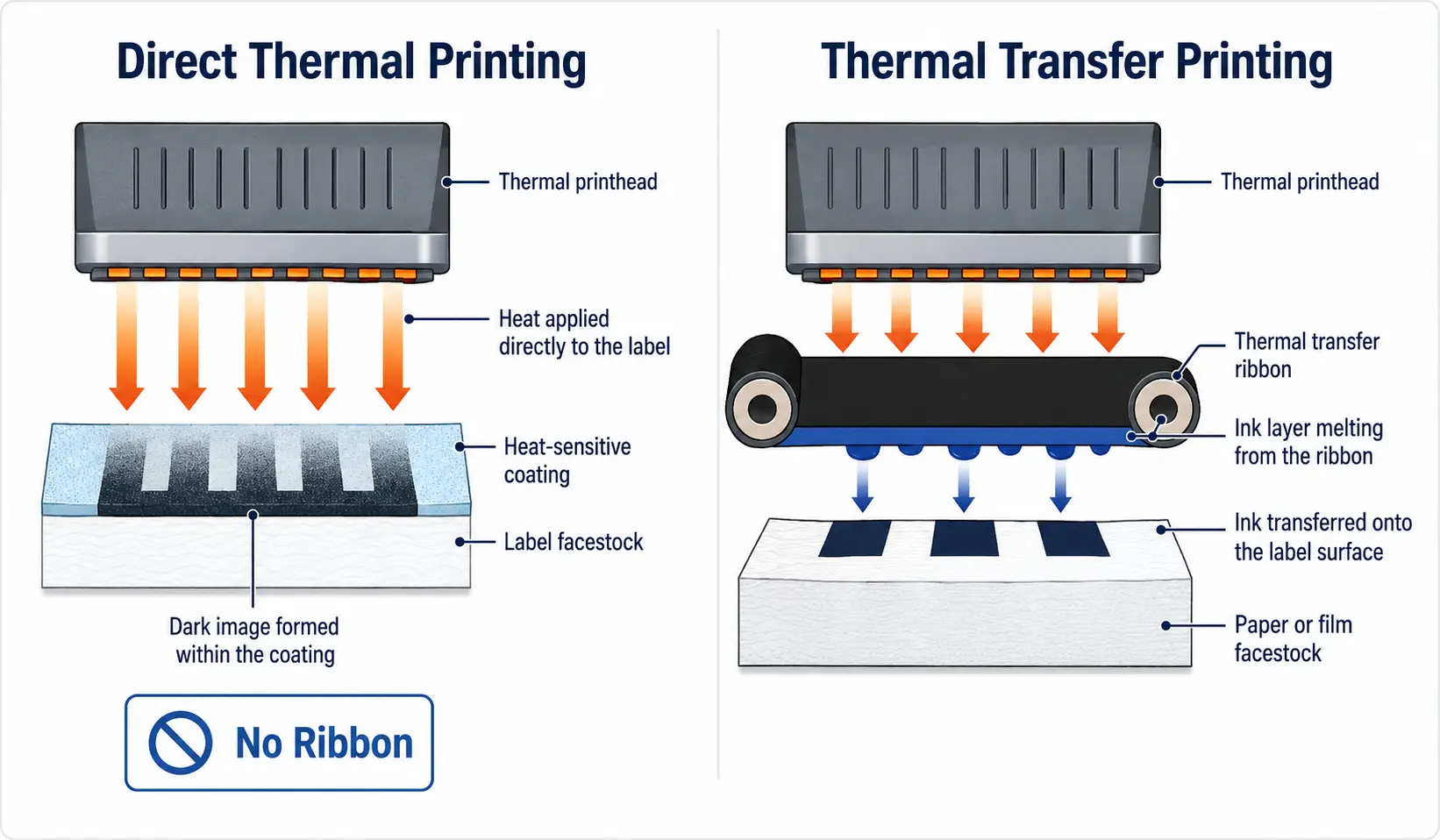
The answer to how does a thermal printer work depends entirely on which of the two main technologies the device employs. Both methods utilize heat as the primary energy source, but the mechanism for creating the visible image differs significantly between them.
How Direct Thermal Printing Creates Images
Direct thermal printing relies on a chemical reaction within the paper itself to generate text and graphics. The media used is specifically coated with a mixture containing a colorless dye and a developer compound.
When the printhead applies heat to specific spots on this coated paper, the dye reacts with the developer to turn black. This process requires no ribbons, ink cartridges, or toner powders. The image forms instantly as the heated areas darken, creating the desired output directly on the surface.
This method is ideal for short-term applications like receipts and tickets. However, the resulting images are sensitive to environmental factors. Exposure to direct sunlight, high heat, or friction can cause the print to fade or the entire page to darken over time.
How Thermal Transfer Printing Differs
Thermal transfer printing adds a ribbon to the equation to create permanent and durable labels. Instead of changing the color of the paper, the printhead melts a solid coating from a ribbon onto the label surface.
The ribbon contains wax, resin, or a hybrid blend that liquefies when heated. As the media passes under the printhead, the melted material bonds physically to the substrate. This creates an image that is highly resistant to abrasion, chemicals, and UV exposure.
You can use this method on a wide variety of materials beyond standard paper. Synthetic labels made of polyester or polypropylene work perfectly with thermal transfer. This makes it the superior choice for asset tags, outdoor signage, and industrial labeling where longevity is critical.
Core Components Inside a Thermal Printer
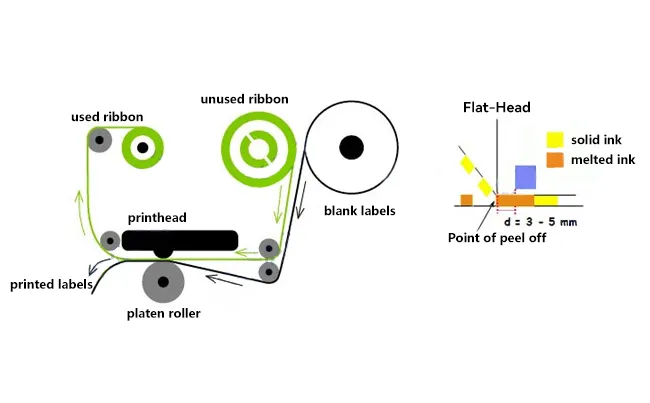
Understanding how does a thermal printer work requires looking at the specific hardware that makes the process possible. These devices contain fewer moving parts than laser or inkjet models, which contributes to their renowned reliability.
The Thermal Printhead Function
The printhead is the most critical component in the entire system. It consists of a thin line of closely spaced microscopic heating elements that span the width of the print area.
- Each element corresponds to a single dot or pixel in the final image.
- The printer sends electrical pulses to specific elements to generate heat instantly.
- Modern printheads achieve resolutions up to 1,200 dots per inch for sharp barcodes.
These elements heat up and cool down in milliseconds to create precise patterns. The quality of the printhead directly determines the clarity and scannability of the output.
The Platen Roller Role
The platen roller works in tandem with the printhead to ensure consistent image quality. This rubberized cylinder presses the media firmly against the heated elements of the printhead.
Its primary job is to maintain full contact between the paper and the heating elements. Without proper pressure from the roller, the heat transfer would be inconsistent, leading to faded or missing sections in the print. It also controls the speed at which the media moves through the device.
Media Handling Systems
The media path varies slightly depending on whether the printer uses direct thermal or thermal transfer technology. Direct thermal models simply need a mechanism to hold and feed rolls of coated paper.
Thermal transfer units require a more complex path to accommodate both the label roll and the ribbon spool. The system must align the ribbon precisely with the label and separate them cleanly after the transfer occurs. Sensors often detect gaps or black marks on the media to ensure accurate positioning for every print.
Step by Step Printing Process Explained
Now that you know the parts, we can break down exactly how does a thermal printer work from the moment you hit print. The entire sequence happens in seconds through a coordinated series of events.
Step 1 Data Transmission and Rasterization
The process begins when your computer or mobile device sends data to the printer. The device converts your text, logo, or barcode into a rasterized image map.
This map tells the printer exactly which heating elements to activate. Many industrial printers use specific programming languages like ZPL to interpret these commands efficiently. The printer buffers this data to ensure smooth operation during high-volume jobs.
Step 2 Media Positioning and Alignment
The platen roller engages to pull the media forward into the correct starting position. Optical sensors detect the leading edge of the paper or a gap between labels.
- The printer checks for black marks or gaps to align the start point.
- It ensures the media is taut against the printhead.
- The system verifies that a ribbon is present in thermal transfer modes.
This alignment step prevents wasted media and ensures your barcode or text prints in the exact intended location.
Step 3 Heat Application and Image Formation
Once aligned, the printer activates the specific heating elements based on the data map. In direct thermal mode, the heat triggers the chemical coating to turn black instantly.
In thermal transfer mode, the heat melts the wax or resin on the ribbon. As the media moves past the head, the melted material transfers and bonds to the label surface. The printer precisely controls the duration and intensity of the heat to create different shades or densities if needed.
Step 4 Cooling and Ejection
The final stage involves cooling the media and ejecting the finished product. Direct thermal images lock in place as the paper cools rapidly after leaving the printhead zone.
Thermal transfer prints solidify instantly as the melted wax or resin cools on the label. The platen roller then pushes the completed item out of the exit slot, ready for immediate use. There is no drying time required for either method.
Why Choose Thermal Over Inkjet or Laser
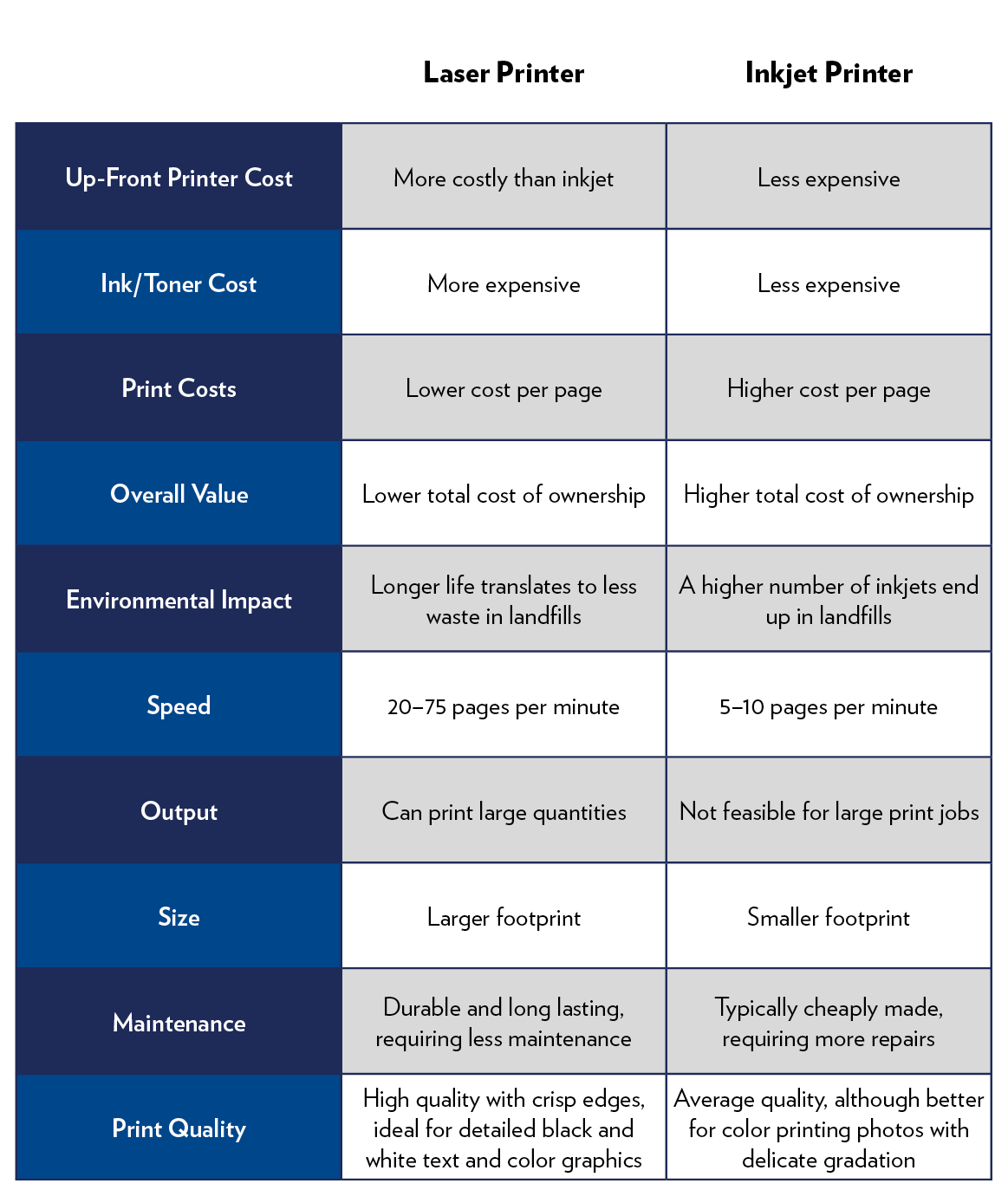
When asking how does a thermal printer work, many users also wonder why they should choose it over traditional options. The advantages lie in its simplicity and specialized performance capabilities.
Elimination of Liquid Consumables
Thermal printers do not use liquid ink or toner powder. This eliminates common issues like clogged nozzles, dried-out cartridges, or messy toner spills.
- No need to replace expensive ink cartridges.
- No risk of ink smudging during the printing process.
- Reduced maintenance due to fewer fluid systems.
This makes them exceptionally clean and reliable for environments where dust or movement is a factor.
Superior Speed and Silence
These devices have very few moving parts compared to laser or inkjet models. There are no swinging print heads or heating fusers that require warm-up time.
Printing starts instantly upon receiving data. The operation is nearly silent, making thermal printers perfect for quiet retail counters or hospital environments where noise pollution is a concern.
Durability in Harsh Conditions
Thermal printers excel in tough environments where other technologies fail. Mobile models are often drop-tested and rated for water resistance.
They operate effectively in extreme temperatures, from freezing cold warehouses to hot factory floors. The lack of liquid components means they are less susceptible to damage from vibration or rough handling.
Common Applications Across Industries

The versatility of thermal printing makes it a staple in many sectors. Understanding how does a thermal printer work helps explain its dominance in these specific fields.
Retail and Hospitality Uses
Stores and restaurants rely heavily on direct thermal printers for point-of-sale receipts. The speed of transaction is critical during rush hours.
- Kitchen order tickets print quickly without noise.
- Price tags and promotional labels are generated on demand.
- Customer queue tickets keep lines organized efficiently.
The ability to print instantly on cheap, coated paper keeps operational costs low for high-volume businesses.
Logistics and Shipping Labels
Shipping companies depend on thermal transfer for durable tracking labels. These labels must survive long journeys and varying weather conditions.
Barcodes printed with thermal transfer remain scannable even after exposure to sunlight or friction. This reliability is essential for supply chain visibility and accurate package sorting.
Healthcare and Laboratory Settings
Hospitals use thermal printers for patient wristbands and specimen labels. The clarity of the barcode ensures accurate patient identification and sample tracking.
- Cardiac monitors print rhythm strips on thermal paper.
- Pharmacy labels provide clear dosage instructions.
- Mobile carts use compact printers for bedside labeling.
Note: Ultrasound images printed on thermal paper should not be laminated, as the heat can darken the entire image.
Maintenance Tips for Longevity
Proper care ensures your thermal printer continues to answer how does a thermal printer work with consistent performance for years. Neglect can lead to poor print quality or hardware failure.
Cleaning the Printhead Regularly
Dust and adhesive residue can build up on the printhead, acting as an insulator. This prevents proper heat transfer and results in faint lines or missing data.
- Clean the printhead every time you change media rolls.
- Use a dedicated cleaning pen or a swab with isopropyl alcohol.
- Avoid abrasive materials that could scratch the delicate heating elements.
Regular cleaning prevents premature wear and maintains high barcode scannability.
Selecting the Correct Media
Using the wrong media type can damage your printer or produce poor results. Direct thermal printers must only use coated thermal paper.
For thermal transfer, match the ribbon type to your label material. Wax ribbons work for paper, while resin ribbons are necessary for synthetics. Using mismatched supplies often leads to smudging or incomplete transfers.
Preventing Overheating Issues
Running a printer at maximum speed and darkness settings continuously can shorten the life of the printhead. Adjust settings to the minimum required for a clear image.
If prints appear too light, increase the darkness setting slightly before increasing the print speed. This reduces the thermal stress on the heating elements during operation.
Environmental and Health Considerations
As we explore how does a thermal printer work, it is important to address the materials involved. Direct thermal paper contains specific chemicals that warrant attention.
BPA and Chemical Coatings
Many thermal papers historically contained Bisphenol A (BPA) as a developer. This chemical has raised health concerns regarding skin absorption.
Manufacturers now widely offer BPA-free and BPS-free alternatives. Businesses concerned about employee safety should specifically request these certified papers from their suppliers.
Recycling and Disposal Challenges
Thermal paper cannot typically be recycled with standard paper products due to its chemical coating. It can contaminate the recycling stream if not separated properly.
Thermal transfer ribbons create plastic waste that requires special disposal methods. Some suppliers offer take-back programs to recycle used ribbons and reduce environmental impact.
Frequently Asked Questions About Thermal Printers
Can thermal printers print in color?
Standard thermal printers produce monochrome black output. However, some advanced direct thermal models can print a second color, usually red, by using paper with multiple chemical layers that react at different temperatures.
Why do my thermal receipts fade over time?
Direct thermal images fade because the chemical reaction is sensitive to heat, light, and friction. Exposure to sunlight or warm environments accelerates this process. For long-term records, use thermal transfer printing or make a photocopy.
Do I need special paper for a thermal printer?
Yes, you must use specific media. Direct thermal printers require chemically coated paper, while thermal transfer printers need standard labels plus a matching ribbon. Plain paper will not work in either system.
How long does a thermal printhead last?
A typical printhead can print millions of linear inches before needing replacement. Regular cleaning and using the correct media settings significantly extend its lifespan.
Can I print photos with a thermal printer?
While thermal printers can produce grayscale images by varying heat intensity, they are not designed for high-quality photo printing. They are optimized for text, graphics, and barcodes rather than photographic detail.
Key Takeaways for Understanding Thermal Printing
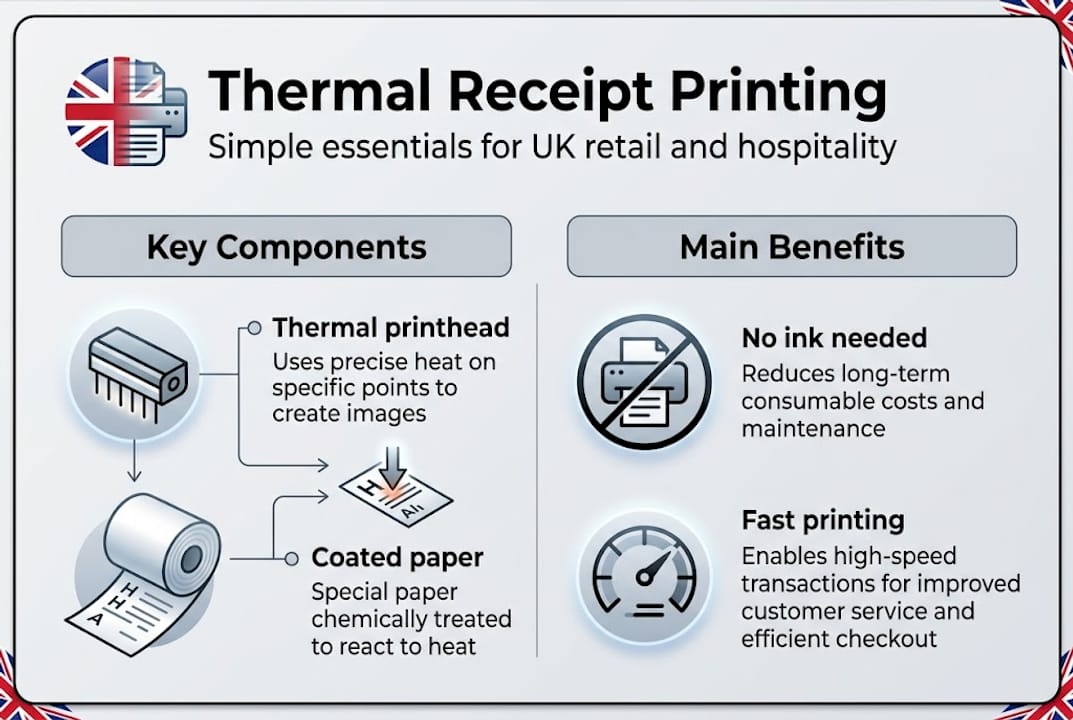
Thermal printers operate by using heat to generate images, either by triggering a chemical change in coated paper or melting a ribbon onto a label. This simple yet effective mechanism eliminates the need for ink and toner, offering a reliable solution for high-volume and mobile printing needs.
Whether you choose direct thermal for temporary receipts or thermal transfer for durable labels, understanding the technology helps you optimize performance. Regular maintenance and correct media selection will ensure your device continues to deliver crisp, scannable results for years to come.


