

Staring at a shelf of supplies and wondering which types of printer cartridge fit your machine is a common frustration for office managers and home users alike. Choosing the wrong option often leads to wasted money, poor print quality, or even permanent damage to your device.
This guide breaks down the critical differences between laser toner and liquid ink systems to help you choose wisely. You will learn how chemical formulations affect durability and which specific cartridge type matches your printing volume and longevity needs.
Laser vs Inkjet: The Core Technology Split
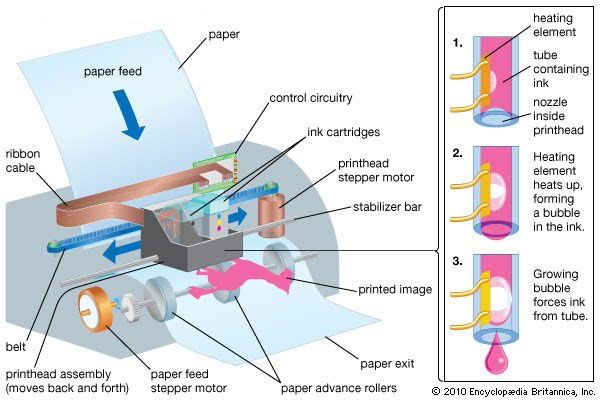
Your printer hardware dictates the types of printer cartridge it accepts because laser and inkjet technologies use incompatible materials. Laser printers rely on dry powder fused by heat while inkjets spray liquid droplets through microscopic nozzles.
How Laser Printers Fuse Dry Toner
Laser printers use an electrostatic process where a laser draws an image on a drum to attract charged toner particles. The machine then applies heat and pressure to melt this polymer-based powder directly into the paper fibers. This thermal fusion creates instant drying times and produces documents that resist water and smudging effectively.
How Inkjet Printers Spray Liquid Ink
Inkjet printers fire tiny droplets of liquid ink onto paper without using heat fusion for the image itself. The liquid dries through evaporation or absorption which allows for incredible detail and color nuance in photos. However this method means prints may require time to dry and can smudge if touched before the solvent fully evaporates.
Laser Toner Cartridge Varieties for Office Use
Toner cartridges dominate professional environments due to their high page yields and sharp text output capabilities. These dry powder units are engineered for efficiency and longevity in high-volume settings.
Monochrome Toner for Black and White Text
Monochrome cartridges contain carbon black pigment designed specifically for text-heavy documents like legal contracts and reports. They offer the lowest cost per page of any cartridge type with yields often exceeding 2000 pages per unit. If your office prints mostly text and does not need color this is the most economical choice available.
Color Toner Using the CMYK System
Color laser printers utilize four separate cartridges containing Cyan Magenta Yellow and Black known as the CMYK model. Some units house these in a single multi-chamber block while others use individual cartridges for each color. This system produces consistent professional documents ideal for internal presentations and marketing handouts.
Specialty Toner for Industrial Applications
Specialized toner formulations exist for niche tasks that standard black or color units cannot handle effectively.
* White toner enables printing on dark or transparent media for labels and apparel.
* Clear toner adds a glossy protective layer over business cards or brochures.
* Waterproof toner resists moisture for outdoor signage or warehouse labeling.
Inkjet Cartridge Types by Ink Chemistry
The chemical composition of the ink inside an inkjet cartridge determines print longevity and resistance to environmental factors. You must choose between dye-based and pigment-based formulations based on your specific needs.
Dye-Based Ink for Vibrant Photos
Dye-based ink dissolves completely in the liquid carrier to create smooth homogeneous solutions with rich saturated colors. This type excels at producing bright photos and colorful graphics where visual impact is the top priority. However these prints fade quickly in sunlight and can run instantly if exposed to water.
Pigment-Based Ink for Archival Documents
Pigment ink suspends microscopic solid particles in liquid that sit on top of the paper surface rather than soaking in deeply. This creates a protective barrier that offers superior resistance to fading water and smudging compared to dye alternatives. Museums and government agencies prefer this type for records that must remain legible for decades.
Expanded Inkjet Color Options for Pros
High-end inkjet printers often utilize more than the standard four colors to achieve superior image quality. These expanded systems reduce graininess and improve tonal transitions in professional photography.
Light Cyan and Light Magenta Variants
Printers add light variants of cyan and magenta to reduce visible dot patterns in skin tones and skies. These lighter shades allow for softer blends and smoother gradients that standard four-color systems cannot replicate accurately. This feature is essential for fine art reproduction and professional portrait printing.
Photo Black versus Matte Black Inks
Many photo printers include two distinct black inks optimized for different paper types. Photo black works best on glossy media to prevent bronzing while matte black provides deep rich tones on fine art paper. Using the correct black ink ensures your images look professional and free of dullness.
Extended Gamut and Specialty Colors
Professional systems may include up to 12 cartridges adding colors like orange green blue red and violet.
* Gray and Brown inks improve neutral tone accuracy.
* White ink allows printing on dark substrates.
* Clear coat enhances gloss or provides protection.
Performance Metrics to Compare Cartridges
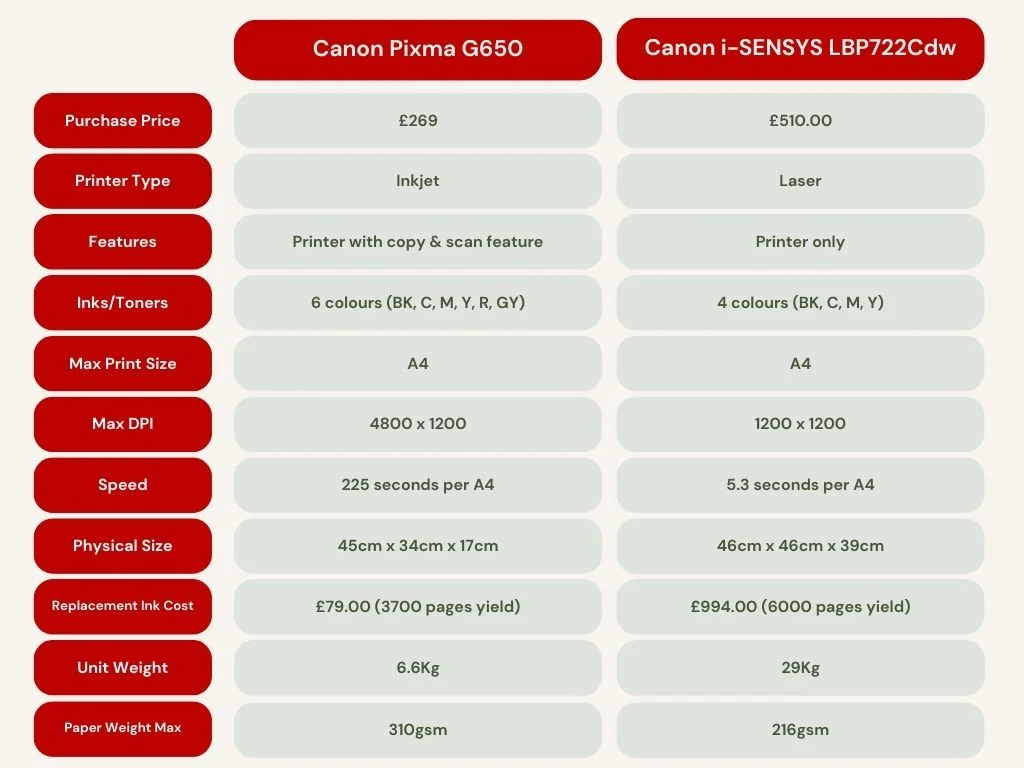
Evaluating types of printer cartridge requires looking beyond basic compatibility to real-world performance data. You should analyze page yield drying time and cost efficiency before buying.
Page Yield and Cost Per Page
Page yield estimates how many pages a cartridge prints at 5% coverage which is standard for text documents. High-yield XL cartridges cost more upfront but offer a significantly lower cost per page for heavy users. Laser toner typically yields 2000 to 5000 pages while standard inkjets may only reach 200 to 400.
Color Accuracy and Gamut Range
Color gamut refers to the range of colors a cartridge can reproduce with dye-based inks often offering wider saturation. Pigment inks with extended color sets provide better accuracy and longevity for professional work. Look for cartridges rated for high sRGB or Adobe RGB coverage if color fidelity matters.
Drying Time and Smudge Resistance
Laser toner fuses instantly requiring zero drying time while inkjet drying varies by formulation. Dye-based inks can take seconds to minutes to dry and remain prone to smudging during this window. Pigment inks dry faster on the surface and resist smearing much better than dye options.
Environmental Resistance and Longevity Factors
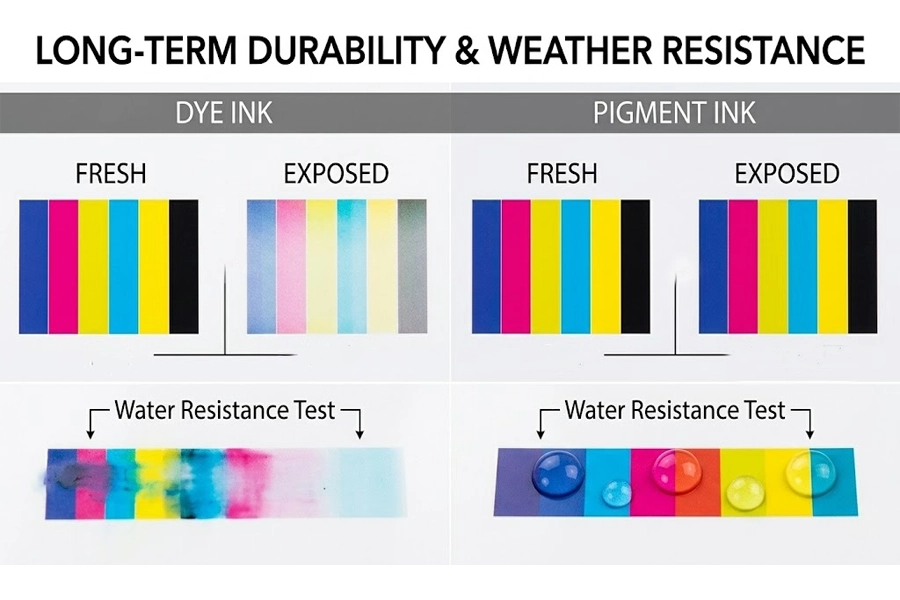
The location where you display or store your prints dictates which types of printer cartridge will survive longest. Durability often outweighs initial color vibrancy for critical documents.
Fade Resistance Against Light Exposure
Dye-based inks begin fading within weeks when exposed to direct sunlight or strong indoor lighting. Pigment-based inks can last over 100 years in archival conditions without significant color shift. Laser toner also offers high resistance to UV degradation making it suitable for long-term storage.
Water and Smudge Resistance Capabilities
Toner and pigment inks survive light moisture and handling without blurring or running. Dye-based inks will blur instantly if they get wet unless you use specialized waterproof paper or lamination. Avoid dye ink for documents that might face rain humidity or frequent fingerprints.
Compatibility and Integration Issues
Even the best cartridge fails if it does not match your specific printer model and chip requirements. Always verify compatibility before purchasing to avoid errors.
Model Specific Design Requirements
Cartridges are engineered with precise mechanical fits for specific printer models and brands. A cartridge designed for one brand will not fit another and may cause damage if forced. Always match the exact cartridge number listed in your printer manual or on the old unit.
Chip Technology and Third Party Options
Modern cartridges use smart chips to track levels and communicate with the printer firmware. Some printers block third-party or refilled units unless the chip is reset or replaced with a compatible version.
* OEM cartridges guarantee full compatibility but cost more.
* Compatible cartridges are third-party made with variable quality.
* Remanufactured cartridges are refilled OEM units offering an eco-friendly middle ground.
Matching Cartridge to Your Specific Use Case
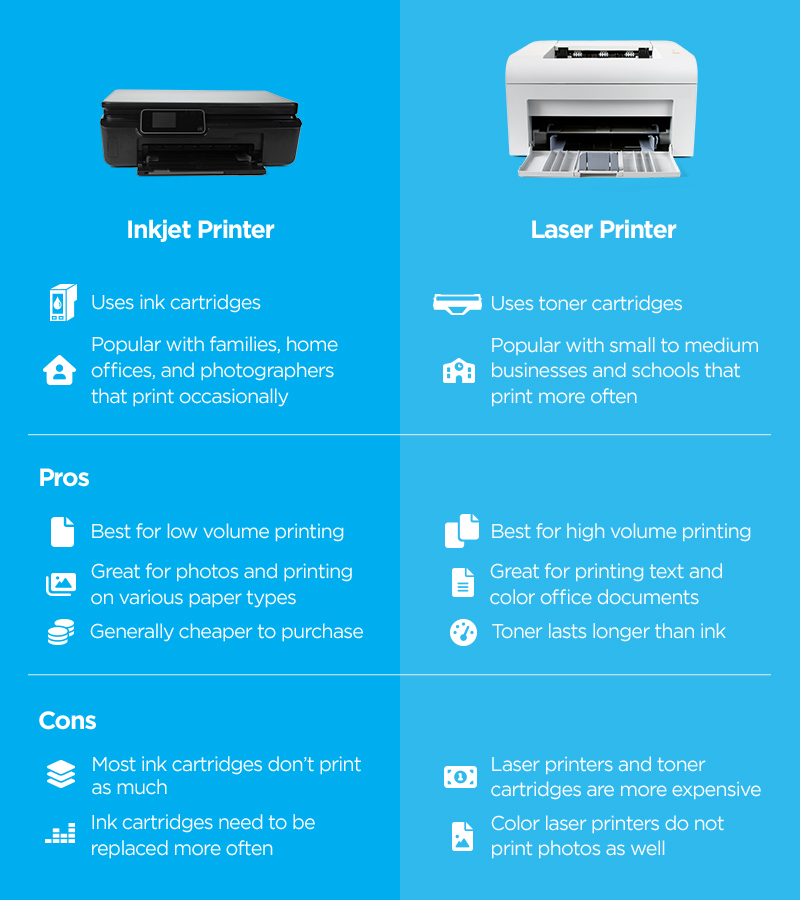
Selecting the right types of printer cartridge depends entirely on what you print and how often you print it. Align your choice with your primary workflow for best results.
Office and High Volume Text Printing
Businesses printing hundreds of pages weekly should choose monochrome or CMYK laser toner. This combination offers low cost per page fast printing speeds and durable output for reports. High-yield toner cartridges are the recommended choice for these environments.
Home and School Mixed Media Printing
Families and students benefit most from inkjet printers using dye-based ink for mixed tasks. These systems handle homework photos and web pages well at an affordable hardware price. Use photo paper for best results and avoid touching prints until they dry completely.
Professional Photography and Design Work
Photographers need pigment-based inkjet systems with 6 to 12 color configurations for gallery quality. These setups provide superior color accuracy and archival stability for client presentations. Ensure your system includes Photo Black Light Cyan and Light Magenta options.
Standards and Quality Assurance Metrics
Industry standards help ensure reliability and consistent performance across different types of printer cartridge. Look for compliance with these specifications when buying supplies.
Key Industry Specifications
Relevant standards include ISO/IEC 19752 for monochrome laser yield and ISO/IEC 19798 for color laser testing. Federal specification A-A-2155 often governs ink and toner quality for government procurement. Manufacturer-specific IDs like 9981349 also reference standardized testing protocols.
OEM versus Third Party Differences
Original Equipment Manufacturer (OEM) cartridges offer guaranteed quality control but come at a premium price. Third-party compatible options can save 30 to 60 percent but may have variable yield or color accuracy. Mission-critical printing jobs should use OEM supplies while personal use can tolerate reputable third-party brands.
Frequently Asked Questions About Printer Cartridges
What is the main difference between toner and ink cartridges?
Toner is a dry powder used in laser printers that fuses to paper with heat while ink is a liquid sprayed by inkjet printers. Toner creates durable water-resistant text quickly whereas liquid ink offers better photo quality but may smudge if wet.
How do I know which cartridge type my printer needs?
Check your printer model number and consult the user manual or the label on your current cartridge. Laser printers always use toner powder cartridges and inkjet printers always use liquid ink cartridges so they are not interchangeable.
Which cartridge type lasts longer on the shelf?
Laser toner cartridges have an indefinite shelf life because the dry powder does not dry out or degrade over time. Liquid ink cartridges can dry out or clog if left unused for long periods especially in hot or dry environments.
Can I use third-party cartridges without voiding my warranty?
Using third-party cartridges generally does not void your printer warranty unless they cause direct damage to the hardware. However some manufacturers may restrict features or display warning messages when non-OEM chips are detected.
Why are pigment inks more expensive than dye inks?
Pigment inks cost more because they use solid particles that provide superior fade resistance and water durability. The manufacturing process is more complex and the resulting prints last significantly longer than those made with dye-based formulations.
Key Takeaways for Choosing Printer Cartridges
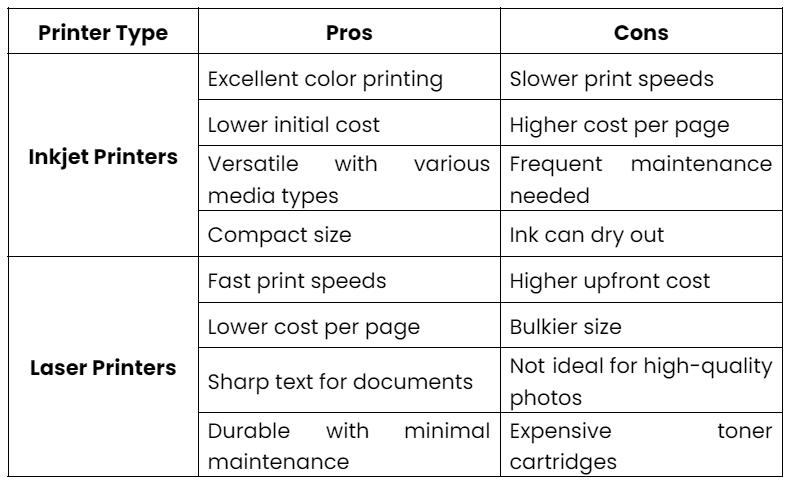
Selecting the right types of printer cartridge comes down to matching your printer technology with your document longevity needs. Laser toner excels for high-volume text and durability while pigment-based inkjets offer the best balance of photo quality and archival stability.
Always verify your printer model before buying and consider the cost per page rather than just the upfront cartridge price. Check your specific requirements for water resistance and color accuracy to ensure your prints last as long as you need them to.