

You click “Print” on your computer, and moments later, a crisp document appears in your hands. That simple action involves a fascinating chain of communication, processing, and mechanical precision. To truly grasp how does a computer printer work, you need to understand that printers come in several types, including inkjet, laser, dot matrix, and thermal, each with unique mechanisms, yet all sharing the same goal: turning digital data into physical text or images.
Knowing the basics of printer operation helps you solve everyday problems like paper jams, faded prints, and connectivity errors. It also guides smarter buying decisions, whether you need a home printer for schoolwork or an office workhorse for high-volume jobs. In this guide, you’ll learn how data travels from your computer to the page, how different printer technologies create images, and what components keep everything running smoothly.
Data Transmission to the Printer
When you press “Print,” your computer doesn’t send raw text or images to the printer. Instead, it packages everything into a structured format the device can interpret accurately.
Conversion to Print Language
Modern printers rely on page description languages like PCL (Printer Command Language) or PostScript to handle layout, fonts, graphics, and formatting. Your operating system or printer driver performs this conversion before sending data to the printer. This step ensures that what appears on screen closely matches the final printed output.
Some consumer printers use a simpler approach called Raster Image Processing (RIP), where the computer renders most of the page and sends a pixel-by-pixel map directly to the printer.
Connection Methods Used
Printers connect to computers in several ways:
– USB: Direct plug-and-play connection for single users
– Wi-Fi: Wireless printing from multiple devices on the same network
– Ethernet: Wired network connection ideal for office environments
– Bluetooth: Used mainly for portable or mobile printing
Once connected, the printer receives the data and begins processing the job.
How Inkjet Printers Work
Inkjet printers are common in homes and small offices because they are affordable and capable of producing high-quality color output.
Nozzle-Based Ink Application
Inside an inkjet printer are one or more print heads filled with tiny nozzles, sometimes hundreds per head, each finer than a human hair. These nozzles spray microscopic droplets of liquid ink onto the paper in controlled patterns.
Two main technologies power inkjet printing:
– Thermal inkjet (used by HP and Canon): Tiny heaters create bubbles in the ink, forcing droplets out of the nozzle.
– Piezoelectric inkjet (used by Epson): Crystals expand when electrified, pushing ink through the nozzles.
Both methods allow precise control over droplet size and placement, producing sharp text and vivid photos.
Paper Feed and Precision Movement
A series of rollers pulls paper through the printer at a steady pace. As the paper advances, the print head moves horizontally across the page, firing ink droplets to build the image line by line.
Color printing uses separate cartridges for cyan, magenta, yellow, and black (CMYK). The printer overlays these colors in varying amounts to create a full spectrum of hues.
How Laser Printers Work
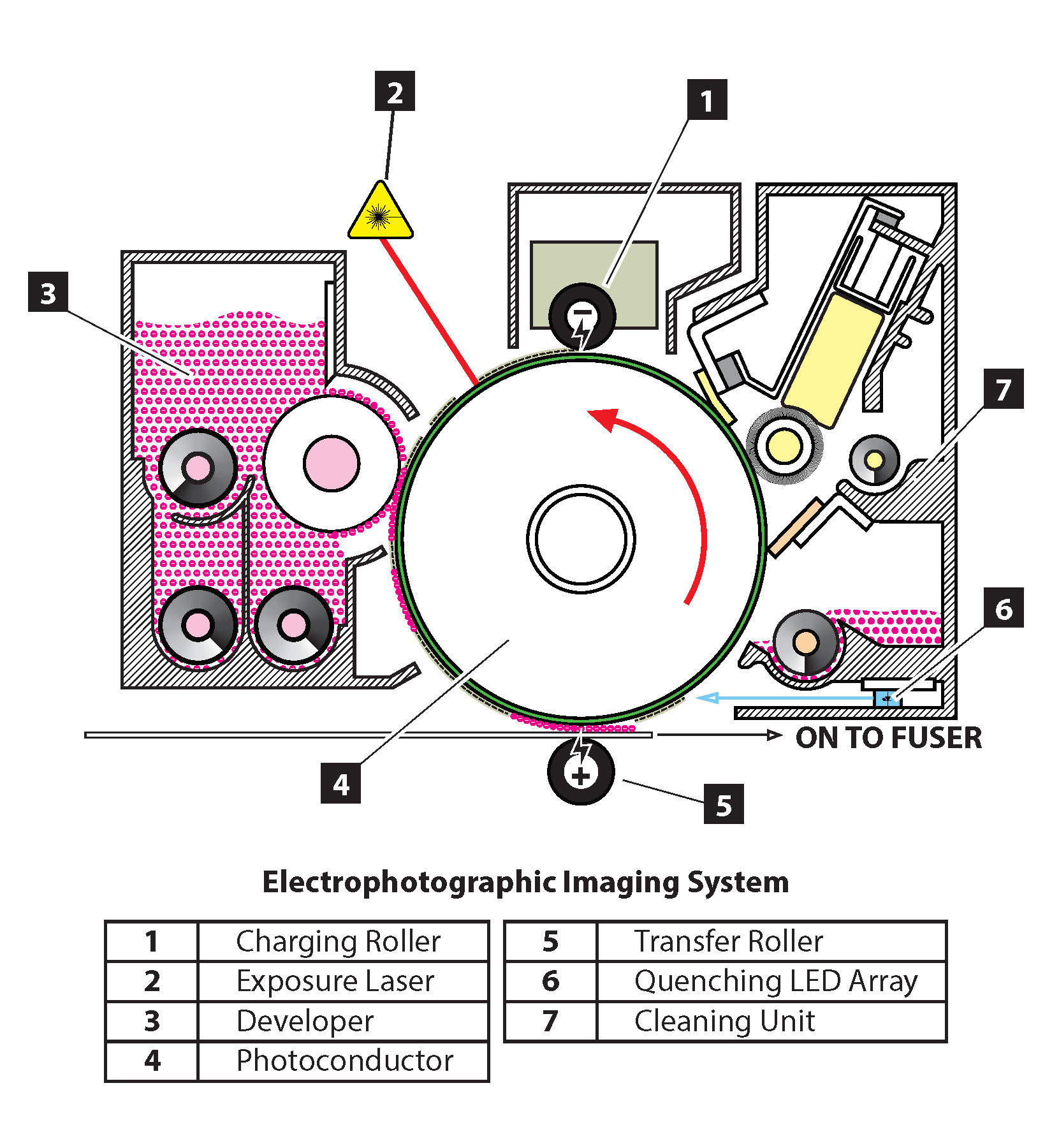
Laser printers dominate offices thanks to their speed, efficiency, and ability to handle high print volumes. Their process is more complex but remarkably precise.
Electrostatic Imaging Process
Laser printing relies on static electricity and light. Here is the step-by-step process:
- A drum unit, a metal cylinder coated with photosensitive material, receives a positive electrical charge.
- A laser beam scans across the drum, removing the charge in specific areas to form an invisible electrostatic image of the page.
- Toner, a fine powder with a negative charge, clings to the discharged areas on the drum.
- The drum rolls over a sheet of paper carrying a stronger negative charge, transferring the toner onto the page.
- The paper passes through fuser rollers, which apply heat and pressure to melt the toner and bond it permanently to the paper.
This entire cycle takes only seconds, allowing laser printers to output pages quickly, even while preparing the next job.
Toner vs. Ink: Key Differences
Unlike liquid ink, toner is a dry powder made of plastic particles, pigment, and other compounds. Because heat fuses it to the page, laser-printed documents resist smudging and last longer. However, toner cartridges cost more upfront, though they typically yield more pages than inkjet cartridges.
Laser printers also require periodic replacement of the drum unit, which wears out over time due to light exposure and friction.
Other Printer Types and Mechanisms

Beyond inkjet and laser, other technologies serve specialized purposes.
Dot Matrix: Impact Printing
Dot matrix printers use small pins that strike an ink-soaked ribbon, transferring dots onto paper. By arranging these dots, they form characters and simple graphics.
These printers are impact-based, meaning they can create carbon copies, a feature still valuable in banks, warehouses, and logistics for multi-part forms. Though slow and noisy, they remain in use where duplicate printing and durability matter most.
Thermal Printers: Heat-Activated Output
Thermal printers use heat instead of ink or toner. There are two main types:
– Direct thermal: Paper coated with a heat-sensitive layer darkens when heated, used in receipt printers.
– Thermal transfer: A wax- or resin-based ribbon melts onto the paper, used in label and barcode printers.
These printers have fewer moving parts, making them reliable and low-maintenance, but prints can fade over time, especially when exposed to heat or sunlight.
Inside the Printer: Key Components
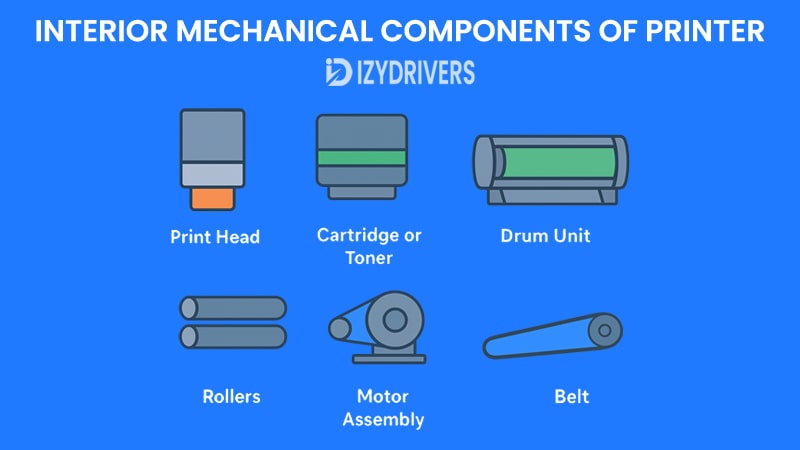
Every printer, regardless of type, contains essential parts that make printing possible.
Print Head or Imaging Drum
- Inkjet printers rely on the print head to eject ink onto the page.
- Laser printers use the imaging drum to carry the electrostatic image.
Both components are critical and degrade with use. Clogged nozzles or scratched drums cause streaks, missing lines, or poor print quality.
Paper Handling System
Rollers feed paper from the tray into the printer. Misalignment, dirt, or worn rollers lead to jams or skewed output. Most printers include sensors that detect paper size, presence, and type, adjusting settings automatically.
Control Board and Memory
The printer’s control board acts as its brain. It receives data, processes instructions, manages motors, and coordinates timing. Advanced models include built-in memory to queue multiple jobs, enabling efficient multitasking in busy environments.
Common Printing Issues and Fixes
Even well-maintained printers can run into problems. Understanding how they work helps you diagnose issues quickly.
Paper Jams and Feed Errors
Common causes:
– Moist or wrinkled paper
– Overfilled paper tray
– Worn or dirty rollers
How to fix:
– Turn off the printer and carefully remove jammed paper.
– Clean rollers with a lint-free cloth.
– Load the correct paper type and avoid overfilling the tray.
Streaks, Smudges, or Faded Prints
Inkjet solutions:
– Clogged nozzles: Run a print head cleaning cycle from your printer settings.
– Low ink: Replace cartridges if output looks faint or patchy.
Laser solutions:
– Low toner: Replace or gently shake the toner cartridge.
– Dirty drum: Inspect for scratches or debris; replace if damaged.
– Fuser issues: Seek professional servicing if toner isn’t bonding properly.
Optimizing Printer Performance
A few simple habits keep your printer running efficiently and extend its lifespan.
Regular Maintenance Tips
- Print regularly to prevent ink from drying inside nozzles.
- Clean print heads using built-in cleaning tools monthly for inkjet models.
- Update firmware to ensure compatibility and security.
- Use quality paper to reduce jams and improve output.
Choosing the Right Settings
Match print settings to your specific task:
– Draft mode: Saves ink or toner for internal documents.
– High quality: Best for photos or client presentations.
– Grayscale: Saves color ink when only black output is needed.
Adjusting these settings extends cartridge life and reduces waste.
The Evolution of Printing Technology
Printing has come a long way from the massive mechanical devices of the past.
Early printers in the 1970s were slow and expensive. The introduction of laser printing by Xerox in 1971 transformed office workflows. Inkjet technology became mainstream in the 1990s, bringing affordable color printing to homes. Today, wireless, mobile, and cloud printing let you print directly from smartphones and tablets.
Emerging trends include 3D printing integration, eco-friendly inks, and AI-driven maintenance alerts in smart printers that can detect issues before they cause downtime.
Frequently Asked Questions About How Printers Work
What is the difference between inkjet and laser printers?
Inkjet printers spray liquid ink through tiny nozzles onto paper, making them ideal for photos and color documents. Laser printers use toner powder and heat to fuse images onto paper, making them faster and more efficient for high-volume text printing.
How does a printer receive data from a computer?
Your computer sends print jobs through a connection such as USB, Wi-Fi, or Ethernet. The printer driver converts the document into a page description language like PCL or PostScript, which the printer interprets to produce the output.
Why does my printer have streaks or missing lines?
Streaks and missing lines usually indicate clogged inkjet nozzles, low ink or toner, or a damaged drum in laser printers. Running a cleaning cycle or replacing the affected cartridge often solves the problem.
How long does printer toner last compared to ink?
Toner cartridges typically print more pages than inkjet cartridges, often several thousand pages per unit. Ink cartridges vary, but most home cartridges print a few hundred pages before needing replacement.
Can I print without a computer?
Yes. Many modern printers support mobile printing apps, USB flash drives, or SD cards. Network-connected printers also allow direct printing from cloud services like Google Cloud Print or manufacturer-specific platforms.
What causes paper jams and how can I prevent them?
Paper jams usually result from misaligned paper, overfilled trays, dirty rollers, or using low-quality paper. Prevent jams by loading paper correctly, keeping the tray clean, and storing paper in a dry environment.
Key Takeaways on How a Computer Printer Works
Understanding how a computer printer work gives you a real advantage when troubleshooting issues or choosing new equipment. The process always follows the same core path: your computer sends data in a language the printer understands, the printer processes that data, and a mechanical system applies ink or toner to paper with precise timing.
Different printer types use different methods, from inkjet nozzles spraying droplets to laser drums attracting toner powder, but each achieves the same result. Regular maintenance, proper settings, and quality supplies keep your printer running smoothly for years.
Next step: Check your current printer settings and run a test page using draft mode to save ink or toner. If you notice streaks or faded areas, try a cleaning cycle or inspect your cartridges before assuming the worst.


