
If you’ve ever clicked “print” and watched crisp, smudge-free text appear on paper in seconds, you’ve likely used a laser printer. Unlike inkjets that spray liquid ink, laser printers use light, electricity, and heat to transfer dry powder called toner onto paper with remarkable precision. But how does a laser printer work? The answer lies in a sophisticated multi-step process that combines physics, engineering, and digital imaging to deliver fast, professional-quality prints.
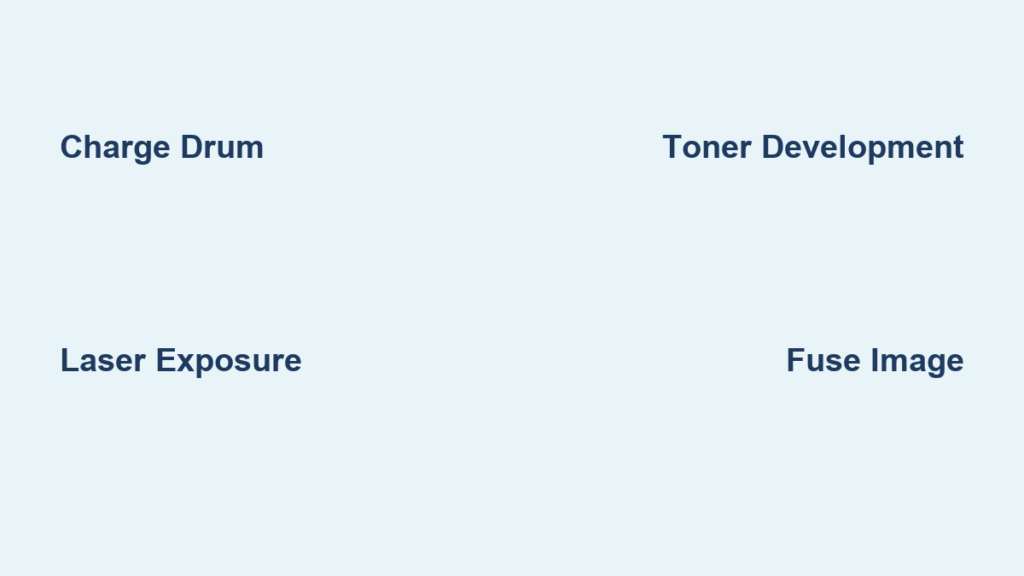
From the moment you send a document to print, a laser printer begins a rapid, automated cycle: it charges a drum with static electricity, uses a laser to draw the image, applies toner to the charged areas, transfers the toner to paper, fuses it with heat, and cleans the drum for the next page. This entire sequence happens in seconds and often before the drum completes a single rotation.
In this guide, you’ll learn exactly how laser printers create sharp text and graphics, why they are ideal for offices, and what makes them different from other printing technologies. Whether you’re troubleshooting print quality issues or simply curious about the machine on your desk, understanding how a laser printer works will give you insight into one of the most reliable tools in modern printing.
Converting the Document into a Bitmap
Raster Image Processing Explained
Before any physical printing begins, the printer must understand what to print. This happens during raster image processing (RIP).
When you hit print, your computer sends the document in a page description language such as PostScript, Printer Command Language (PCL), or Open XML Paper Specification (OpenXPS). The printer’s internal processor, or your computer in host-based models, converts this code into a bitmap: a grid of dots representing every pixel on the page.
Each horizontal strip of dots across the page is called a raster line or scan line. Each dot corresponds to whether the laser turns on (discharges the drum) or stays off (leaves the charge intact) at that location.
Because laser printing renders the entire page in a single continuous pass, the printer needs enough raster memory to hold the full bitmap. Memory requirements grow with the square of the dots per inch:
- 300 dpi: about 1 megabyte for a monochrome A4 page
- 600 dpi: about 4 megabytes for monochrome, 16 megabytes for color
Early laser printers had powerful onboard processors because personal computers of the 1980s could not handle this work. Modern budget printers often rely on the host computer to do the rendering, a design called host-based printing.
💡 Pro Tip: Low memory can cause print errors or slow output, especially with complex graphics.
Charging the Photosensitive Drum
Applying a Uniform Negative Electrostatic Charge
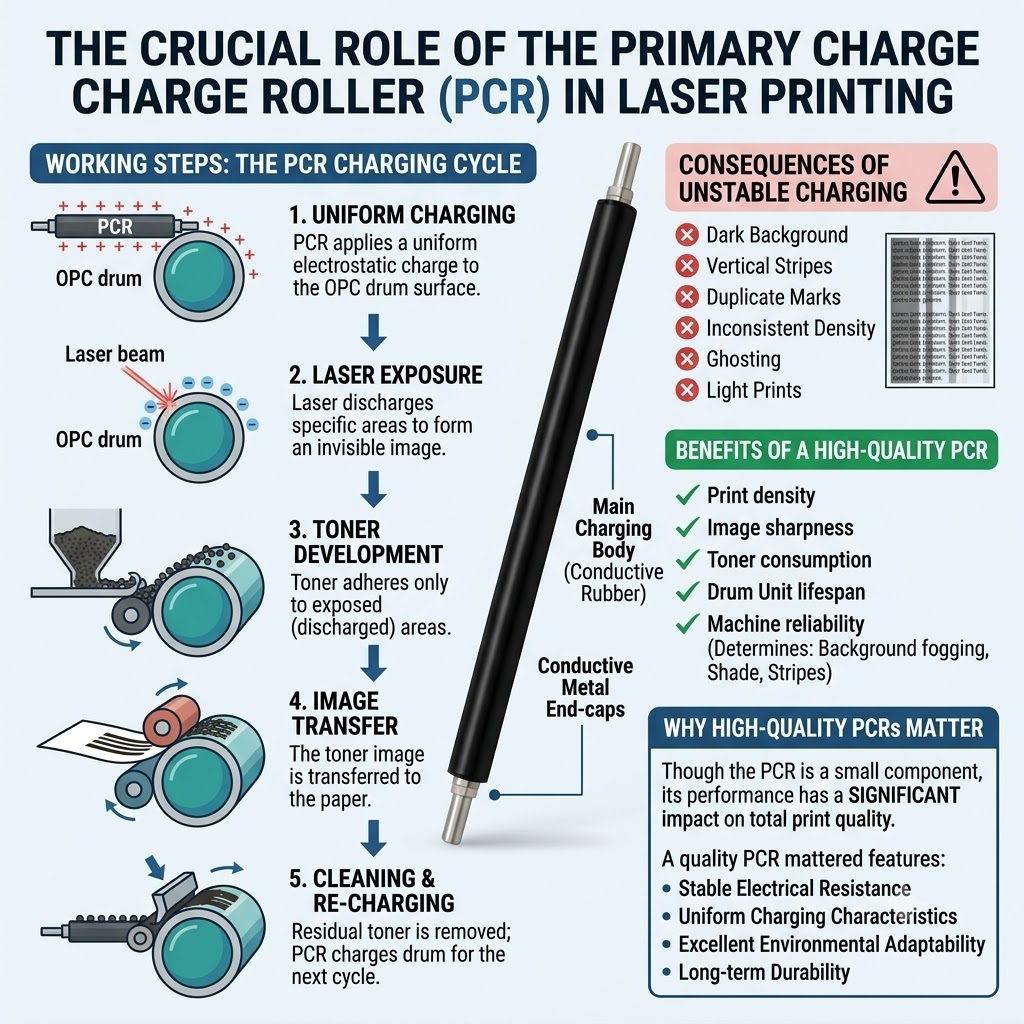
The first physical step is preparing the photosensitive drum (also called the photoreceptor). This cylindrical component is coated with a light-sensitive material capable of holding an electrostatic charge in the dark.
In older printers, a thin wire called a corona wire generated this charge using high voltage. Most modern laser printers use a safer, more reliable primary charge roller (PCR) instead.
As the drum spins, the PCR performs two key functions:
- An AC (alternating current) bias removes any residual charge left over from previous print jobs.
- A DC (direct current) bias establishes a uniform negative potential across the drum surface.
The result is a drum with a clean, consistent negative charge, ready for the laser to “draw” the image.
⚠️ Pro Tip: Exposure to bright light can damage the drum by discharging it prematurely. Always store or replace drums in low-light conditions.
Writing the Image with a Laser
Using Light to Neutralize Specific Areas
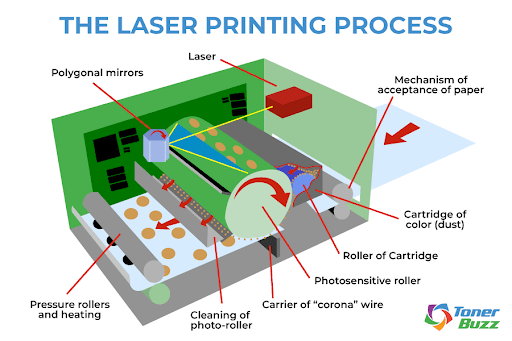
With the drum negatively charged, the laser assembly takes over. This is where the printer “writes” your document, one microscopic dot at a time.
A laser beam, controlled by a rotating polygonal mirror and a series of lenses, scans rapidly across the drum’s surface. Wherever the laser hits, it neutralizes the negative charge, creating an invisible electrostatic pattern known as a latent image.
The laser turns on and off at extremely high speeds, guided by the bitmap stored in the printer’s memory. Areas struck by the laser lose their charge; untouched areas keep their negative charge. Lasers are ideal for this task because they produce highly focused, coherent light, accurate enough to target tiny areas even over the short internal distances of a desktop printer.
Some non-laser printers use a linear array of light-emitting diodes (LEDs) spanning the width of the page instead of a laser. The principle is identical: selective discharge of the drum surface.
✅ Note: “Exposing” is also known as “writing” in some technical documentation.
Developing the Toner Image
Attracting Powder to Discharged Areas
Now that the latent image exists on the drum, it is time to make it visible using toner.
Toner is a fine dry powder made of plastic particles combined with carbon black (for black toner) or colored pigments (in color printers). Inside the toner cartridge, these particles receive a negative electrostatic charge.
The drum rotates past the developer roller (or developer unit), which is also negatively charged and carries a thin layer of toner on its surface. Due to electrostatic principles:
- Discharged areas (where the laser hit) attract the negatively charged toner.
- Negatively charged areas (the background) repel the toner.
This selective adhesion forms a physical version of your document on the drum. The toner clings only where the laser removed the charge, much like ink following an invisible map.
❌ Common Issue: If the toner doctor blade fails to apply a smooth, even layer of toner, the printout may show white streaks or dark vertical stripes with soft edges.
Transferring Toner to Paper

Moving the Image from Drum to Page
With the toner image sitting on the drum, it must now move to paper.
A sheet of paper is fed from the tray and passes near the rotating drum. Many printers use a positively charged transfer roller behind the paper to pull the negatively charged toner particles off the drum and onto the page. Some machines use a corona wire to charge the paper instead.
Because the electrostatic attraction to the paper is stronger than the attraction to the drum, nearly all the toner transfers cleanly, forming your printed page.
In color printers, a transfer belt often passes in front of multiple drums (cyan, magenta, yellow, and black). Each toner layer is applied precisely to the belt, and all four layers transfer to the paper in a single, uniform step. This belt system improves registration and prevents color misalignment.
🔄 Why It Matters: Misalignment here causes ghosting, faint duplicate images, or color fringing along edges.
Fusing Toner with Heat and Pressure

Bonding the Image Permanently
At this stage, the toner is resting loosely on the paper, like flour on a countertop. A light touch could smear it. To make the print permanent, the paper passes through the fuser assembly.
The fuser uses two rollers working together:
- A heated roller (often a hollow tube heated from within)
- A pressure roller (covered in rubber or silicone)
As the paper passes through, the heat melts the plastic in the toner while the pressure presses it into the paper fibers. The result is a smooth, durable print that will not smudge or flake.
Fuser temperatures can reach up to 427°C (801°F) in high-speed commercial printers. Smaller home printers often run cooler to save energy, printing more slowly to give the toner enough contact time to melt. The warmup process when you first power on a laser printer consists mainly of heating this fuser element.
⚠️ Warning: A cold or worn fuser causes toner to flake off. An overheated fuser can cause smudging, wet-looking text, or toner bleeding through to the back of the page.
Cleaning and Recharging the Drum
Preparing for the Next Page
After the toner transfers to paper, a small amount of residue may remain on the drum. If left behind, it could appear as smears or ghost images on subsequent prints.
A cleaning blade (a soft plastic wiper) scrapes leftover toner off the drum and deposits it into a waste reservoir. Some printers also use a discharge lamp to erase any remaining charge.
Then the primary charge roller reapplies a uniform negative charge to the now-clean drum, resetting it for the next page.
This entire cycle (charging, exposing, developing, transferring, fusing, and cleaning) can happen in less than a second. Different printers implement these steps at different points around the drum, but the entire process is usually completed before the drum completes a single full revolution.
🔁 Fun Fact: Some printers complete all six steps as the drum rotates only a few degrees at a time, making the mechanism compact and fast.
How Color Laser Printing Works
Layering CMYK for Full-Color Images
Color laser printers follow the same six-step process, but they repeat it four times per page, once for each toner color: Cyan, Magenta, Yellow, and Black (CMYK).
There are two main approaches:
- Single-pass (tandem) printers use four separate drums and lasers to apply each color in one pass. They are fast but bulky.
- Multi-pass printers feed the paper past the same drum multiple times, layering each color sequentially. They are slower but more compact.
To prevent registration errors (slight misalignments between colors), many color printers use a transfer belt. Each color layer is applied precisely to the belt, then all four layers transfer to the paper together for sharp, accurate results.
By combining CMYK in varying dot patterns, color laser printers can reproduce millions of colors through a process called halftoning.
🎨 Did You Know?: Many modern color laser printers embed nearly invisible yellow dots on every page, encoding the printer’s serial number and print date. These Machine Identification Codes help track counterfeiters but have raised privacy concerns.
Common Print Quality Problems and Their Causes
Diagnosing Streaks, Smudges, and Ghosting
Even small malfunctions can degrade print quality. Here is how to identify and address common issues:
-
White vertical streaks
Cause: A scrap of torn paper blocks the laser, or the optics are dirty.
Fix: Remove obstructions and clean mirrors and lenses. -
Black streaks or smudges
Cause: The cleaning blade has failed, leaving excess toner on the drum.
Fix: Clean the drum area or replace the cleaning blade. -
Ghosting (faint repeated images down the page)
Cause: The charge roller is failing to fully recharge the drum.
Fix: Replace the primary charge roller or drum assembly. -
Toner rubs off the page
Cause: The fuser is too cool, or humidity is too high.
Fix: Check fuser temperature and replace the fuser if worn. -
Color misalignment or fringing
Cause: Poor registration in multi-pass printers.
Fix: Run the printer’s calibration routine and clean the transfer belt.
✅ Prevention Tip: Use genuine toner, keep the printer in a climate-controlled space, and clean internal components regularly.
Safety and Environmental Considerations
Ozone, Particles, and Toner Waste
Laser printers are powerful machines, but they come with a few health and environmental considerations worth knowing.
Ozone Emissions
High-voltage components inside the printer can produce a corona discharge, generating small amounts of ozone and nitrogen oxides. In large commercial machines, activated carbon filters neutralize these gases. Home printers usually have no ozone filter, so ventilation matters, especially in small rooms.
Ultrafine Particle Emissions
A 2012 Queensland University of Technology study found that some laser printers emit sub-micrometer particles, with one model emitting as many particles as a burning cigarette. While the health risks remain debated, using printers in well-ventilated areas and choosing models with HEPA filters can reduce exposure.
Toner Spills
Toner particles are formulated to hold static electric charges. A regular household vacuum can create sparks or even small dust explosions when picking up spilled toner. Always use an ESD-safe vacuum with a HEPA filter designed specifically for toner cleanup.
Cartridge Waste
Toner cartridges contribute to e-waste. Many include smart chips that limit the number of pages you can print, even when toner remains. Refilling or resetting cartridges can reduce waste, though it may void your warranty.
🌱 Eco Tip: Choose printers with high-yield toner cartridges and active recycling programs.
Laser Printers vs. Inkjet Printers
Which Technology Fits Your Needs?
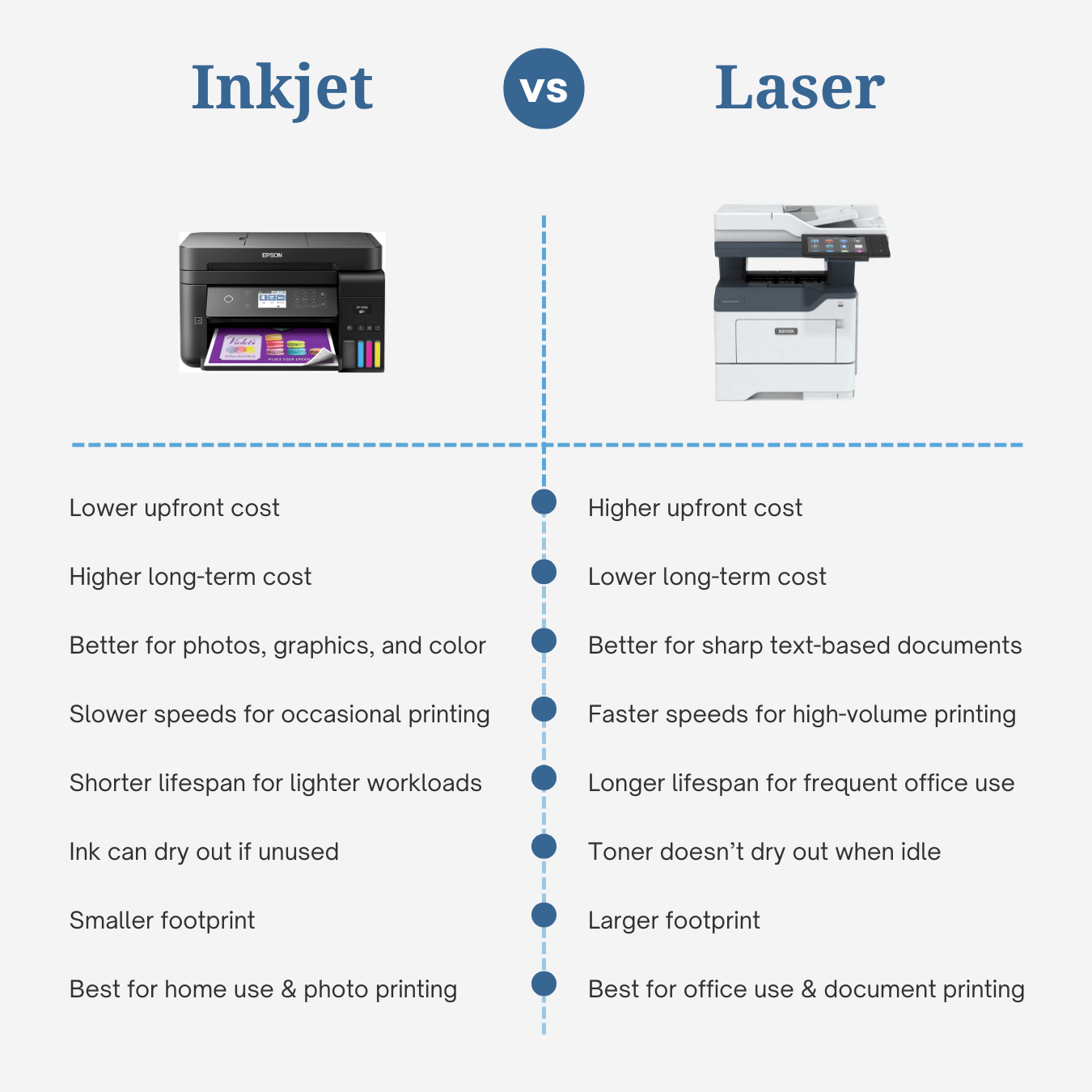
| Feature | Laser Printer | Inkjet Printer |
|---|---|---|
| Speed | Fast (10–200+ ppm) | Slower (5–20 ppm) |
| Cost per Page | Lower for text | Higher overall |
| Text Quality | Crisp, sharp edges | Good, but may bleed |
| Photo Quality | Moderate | Excellent |
| Upfront Cost | Higher | Lower |
| Best For | Offices, high-volume text | Home, photos, color graphics |
While inkjets dominate photo printing, laser printers excel in offices where speed, volume, and text clarity matter most. Color laser printers are also much faster than inkjets, though they tend to be larger and more expensive upfront.
💬 Bottom Line: Printing 500 pages of contracts fast? Choose laser. Printing birthday invitations with photos? Choose inkjet.
Frequently Asked Questions About Laser Printers
What is the difference between a laser printer and an LED printer?
A laser printer uses a single laser beam directed by a rotating polygonal mirror to draw the image on the drum. An LED printer uses a stationary array of light-emitting diodes spanning the width of the page. Both technologies selectively discharge the drum to form a latent image, so the end result is similar. LED printers often have fewer moving parts and can be more compact and reliable.
How fast can laser printers print?
Speed varies widely by model and job complexity. The fastest monochrome laser printers can exceed 200 pages per minute (12,000 pages per hour). The fastest color models reach over 100 pages per minute. Typical office laser printers print between 20 and 60 pages per minute, while budget home models often run at 10 to 30 pages per minute.
Why does my laser printer need warm-up time?
The warm-up period is mostly for the fuser assembly to reach operating temperature. The fuser must be hot enough to melt the plastic in the toner and bond it to the paper fibers. Smaller printers often use lower fuser temperatures and print more slowly to save energy, while high-speed commercial printers reach higher temperatures almost instantly using xenon flash lamps or fast-heating ceramic elements.
Can laser printers print high-quality photos?
Color laser printers typically offer resolutions of 600 to 1200 dpi and use four toner colors (CMYK). They produce sharp text and graphics but can struggle with subtle color gradations and large areas of uniform color. Inkjet printers designed for photo printing generally produce richer, more detailed photographs. For professional photo printing, inkjet or dedicated photo printers are usually the better choice.
Why is toner hazardous to vacuum with a regular vacuum cleaner?
Toner particles hold electrostatic charges and are extremely fine. A standard vacuum can generate sparks from static discharge, potentially igniting airborne toner and causing a small dust explosion. Toner particles also pass through conventional filter bags and blow back into the room. Always use an ESD-safe vacuum with a HEPA filter designed for toner spills.
How long does a laser printer drum last?
Drum lifespan depends on the model and usage, but most last between 10,000 and 50,000 pages. Because drums are light-sensitive, they should never be left exposed to ambient light for more than a few hours. Prolonged light exposure causes the drum to lose its charge-holding ability and eventually wears it out. Storing replacement drums in their original light-proof packaging extends their life.
Key Takeaways on How Laser Printers Work
Understanding how a laser printer works reveals the elegant engineering behind its speed and precision. The entire process is a coordinated cycle of electrostatic charging, laser imaging, toner development, transfer, fusing, and cleaning, all happening in less than a second per page.
The six core steps to remember are:
- Charging: The drum receives a uniform negative charge.
- Exposing: A laser selectively neutralizes charge to form a latent image.
- Developing: Toner clings to the discharged areas.
- Transferring: The toner image moves from the drum to the paper.
- Fusing: Heat and pressure bond the toner permanently.
- Cleaning: The drum is wiped clean and recharged for the next page.
Whether you are troubleshooting streaky printouts, choosing a new office machine, or simply curious about the technology on your desk, knowing these steps gives you the power to maintain, optimize, and get the most from your printer. If you are deciding between a laser and inkjet model, match the technology to your typical print jobs: laser for speed, volume, and crisp text, and inkjet for photos and high-quality color graphics.


