

You press “Print” and within seconds, a crisp document slides out of your machine. But what actually happens between the click and the page? An inkjet printer works by firing thousands of microscopic ink droplets onto paper with pinpoint accuracy, building images dot by dot. Each droplet is tinier than a grain of sand, yet placed with such precision that your eye sees smooth colors and sharp text.
This guide breaks down the full journey from digital file to finished print. You will learn how nozzles fire ink, how printers sync every droplet to the right position, and why CMYK replaces RGB for color. By the end, you will understand the engineering hidden inside that unassuming box on your desk.
The Print Head: The Heart of Precision
Every inkjet printer centers on one critical component: the print head. This small assembly moves across the paper and releases the droplets that form your image. Its performance determines everything from text sharpness to photo quality.
Nozzle Design and Function
Inside the print head sit dozens to hundreds of microscopic nozzles, each about 10 micrometers wide. That is roughly one-tenth the thickness of a human hair. These nozzles hover about 1 millimeter above the paper surface, close enough to aim accurately but far enough to avoid smearing.
Each nozzle fires droplets at speeds between 5 and 10 meters per second. High-end print heads pack between 2,100 and 4,200 nozzles total, allowing faster printing and finer detail. More nozzles mean fewer passes and smoother results.
Micro-Fabrication Techniques
Creating such tiny, uniform nozzles demands precision manufacturing. Manufacturers use methods like photolithography, laser ablation, electroforming, and anisotropic etching to form nozzles in a single planar sheet. This process ensures perfect alignment, since even slight misalignment causes banding or streaks.
Companies like Canon apply semiconductor-grade processes to integrate heaters, fluid channels, and nozzles on a single silicon chip. This vertical integration allows thousands of components to work in unison, delivering reliability and accuracy.
Ink Ejection: Thermal vs. Piezoelectric
Two main technologies create the pressure needed to push ink from nozzles. Both work reliably, but they take very different approaches.
Thermal Bubble Mechanism
HP and Canon use this method. A tiny heater, roughly 10 to 20 micrometers square, sits inside each ink channel.
When a current pulse lasting about 1 microsecond flows through the heater, the temperature spikes by around 100°C per microsecond. This heat boils a paper-thin layer of ink (about 0.01 micrometers thick), creating a vapor bubble that expands roughly 1,000 times in volume.
The expanding bubble forces a droplet out of the nozzle. Within microseconds, the bubble collapses and surface tension pulls fresh ink in from the reservoir. The result is a perfectly circular droplet of 1 to 5 picoliters, fired thousands of times per second.
Pro Tip: Modern ink formulations are engineered to resist thermal breakdown, so despite the boiling process, these inks remain stable and long-lasting.
Piezoelectric Mechanism
Epson takes a different approach using piezoelectric crystals, which change shape when voltage is applied. These crystals sit beside each ink chamber. When energized, they bend or elongate, squeezing the chamber and forcing ink out.
Since no heat is involved, the ink stays chemically stable over time. This method also allows finer droplet control, which is ideal for high-quality photo printing. The trade-off is higher cost and more complex manufacturing, since piezoelectric elements are larger than thermal heaters and require laminated metal plate construction.
Carriage and Paper Movement
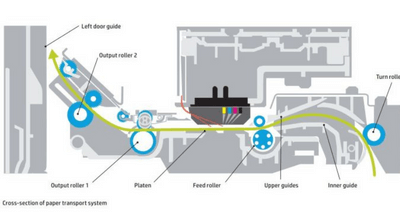
Printing accurately requires synchronized motion in two directions: horizontal for the print head and vertical for the paper.
Carriage Motion System
The print head rides on a belt-and-pulley system driven by a stepper motor, moving at speeds over 1 meter per second. Modern printers use intelligent path algorithms that allow the head to print in both directions (bidirectional printing), cutting total print time nearly in half.
Paper Feed Precision
While the head scans horizontally, the paper advances vertically via rollers connected to a second stepper motor. After each pass, the paper moves up by a precise distance called the swath advance. A disk-shaped encoder wheel with radial stripes controls this movement, generating pulses that ensure the paper advances exactly the right amount, with no slippage or misalignment.
Dot Placement: The Role of Optical Encoders
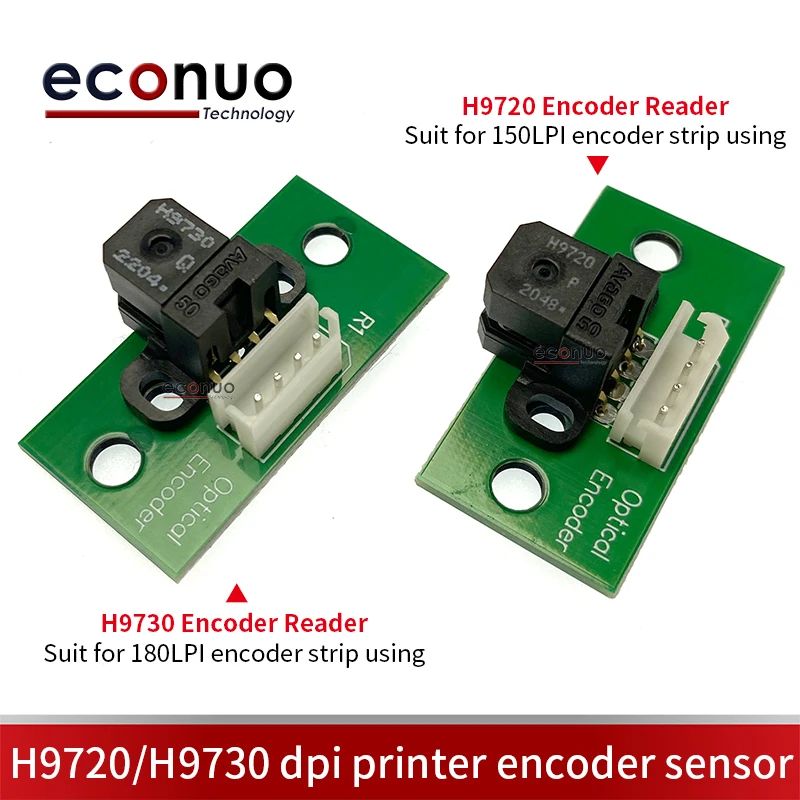
Even the most advanced print head cannot place droplets accurately without precise timing. Optical encoders solve this problem.
How Encoders Sync Droplet Firing
An LED and photodetector mount on the moving carriage, with a transparent code strip between them. This strip contains fine black stripes running its full length.
As the carriage moves, the photodetector senses each stripe interruption and generates a synchronization pulse. These pulses tell the printer exactly when to fire each droplet, ensuring perfect placement even when the carriage accelerates or decelerates. Without this feedback loop, you would see wavy lines, blurry text, and color misalignment.
Vertical Accuracy
Dots stack vertically based on two factors:
- Nozzle pitch: The fixed spacing between nozzles, built during fabrication
- Swath advance: The exact paper movement between passes
Together, these ensure seamless image continuity from top to bottom.
Color Printing: The CMYK System
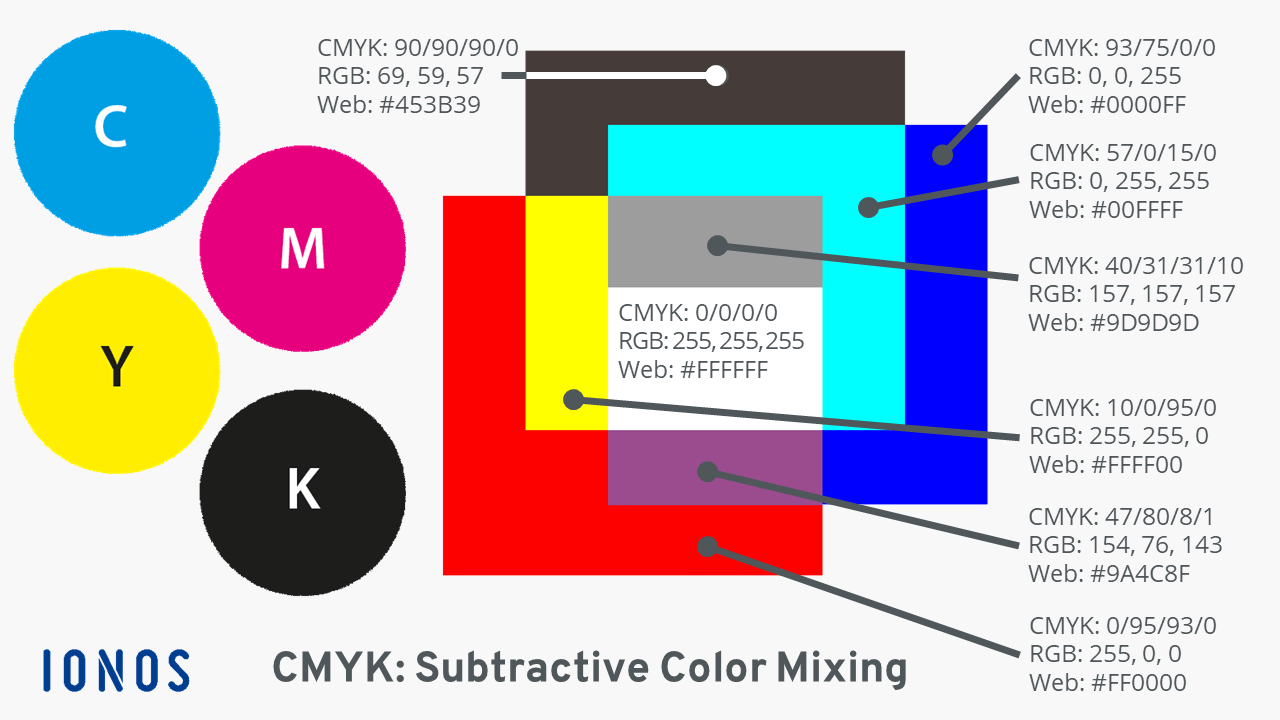
Inkjet printers do not mix colors like paints. They layer microscopic droplets using the CMYK color model, a system based on subtractive color mixing.
Why Not RGB?
Screens use RGB (red, green, blue) because screens emit light. When you combine red and green light, you get yellow. But ink works the opposite way: it absorbs light.
If you mixed red and green ink, both would absorb different parts of the spectrum, creating muddy brown. Worse, overlapping areas cause double-layer absorption, producing dark, uneven spots.
The CMY Solution
Printers use complementary colors instead:
- Cyan absorbs red light
- Magenta absorbs green light
- Yellow absorbs blue light
Layering these creates a wide color range. For example, cyan plus yellow produces green because both absorb red and blue, leaving only green light to reflect.
The Need for Black (K)
Mixing cyan, magenta, and yellow produces a dark brown, not true black. So printers add a fourth ink: black, designated as “K” (for “Key”). This produces sharp text and deep shadows.
Creating Lighter and Darker Shades
Lighter colors (halftoning): Printers cannot dilute ink, so they create lighter shades by spacing droplets apart. Your eye blends the gaps into a perceived lighter tone. This technique, called halftoning or dithering, uses patterns optimized to minimize visible grain.
Darker shades: Since droplets are fixed in size, printers darken colors by placing black droplets between colored ones. Your brain interprets this placement as a deeper, richer shade.
Light inks for photos: Many photo printers include light cyan, light magenta, and gray inks. These have lower pigment concentration, reducing graininess in light areas and improving shadow detail for natural-looking skin tones and gradients.
Ink Chemistry: More Than Just Colored Water
Ink is a carefully engineered fluid, not simply dye in water. Formulations must balance viscosity, surface tension, and drying time to work reliably inside microscopic nozzles.
Dye vs. Pigment
- Dye-based inks offer bright colors at lower cost but can fade over time
- Pigment-based inks are more durable and water-resistant, ideal for archival prints
Preventing Clogs
Ink must dry fast on paper but stay liquid in the nozzle. Additives prevent drying and clogging. During manufacturing, inks pass through filters that remove particles larger than a few micrometers. Printers also include additional filters in the ink manifolds to catch any debris before it reaches the nozzles.
Ink-Paper Interaction
Coated papers absorb ink quickly and evenly, preventing bleeding. The printer’s firmware adjusts ink volume based on content: less for text, more for photos. Too much ink causes smudging or paper curl; too little leads to faded output. The system constantly balances these factors.
Print Resolution and Droplet Size
Resolution, measured in dots per inch (dpi), determines print clarity:
- 300 dpi works well for standard documents
- 600 dpi suits high-quality prints
- 1200 dpi delivers professional photo quality
Smaller droplets create finer detail and smoother gradients. Advanced printers fire droplets as small as 1 picoliter (a trillionth of a liter), producing spots just 10 to 20 micrometers wide on paper, invisible to the naked eye.
Maintenance: Keeping Nozzles Clear

Even the best printer fails if nozzles clog. Built-in maintenance systems prevent this.
Capping System
When idle, the print head rests on a rubber cap that seals the nozzles, keeping ink from drying out.
Regular Nozzle Firing
During printing, some nozzles may go unused. To keep them primed, the printer fires “spit” droplets into a waste ink receptacle off the paper edge. This prevents drying in the nozzles.
Automatic Wiping
A squeegee blade wipes the nozzle plate after prints or during maintenance, removing dust and dried ink that could deflect droplets off course.
Paper Types and Print Quality
Paper choice significantly affects results.
Plain Paper
Standard for documents, plain paper may show slight feathering, but modern inks and coatings minimize this effect.
Photo Paper
Thicker and coated with a smooth, absorbent layer, photo paper locks ink in place for vibrant colors and sharp detail. It is available in glossy or matte finishes, designed specifically for photographic printing.
Advantages of Inkjet Technology
Inkjet printers dominate homes and offices for good reason:
- Low upfront cost: Affordable models suit most budgets
- Excellent color reproduction: Ideal for photos and graphics
- Quiet operation: No loud motors or fusers
- High-resolution output: Matches or exceeds traditional photo prints
These benefits make inkjets the most popular choice for home and photo printing.
Real-World Applications
Inkjet printers serve a wide range of users:
- Home offices: Schoolwork, bills, and family photos
- Creative professionals: Artists, photographers, and designers producing portfolios
- Small businesses: Flyers, brochures, and internal documents
Their versatility and quality suit both everyday and specialty printing needs.
Frequently Asked Questions About Inkjet Printers
What is the difference between thermal and piezoelectric inkjet printers?
Thermal printers (HP, Canon) use heat to create vapor bubbles that eject ink. Piezoelectric printers (Epson) use crystals that change shape when voltage is applied, squeezing ink out without heat. Thermal systems are faster and cheaper to produce, while piezoelectric systems offer finer droplet control and better ink stability over time.
Why do inkjet printers use CMYK instead of RGB?
Screens emit light, so they use RGB (additive color). Ink absorbs light, so printers use CMYK (subtractive color). Cyan, magenta, and yellow each absorb one primary color of light, allowing them to combine into a wide spectrum. Black (K) is added because mixing all three colors only produces a dark brown, not true black.
How small are inkjet printer droplets?
Typical droplets range from 1 to 5 picoliters (trillionths of a liter). Advanced printers can fire droplets as small as 1 picoliter, creating spots on paper that are 10 to 20 micrometers wide, smaller than the diameter of a human hair.
How do inkjet printers prevent nozzle clogs?
Printers use a capping system that seals nozzles when idle, periodic “spit” firing into a waste receptacle to keep nozzles primed, and a squeegee blade that wipes the nozzle plate clean. Ink formulations also include additives that prevent drying inside the nozzles.
Can inkjet printers print on any paper?
Yes, but results vary. Plain paper works well for documents, though ink may feather slightly. Photo paper, with its smooth coated surface, produces sharper images and more vibrant colors. Specialty papers (matte, glossy, fine art) are designed for specific print qualities.
How long do inkjet prints last?
Dye-based prints can last decades indoors but may fade faster with light exposure. Pigment-based prints are more durable and water-resistant, often lasting over 100 years under proper conditions. Using archival paper further extends longevity.
Key Takeaways for Understanding How Inkjet Printers Work
An inkjet printer combines microfluidics, thermal or mechanical actuation, optical feedback, and color science into a seamless system. From the moment you hit “Print,” your digital file becomes millions of precisely timed droplets, each placed with micron-level accuracy. The result is a quiet revolution happening in your home or office, one drop at a time.
If you want the best results from your printer, match the paper to your project, run maintenance cycles regularly, and choose pigment-based inks for archival prints. Understanding the technology behind your printer helps you make smarter choices and get the most out of every page.


