A stuck nozzle or broken strand often happens when you skip steps on how to remove filament from 3D printer systems. Ignoring heat settings or pulling too hard damages your extruder gears and ruins future prints.
This guide covers automatic and manual removal methods for every material type. You will learn safe temperatures, tension release tricks, and how to clear jams without disassembling your machine.
Use Automatic Unload Functions on Modern Printers
Many contemporary machines simplify the process with built-in automation features. These systems handle heating and retraction sequences to minimize user error during material changes.
Access Built-in LCD Menu Options
Check your printer display for a dedicated Unload Filament command. Models like the Ultimaker S5 guide users through visual prompts on a touchscreen interface.
The printer heats the hotend automatically before retracting the material. Select your material type from the list to ensure correct temperature settings.
Run Slicer Macros for Advanced Control
Advanced users can trigger unloading via G-code macros in software like MatterControl. The Pulse XE utilizes these macros to execute precise unload sequences with minimal intervention.
You can write custom G-code files if you understand your specific printer intricacies. Always verify the macro includes proper heating commands before retraction starts.
Pro Tip: Never interrupt an automatic cycle once it begins. Stopping mid-process often leaves soft filament stuck inside the heat break.
Execute Manual Filament Removal Steps Correctly
Manual removal requires precise timing and temperature control to prevent breakage. Following the correct sequence ensures the filament slides out without snapping inside the tube.
Heat Hotend to Current Material Temperature
You must heat the nozzle to the printing temperature of the material currently inside. Using the wrong temperature causes the filament to soften too much or remain too rigid.
Refer to these standard starting points for common materials:
- PLA: 200°C (range 190–210°C)
- ABS: 230°C (range 220–240°C)
- TPU/TPE: 220–240°C
- PETG: 235°C (range 235–255°C)
- Nylon/NylonX: 250–255°C
Wait until the display confirms the target temperature is reached and stable. Attempting removal before full heating guarantees a jammed nozzle.
Release Extruder Tension Mechanism
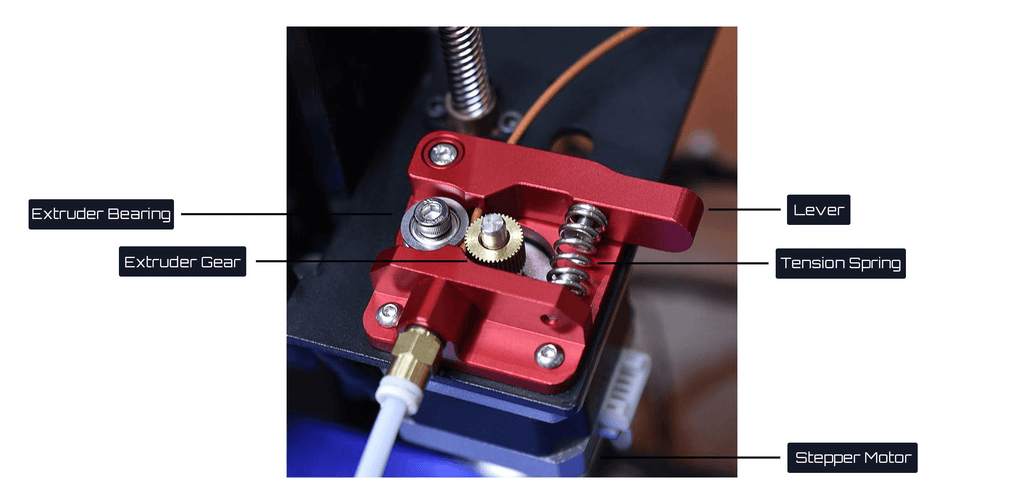
Locate the tension adjustment on your extruder assembly before pulling. Failing to release this pressure grinds the filament and prevents smooth extraction.
- Lever systems: Press the spring-loaded lever down firmly (common on Creality printers).
- Thumbwheel systems: Loosen the screw completely to relieve spring pressure (common on Bondtech BMG).
- Integrated systems: Push the release lever built directly into the filament path (e.g., E3D Hemera).
Hold the release mechanism in place throughout the entire removal motion.
Perform the Push-Pull Extraction Motion
Push the filament gently into the extruder until a small amount oozes from the nozzle. This action clears the melt zone and ensures the tip is fully molten.
Immediately pull the filament out in one smooth, continuous motion. Do not yank or jerk the material, as this causes it to snap below the gears.
Visual Cue: The removed filament end should look slightly bulbous or rounded. A flat or jagged end indicates it broke inside the hotend.
Adjust Removal Technique by Filament Type

Different polymers react uniquely to heat and stress during removal. Adapting your approach prevents damage to flexible or high-temperature materials.
Handle PLA and Standard Materials
PLA behaves predictably but can become brittle if old. Heat the nozzle to 200°C and perform the standard push-pull method described above.
Some users attempt to remove PLA as it cools to 60–70°C. This works only if the filament contracts enough to loosen from the nozzle walls.
Warning: If you feel significant resistance, stop immediately. Reheat the nozzle to full printing temperature to avoid breaking the strand.
Extract Flexible Filaments Like TPU
Flexible filaments coil easily inside the extruder path if pulled incorrectly. Always unload these materials while the hotend is fully heated to 220–240°C.
Pull slowly and keep the filament path as straight as possible. Avoid sharp bends that encourage the material to curl back into the gears.
Remove High-Temperature Nylon and PEEK
These materials bond strongly and degrade quickly if left in a hot nozzle. Unload them immediately after printing while the system is at maximum temperature.
Do not let nylon sit in the heat block for extended periods. Carbonization occurs rapidly and creates stubborn clogs that require disassembly to fix.
Troubleshoot Stuck or Broken Filament Issues
Filament sometimes snaps inside the tube despite following proper procedures. Specific techniques help recover broken strands without damaging the printer.
Retrieve Snapped Filament Segments
If the filament breaks, reheat the hotend fully to soften any remaining pieces. Use needle-nose pliers to grip the exposed end if it is accessible from the top.
Perform a cold pull if the break occurred deep inside the heat break:
- Heat the nozzle to printing temperature.
- Insert a piece of PLA or nylon filament.
- Extrude 20mm, then cool the hotend to 90–100°C.
- Yank the filament hard when the temperature drops.
The cooled blob grabs debris and pulls it out of the nozzle effectively.
Clear Persistent Nozzle Clogs
A filament that will not budge often indicates a partial clog or carbon buildup. Leave the hotend at maximum temperature for five minutes to soften hardened material.
Try pushing fresh filament through to force the blockage out. If this fails, you may need to disassemble the hotend and clear it with a fine needle or drill bit.
Prevent Future Unloading Problems
Proper storage and maintenance reduce the frequency of difficult removals. Taking care of your materials ensures they perform well during every changeover.
Store Filament in Airtight Containers
Moisture absorption makes filament brittle and prone to snapping during removal. Seal PLA, PETG, and especially Nylon or TPU in airtight bags with desiccant packs.
Vacuum-sealed storage extends the life of your spools significantly. Dry filament slides through the extruder much smoother than damp material.
Protect the Nozzle Between Prints
Leave a small blob of filament at the tip or apply a silicone cap. This prevents dust accumulation and oxidation inside the nozzle while the machine is idle.
Some users print magnetic dust covers for their specific printer model. Keeping the nozzle clean reduces the chance of future jams.
Frequently Asked Questions About Removing Filament
Can I remove filament without heating the printer?
No, you should never remove filament cold unless it is a specific cool-pull technique for cleaning. Cold filament hardens inside the nozzle and will snap if pulled, leaving a difficult clog behind.
What temperature should I set for removing PLA?
Set your hotend to approximately 200°C to remove PLA safely. This temperature softens the material enough to slide out without stretching or breaking inside the extruder gears.
Why does my filament keep snapping during removal?
Snapping usually occurs because the nozzle is not hot enough or the extruder tension is too high. Ensure the hotend reaches the target temperature and release all tension before pulling.
How do I know if the filament is completely out?
Inspect the end of the removed strand for a bulbous shape. If the end looks melted and rounded, it passed through the entire heat zone. A flat cut indicates it broke inside.
Is it safe to leave filament in the printer overnight?
It is generally safe if the printer is turned off and the filament is not under tension. However, hygroscopic materials like Nylon or TPU should be removed and stored in sealed containers to prevent moisture damage.
Key Takeaways for Safe Filament Removal
Successfully learning how to remove filament from 3D printer systems relies on heat and patience. Always heat the nozzle to the correct temperature for your specific material before attempting extraction.
Release the extruder tension completely to prevent grinding or snapping the strand. Use the push-pull method for a smooth exit and inspect the filament tip to confirm full removal.
Store your materials properly and keep your nozzle clean to avoid future jams. Follow these steps to maintain peak performance and ensure every print starts with a clear path.