Is your 3D printer suffering from sudden clogs, grinding extruder gears, or inconsistent filament flow? You are likely experiencing heat creep, a condition where excess heat travels up into the heat sink and softens filament prematurely. This thermal imbalance causes blockages that halt prints and damage your equipment if left unchecked.
This guide explains exactly how to fix heat sink on 3D printer nozzle assemblies by optimizing cooling, inspecting hardware, and tuning settings. You will learn to measure thermal boundaries, clean critical components, and upgrade parts to restore smooth extrusion. Follow these steps to eliminate clogs and ensure reliable printing performance.
Diagnose Heat Sink Temperature Before Disassembly

Confirming overheating is the first step before taking apart your hot end. A functional system keeps the cold zone near room temperature while printing.
Measure Thermal Boundaries with Precision
Use a non-contact infrared thermometer to check the heat sink surface during a print job. The ideal temperature range sits between 20°C and 30°C. Readings exceeding 35°C signal that your cooling system cannot dissipate heat effectively.
Identify Visual Symptoms of Failure
Watch for specific signs that indicate filament is softening too high in the assembly.
* Intermittent extrusion or sudden under-extrusion events.
* Audible grinding from the extruder gear chewing filament.
* Oozing followed immediately by a complete jam.
* Faint smoke or burning smells near the hot end.
These symptoms occur because softened filament expands inside the heat sink and creates a physical blockage.
Optimize Cooling System Performance Immediately

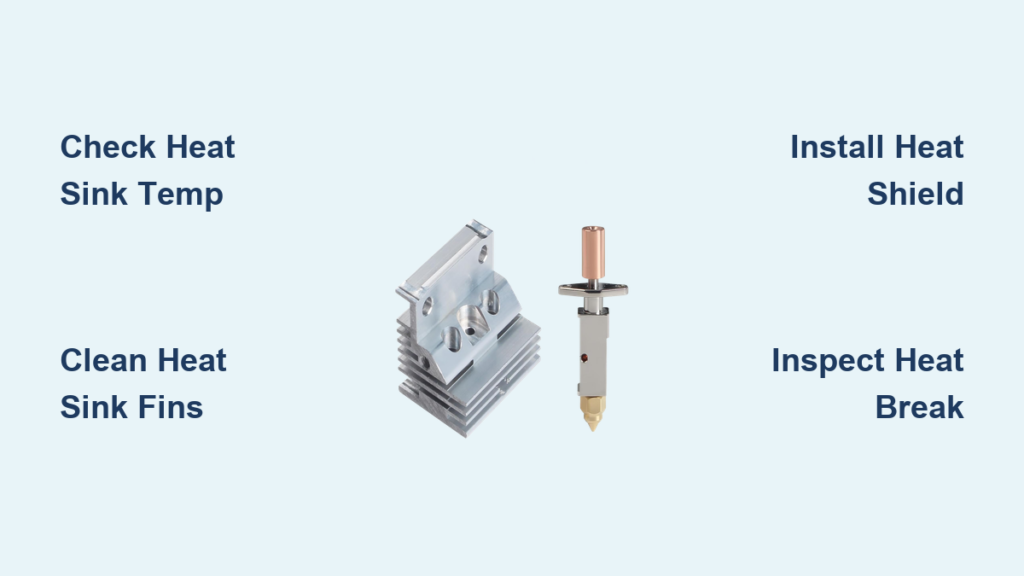
Improving airflow is the most effective way to fix heat sink issues and maintain a sharp thermal gradient. Your goal is to keep the cold end significantly cooler than the heater block.
Verify Fan Direction and Airflow Path
Ensure your part cooling fan blows air directly onto the metal fins of the heat sink. A common error involves fans mounted backward or blocked by frame wires. Reposition the unit so you feel strong, focused air hitting all sides of the fins.
Clean Dust and Debris from Fins
Dust acts as an insulator that traps heat within the metal structure.
1. Power off the printer and let components cool completely.
2. Use compressed air or a soft brush to clear dust from heat sink fins.
3. Clean fan blades and the surrounding shroud thoroughly.
4. Reassemble the unit and test airflow.
Perform this maintenance every two to three weeks if you print frequently.
Upgrade Hardware for Better Dissipation
Replace stock fans with high-speed 24V models rated for 5000+ RPM if cleaning fails. You can also mount a second fan to blow from the opposite side for increased volume. Adding a custom 3D printed duct channels all airflow precisely onto the heat sink to improve efficiency by up to 40 percent.
Install Heat Creep Shields to Block Radiant Heat

Radiant heat from the heater block often warms the upper heat break even with good airflow. Insulating this area helps fix heat sink temperature spikes.
Fit Silicone or Ceramic Barriers
Wrap a heat creep shield around the heater block and upper heat break to contain radiant energy. Silicone sleeves offer flexibility and ease of installation. Ceramic tape provides higher heat resistance for extended durability.
Apply Shields Correctly
- Remove power and ensure the hot end is cool.
- Slide the shield over the heater block carefully.
- Cover the top of the block without touching thermistor wires.
- Reconnect power and monitor temperatures.
This simple modification can reduce heat sink temperature by 5°C to 10°C instantly.
Inspect and Replace Heat Break Components
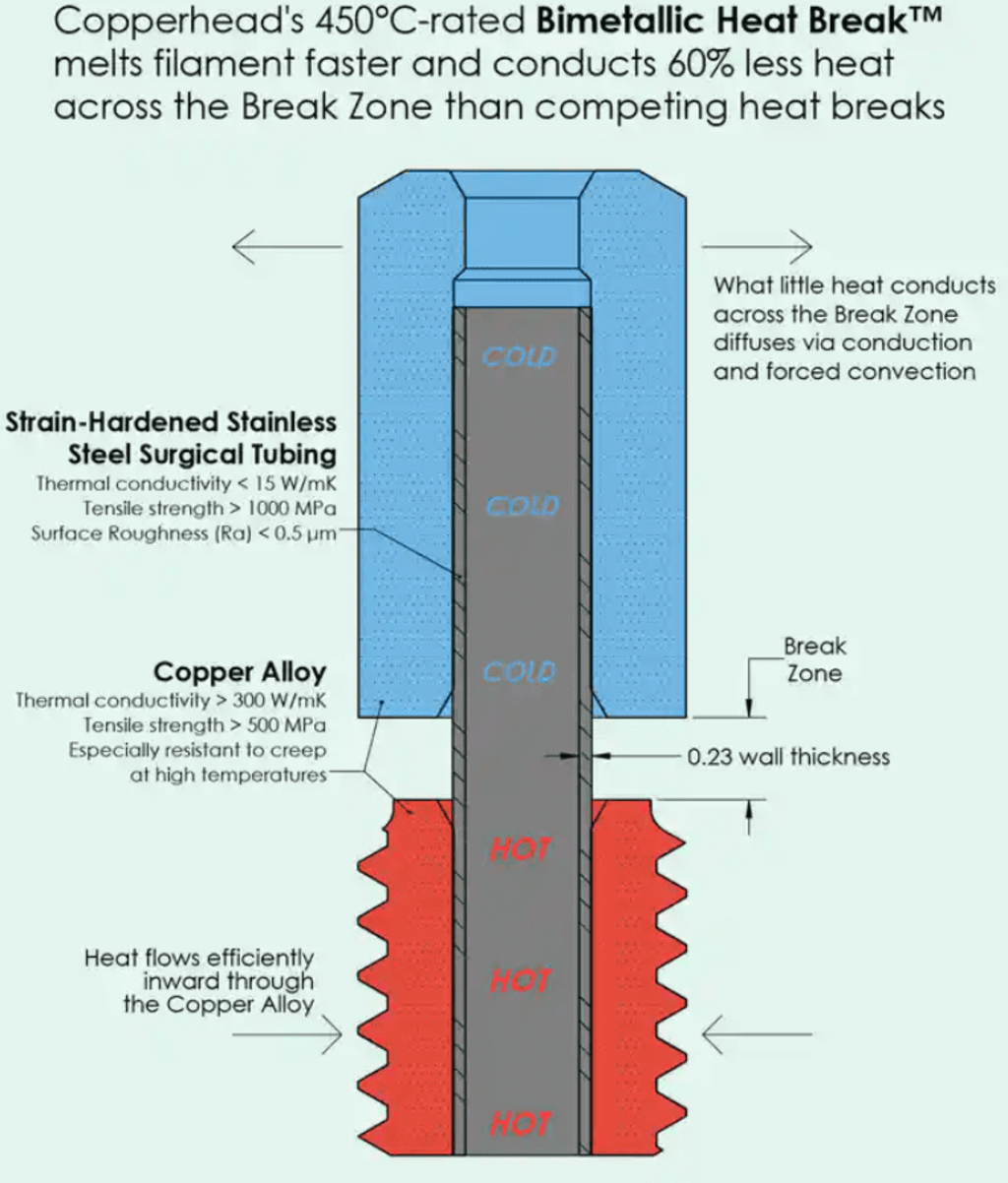
Physical damage or poor fitment allows heat to travel upward and defeat your cooling efforts. Inspect the connection between the heater block and heat sink closely.
Check Heat Break Seating
The heat break must sit tightly between the heater block and heat sink to prevent thermal bridging. For all-metal hot ends, heat the nozzle to 260°C and tighten the nozzle into the block. Then tighten the heat break from below while hot. Let it cool before printing to ensure a proper thermal seal.
Look for Structural Damage
Inspect the heat break for cracks, warping, or carbon buildup inside the bore. Any gap between components creates a path for heat migration. Replace damaged parts immediately to restore proper function.
Upgrade to Superior Materials
Consider replacing worn parts with high-performance alternatives. Choose heat sinks with larger fin surface areas and optimized airflow channels. Upgrading to hardened steel or stainless steel heat breaks improves durability and thermal isolation.
Evaluate Cold End Geometry and Tube Routing

The length and design of your cold end determine how far heat can travel before melting filament.
Utilize Longer Cold Ends
A longer path between the heat sink and melt zone reduces heat creep risk significantly. Some aftermarket hot ends add 10mm to 15mm of cold length. This extension is particularly helpful when printing high-temperature filaments like polycarbonate.
Examine Bowden Tube Connections
In Bowden systems, the PTFE tube must sit flush against the heat break at both ends.
* Ensure the tube is fully inserted into the heat sink.
* Replace worn or split tubes that allow heat escape.
* Avoid sharp bends that increase resistance.
Cut the tube cleanly with wire cutters and reinsert it until it hits the stop. Secure it with a clip or collet to prevent movement.
Upgrade Extruder for Enhanced Grip

If filament slips when it begins to soften, your extruder may lack sufficient traction. Upgrading helps push through minor thermal issues.
Install Dual-Gear Extruders
Dual-gear systems provide superior grip compared to single-gear setups. They reduce slippage when filament softens slightly and maintain consistent pressure during mild heat creep events.
Consider Direct-Drive Conversion
Switching from Bowden to direct drive eliminates long filament travel paths. Filament enters the hot end immediately after extrusion, reducing the chance for pre-softening in the tube. This setup is ideal for flexible or high-temperature materials.
Clean Nozzle and Heat Break Thoroughly
Residue buildup often mimics heat creep symptoms. Perform a deep clean before concluding your hardware is faulty.
Perform a Cold Pull Procedure
This method removes internal clogs and degraded plastic effectively.
1. Heat the nozzle to 240°C for PLA or material-specific temps.
2. Insert a piece of PLA or nylon filament.
3. Push until clean extrusion appears.
4. Cool the nozzle to 90–110°C.
5. Pull sharply upward to extract debris.
Repeat this process two or three times until the pull comes out clean.
Use Cleaning Needles
Insert a 0.4mm brass needle into the nozzle bore while hot to dislodge carbonized particles. Never use steel needles as they can scratch softer nozzle materials. Clean the heat break bore as well if it is removable.
Adjust Print Settings to Reduce Thermal Load
Aggressive software settings can overwhelm even perfect hardware. Tune your parameters to match your system capabilities.
Lower Nozzle Temperature
Excessive heat increases the risk of creep. Try lowering your print temperature by 5°C to 10°C below the manufacturer recommendation. Test with a temperature tower to find the minimum working temperature for your filament.
Reduce Print Speed
High speeds increase pressure and dwell time in the melt zone. Start with 50 mm/s for PLA and 30 mm/s for PETG. Reduce speed by 10–20 mm/s if heat creep occurs. Enable adaptive layering features in your slicer to manage acceleration.
Optimize Retraction Parameters
Too much retraction pulls molten filament into the cooler zone where it solidifies.
* Set retraction distance to 0.5–1.0 mm for direct drive.
* Set retraction distance to 3–5 mm for Bowden systems.
* Keep retraction speed between 25–40 mm/s.
Use a retraction tower test print to fine-tune these values for your specific setup.
Manage Filament Quality and Moisture Levels
Poor quality or wet filament degrades early and increases clog risk significantly.
Dry Filament Before Use
Moisture turns to steam in the nozzle and causes bubbling residue. Dry PLA at 45°C for 4–6 hours and nylon at 70°C for 8–12 hours. Use a food dehydrator or dedicated filament dryer for best results.
Store Materials Properly
Keep spools in sealed bins with desiccant packs to prevent moisture absorption. Avoid leaving filament exposed to humidity overnight. Low-quality filament with inconsistent diameter stresses the extrusion system and worsens heat creep issues.
Frequently Asked Questions About Heat Sink Repairs
What is the ideal temperature for a 3D printer heat sink?
The heat sink should remain close to ambient room temperature, ideally between 20°C and 30°C. Temperatures above 35°C indicate insufficient cooling or improper heat transfer.
How often should I clean my heat sink fins?
You should clean dust and debris from heat sink fins every two to three weeks if printing frequently. Dust acts as an insulator that traps heat and reduces cooling efficiency.
Can a silicone shield really fix heat creep issues?
Yes, silicone or ceramic shields block radiant heat from the heater block. This simple addition can reduce heat sink temperature by 5°C to 10°C and prevent premature filament softening.
Why does my filament grind in the extruder during prints?
Grinding often occurs when filament softens inside the heat sink and creates a blockage. The extruder gear continues pushing but cannot move the jammed filament, causing it to grind.
Should I upgrade to a dual-gear extruder for heat creep?
Upgrading to a dual-gear extruder provides better grip on softened filament. While it does not fix the root thermal cause, it helps push through minor softening issues that single-gear systems cannot handle.
How do I know if my heat break is damaged?
Inspect the heat break for cracks, warping, or carbon buildup inside the bore. Poor seating or visible gaps between components also indicate damage that requires replacement.
Key Takeaways for Fixing Heat Sink Issues
Fixing heat sink problems requires maintaining a precise thermal balance between hot and cold zones. You must ensure active cooling keeps the heat sink near room temperature while blocking radiant heat with shields and proper insulation. Regular cleaning and hardware inspections prevent minor issues from becoming major print failures.
Start by measuring your heat sink temperature and cleaning all dust from fins and fans. If problems persist, install heat creep shields and verify your heat break seating before considering component upgrades. With consistent maintenance and these targeted adjustments, you can eliminate heat creep and enjoy reliable, clog-free 3D printing.