You’re watching your printer when you spot the first signs of trouble—the corners of your model start lifting from the bed. Within minutes, the entire print peels off and curls into a tangled mess. If this sounds familiar, you’re dealing with one of the most frustrating issues in 3D printing: 3D printing bed adhesion problems. These failures waste filament, cost hours of work, and discourage both beginners and experienced makers.
Most adhesion failures don’t come from one catastrophic mistake. They result from a chain of small oversights—a contaminated build plate, an incorrect Z-offset, or a draft from an open door. The good news? Nearly every adhesion issue is fixable with a methodical approach. In this guide, you’ll learn how to identify the root cause, apply the right fix, and prevent future failures.
Start with a Clean Build Plate
Why Cleaning Fixes Most Adhesion Issues
Contamination is the leading cause of poor first-layer adhesion. Oils from your fingers, dust particles, old glue residue, or leftover filament create an invisible barrier between your extruded plastic and the build surface. Even when a bed looks clean, microscopic contaminants can prevent bonding.
Clean your build plate before every print as a baseline habit. Also clean it whenever you touch the surface, when prints suddenly stop sticking, or when adhesion becomes inconsistent across the bed.
Step-by-Step Cleaning Method
- Remove the build plate from the printer.
- Wash with warm water and mild dish soap using a soft sponge.
- Rinse thoroughly to remove all soap residue.
- Dry completely with a lint-free cloth or let air dry.
- Handle only by the edges to avoid recontamination.
For stubborn residue, use 90%+ isopropyl alcohol on glass or PEI surfaces. For glue buildup, soak the plate in warm soapy water and gently scrub. Remove dried filament with a plastic scraper—never metal, which can scratch the surface.
Expert Note: If your print sticks in one area but not another, cleaning is almost always the fix. Skip this step and you’ll waste time adjusting settings that weren’t the problem.
Diagnose the Failure Mode
Match Symptoms to Root Causes
Different adhesion problems require different solutions. Identifying the specific symptom helps you apply the right fix without guesswork.
| Symptom | Likely Cause | Immediate Action |
|---|---|---|
| Print detaches completely | Dirty bed, wrong Z-offset | Clean plate, check leveling |
| Corners lifting | Cooling too fast, low bed temp | Reduce fan, increase bed heat |
| First layer won’t stick | Nozzle too high, cold bed | Adjust Z-offset, verify temps |
| Print sticks in spots | Uneven leveling | Re-level the bed |
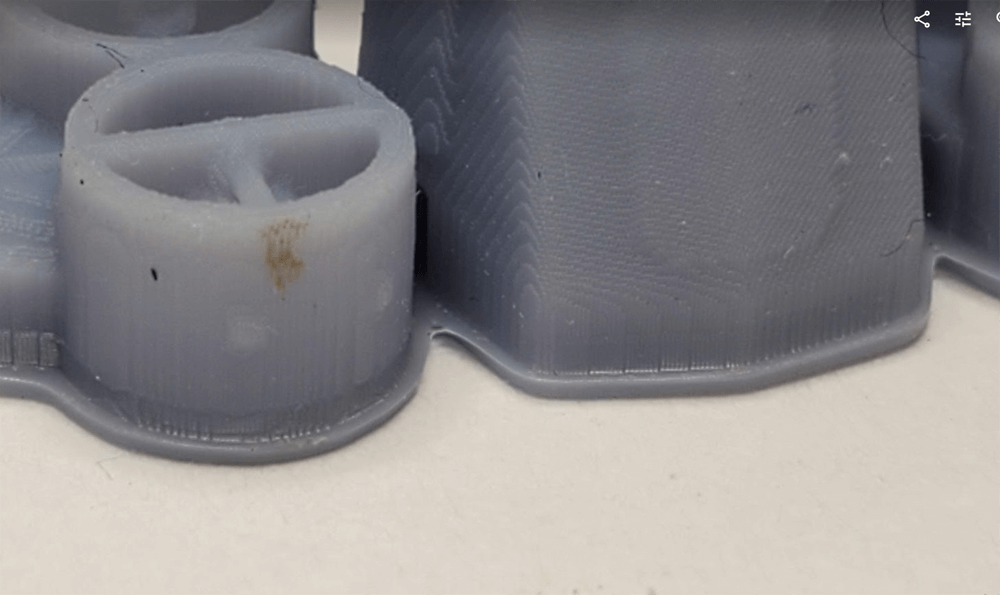
| Bottom layers bulge (elephant’s foot) | Bed too hot, first layer too squished | Lower bed temp, adjust Z-offset |
Identify the Pattern
Sudden failures usually indicate contamination or a mechanical shift, like the printer being bumped. A gradual decline points to residue buildup or component wear. Intermittent issues often relate to inconsistent leveling or environmental drafts.
Always begin troubleshooting by cleaning the plate and inspecting the first layer. This combination solves the majority of cases.
Optimize the First Layer

The Foundation of Every Successful Print
Your first layer is the base for the entire object. It should appear slightly squished, smooth, and gap-free—not round, stringy, or bumpy.
Signs of an ideal first layer include flattened extrusion lines forming a continuous sheet, no gaps between passes, no scraping or skipping, and a slight “hiss” as filament contacts the bed.
Fix Nozzle Height with Z-Offset
Nozzle too high: Filament doesn’t reach the surface properly, resulting in stringy, weak adhesion. Decrease Z-offset to move the nozzle closer to the bed.
Nozzle too low: The nozzle scrapes the bed, blocks filament flow, and can damage the build surface. Increase Z-offset to move the nozzle up.
Calibration process:
1. Level the bed.
2. Perform a paper test at each corner until you feel slight resistance when sliding standard paper.
3. Print a first-layer test, like a 50mm square.
4. Fine-tune Z-offset based on the results.
Never proceed with a full print if the first layer looks wrong. Fixing it now saves time and filament later.
Re-Level the Build Plate
Even Auto-Leveling Needs Help
Auto-leveling is helpful but not foolproof. It cannot compensate for a dirty plate, worn components, or mechanical misalignment. If your printer has auto-leveling, you still need to clean the bed and verify results manually.
Re-level when you change the nozzle or bed, after multiple failed prints, or whenever the printer is moved.
Best Practices for Reliable Leveling
- Run the auto-leveling routine if your printer includes one.
- Manually check 3-5 points across the bed using the paper test.
- Look for consistency: the nozzle should sit at the same distance from the bed at every point.
- Re-run the routine if any point feels too tight or too loose.
If auto-leveling gives inconsistent results, clean the probe and bed, then check for loose belts or warped components.
Slow Down the First Layer
Speed Undermines Adhesion
Printing the first layer too fast prevents proper bonding. The filament doesn’t have enough time to melt, spread, and stick to the surface. This is especially critical for PETG and ABS.
Recommended first layer speeds:
– PLA: 20–30 mm/s
– PETG and ABS: 15–25 mm/s
– TPU: 10–20 mm/s
In your slicer, find “Initial Layer Speed” or “First Layer Speed” and reduce it by 30–50% from your normal print speed. Maintain this slower pace for the first 2–3 layers.
The first layer isn’t about speed—it’s about survival. A slow, solid start prevents hours of failure.
Adjust Bed and Nozzle Temperatures
Small Changes Deliver Big Results
Temperature plays a major role in adhesion. Even a 5°C shift can determine whether your print sticks or fails.
Bed Temperature Guidelines
| Material | Standard Bed Temp | First Layer Boost |
|---|---|---|
| PLA | 55–60°C | +2–5°C (up to 65°C) |
| PETG | 70–80°C | +5°C |
| ABS | 100–110°C | +5°C |
| TPU | 30–50°C | +5°C |
Too hot causes elephant’s foot and warping. Too cold results in poor bonding.
Nozzle Temperature Boost
Increase first-layer nozzle temperature by 5–10°C to improve flow and adhesion:
– PLA: 195–220°C
– PETG and ABS: 235–260°C
Return to normal temperature after 2–5 layers. Most slicers offer an “Initial Layer Temperature” setting that automates this.
Use a Brim for Problem Prints
Widen the Footprint
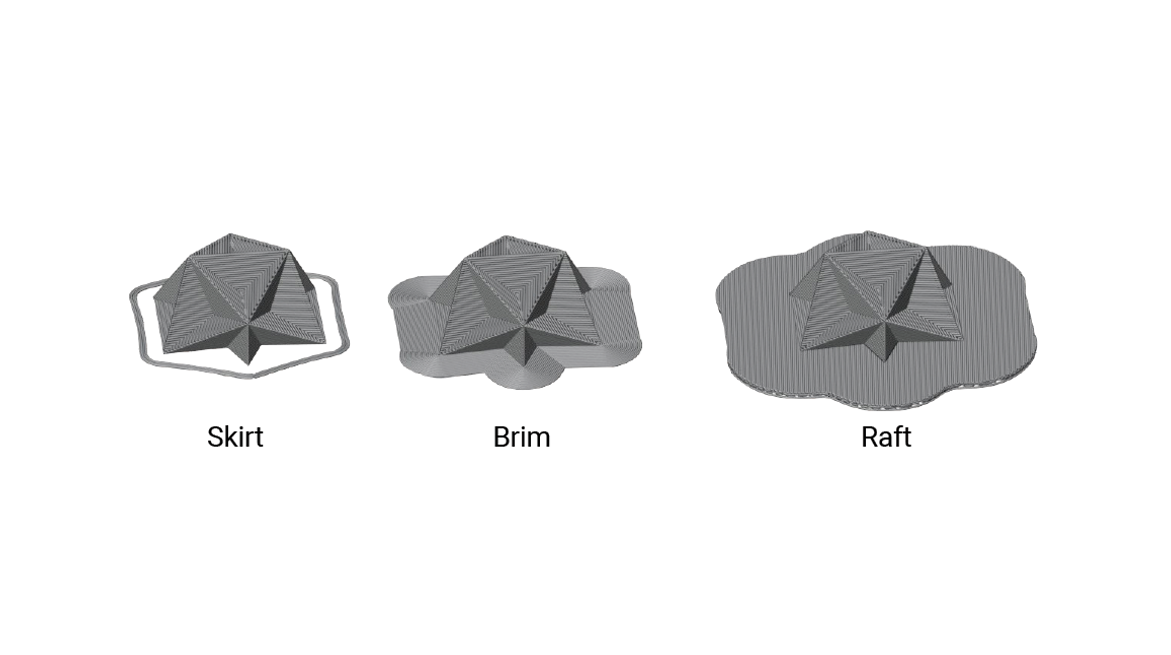
A brim is a single-layer extension that surrounds your model, increasing surface area and grip. It’s one of the easiest and most effective fixes for tricky prints.
Apply a brim when:
– The model has a small base, like a figurine
– You’re printing tall, thin objects prone to tipping
– The model has sharp corners that are warping hotspots
– You’re working with ABS or PETG
In your slicer, enable “Brim” under build plate adhesion settings, set the width to 5–10 mm, and remove the brim after the print cools.
Manage the Part Cooling Fan
Don’t Cool Too Soon
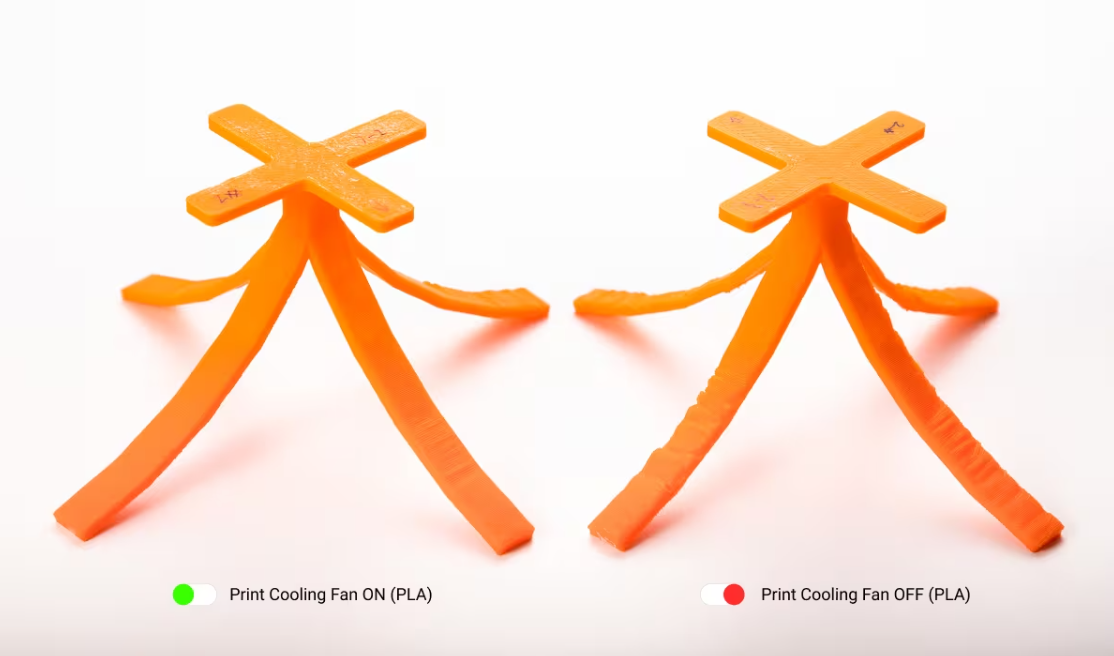
The part cooling fan helps with overhangs and fine details, but running it too early cools the first layers too quickly. This contraction causes warping and edge lifting.
Best practices:
– Disable the fan for the first 2–4 layers
– Start the fan at layer 5 or higher
– Set “Initial Fan Speed” to 0% and “Fan Speed Delay” to 4 layers
For ABS, keep the fan off entirely and use an enclosure. For PETG, use minimal fan on first layers. PLA can use the fan sooner, but delaying helps in drafty rooms.
Even PLA can warp in a drafty environment, so consider shielding your printer or using a simple cardboard enclosure.
Match Adhesion to Your Material
One Approach Doesn’t Fit All
Different materials require different adhesion strategies. Using PLA settings for ABS is a recipe for failure.
PLA: Simple but Sensitive
- Bed temp: 55–60°C (65°C maximum)
- Nozzle: 190–210°C
- First layer speed: 20–30 mm/s
- Cooling: Start at layer 3–5
- Surface: PEI or glass with glue stick
- Watch for: Elephant’s foot at high bed temp, lifting in drafts
ABS: Warping Warrior
- Bed temp: 100–110°C
- Nozzle: 230–250°C
- Cooling: Fan off
- Must-have: Enclosed printer
- Adhesion boost: ABS slurry (ABS dissolved in acetone) on the build plate
- Use brim or raft for large prints
PETG: Sticky but Tricky
- Bed temp: 70–80°C
- Nozzle: 230–250°C
- Cooling: Minimal for first layers
- Surface: Clean PEI or glass
- Use a glue stick as a release agent on glass to prevent over-adhesion
- Avoid excessive bed temperature, which causes oozing
TPU: Flexible and Forgiving
- Bed temp: 30–50°C
- Nozzle: 220–250°C
- First layer speed: 15–20 mm/s
- Cooling: Low fan
- Surface: Painter’s tape or textured PEI
Try Advanced Adhesion Methods
Rafts for Maximum Stability
A raft is a thick, grid-like base printed beneath your model. It provides maximum adhesion, helps with warped or uneven models, and protects the print bottom.
Downsides include increased filament use, longer print times, and texture left on the bottom surface. Use rafts for ABS, nylon, or models with tiny contact points.
Skirts vs. Brims vs. Rafts
| Type | Touches Model? | Purpose | Best For |
|---|---|---|---|
| Skirt | No | Prime nozzle, check flow | All prints |
| Brim | Yes | Improve adhesion | Small or tall models |
| Raft | Yes | Maximum stability | Warping-prone materials |
Try a brim before escalating to a raft.
Prevent Future Failures
Build a Reliable Routine
Consistency outperforms heroics. Follow a maintenance schedule to keep adhesion issues rare.
Daily: Clean with IPA or soap, inspect the first layer of every print, and keep the printer away from drafts.
Weekly: Deep clean the build surface, check bed leveling, and verify nozzle condition.
Monthly: Inspect for bed warping, clean leveling sensors, and replace worn surfaces like PEI sheets or BuildTak.
Long-term: Track successful settings in a log, replace PEI sheets every 6–12 months, and consider upgrading to a magnetic flexible bed for easier print removal.
Avoid Common Mistakes
Don’t Sabotage Your Own Success
Jumping to adhesives too soon: Using glue or hairspray before fixing first-layer issues masks the real problem. Clean, level, and optimize first.
Changing multiple settings at once: If you adjust speed, temperature, and leveling together, you won’t know what fixed it. Change one variable at a time.
Ignoring environmental factors: A window draft or AC vent can ruin a print. Use a draft shield or enclosure.
Believing auto-leveling fixes everything: Auto-leveling helps but can’t compensate for a dirty bed or mechanical issues. Maintenance still matters.
Frequently Asked Questions About 3D Printing Bed Adhesion
What Causes 3D Printing Bed Adhesion Problems Most Often?
The most common cause is a contaminated build surface. Fingerprint oils, dust, and leftover filament create an invisible barrier that prevents the first layer from bonding. Cleaning the bed with soap and water or 90%+ isopropyl alcohol resolves the majority of adhesion failures.
How Do I Fix First Layer Bed Adhesion Issues?
Start by cleaning the build plate thoroughly. Then verify the nozzle height using the paper test and adjust the Z-offset until the first layer appears slightly squished. Reduce first layer speed by 30–50% and increase bed temperature by 2–5°C above standard settings for the first layer.
Why Do My 3D Print Corners Keep Lifting From the Bed?
Corner lifting usually results from premature cooling or insufficient bed temperature. The part cooling fan cools the plastic too quickly, causing contraction and warping. Disable the fan for the first 2–4 layers and raise the bed temperature by 5°C. For ABS, use an enclosed printer.
What Is the Best Bed Temperature for PETG Adhesion?
PETG adheres best at a bed temperature of 70–80°C. Increase to 75–85°C for the first layer to improve bonding. Be cautious with higher temperatures, as PETG can over-adhere and damage glass or PEI surfaces.
Should I Use a Brim or Raft for Better Adhesion?
Use a brim first. Brims add a single-layer extension around the model, increasing surface area and grip with minimal material cost. Rafts are thicker, use more filament, and leave texture on the bottom of the print. Reserve rafts for warping-prone materials like ABS or models with very small contact points.
Does Auto-Leveling Eliminate Bed Adhesion Problems?
No. Auto-leveling helps maintain consistent nozzle distance across the bed, but it cannot fix contamination, worn components, or incorrect Z-offset settings. You still need to clean the build plate regularly, inspect the first layer, and verify leveling accuracy manually.
Final Thoughts on Solving 3D Printing Bed Adhesion Problems
3D printing bed adhesion problems rarely have a single magic solution. Instead, they respond to a combination of small, intentional adjustments. Start with the basics: clean the build plate, inspect the first layer, re-level the bed, reduce speed, and fine-tune temperatures. Use a brim for tricky prints and manage cooling to prevent warping.
Match your approach to the material you’re printing. PLA, ABS, PETG, and TPU each have unique requirements. Consistency in cleaning and maintenance will transform adhesion failures from frequent frustrations into occasional exceptions.
Pick one fix from this guide, apply it to your next print, and document the result. Building a reliable first layer is a habit—and you’re now equipped with the knowledge to make it stick.