A failing thermal printer can bring your business to a standstill. Lost labels, unreadable barcodes, and shipping delays all add up fast when your equipment goes down. For businesses in the Brazos Valley, getting fast and reliable thermal printer repairs in Bryan, TX is essential to keeping operations moving. Local technicians with the right parts and expertise can resolve most issues in a single visit.
This guide covers the most common thermal printer problems, practical troubleshooting steps, and how to access professional repair support in Bryan and surrounding areas.
Common Thermal Printer Problems That Require Repairs

Thermal printers are dependable workhorses, but they do develop issues over time. Spotting the warning signs early can prevent minor problems from becoming major repairs.
Printhead Not Printing Clearly
Faded text, streaked barcodes, or missing lines usually point to a dirty or failing printhead. The printhead is the most sensitive component inside a thermal printer, and it reacts poorly to dust, adhesive residue, and heat buildup. When routine cleaning fails to restore quality, replacement is often the only solution.
Printer Not Feeding Labels
Labels that jam, skew, or fail to advance are among the most frequent service calls. Common causes include sensor misalignment, worn platen rollers, debris in the feed path, or incorrect media settings. Powering off the printer before manually clearing jams protects internal components from damage.
Error Lights and Beeping
Flashing LEDs and error beeps indicate internal faults that need attention. A red light may signal overheating, while rapid beeping often points to a jam or communication failure with the host system. Noting the flash pattern or beep count before calling for service helps technicians diagnose problems faster.
Fix Printhead Issues Before They Worsen
Printhead problems are the number one reason businesses need thermal printer repairs. The printhead generates the heat that creates images on labels, making it vulnerable to wear, contamination, and pressure damage.
Clean the Printhead the Right Way
A dirty printhead is the leading cause of poor print quality. Cleaning it every time you change labels or ribbons takes less than two minutes and dramatically extends printhead life.
Follow these steps for safe cleaning:
1. Power off and unplug the printer.
2. Open the print mechanism to access the printhead.
3. Moisten a lint-free cloth with 90% isopropyl alcohol.
4. Wipe the printhead surface using light, straight strokes.
5. Allow the printhead to dry completely before powering on.
Never use abrasive materials or household cleaners, as they can permanently scratch the printhead surface.
Replace a Failing Printhead
If cleaning does not restore print quality, replacement is usually necessary. Persistent streaks, blank lines, or burn marks on the printhead are clear indicators that it has reached the end of its service life. Bryan-based technicians carry OEM-compatible printheads for popular models, including Zebra ZT410, ZT420, and ZD420 series, and can complete replacements on-site.
Diagnose Platen Roller Failures
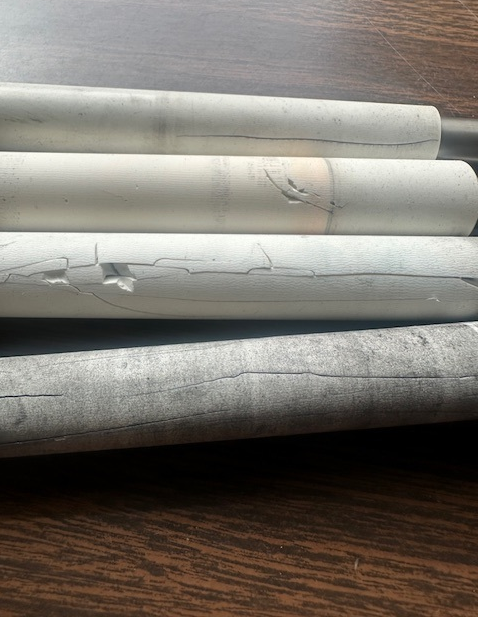
The platen roller works alongside the printhead to feed labels through the printer. When it wears out or accumulates residue, you may notice misfeeds, jams, or uneven pressure during printing.
Inspect the Platen Roller Monthly
A quick visual inspection each month helps catch roller issues early. Look for:
– Cracks, flat spots, or visible wear
– Sticky residue from label adhesive
– Loss of grip causing labels to slip
Cleaning the roller with isopropyl alcohol often resolves minor issues. Severely damaged rollers should be replaced, and most replacements take less than 30 minutes when performed by an experienced technician.
Prevent Label Skew and Jams
Skewed labels are usually caused by uneven roller pressure, misaligned media sensors, or incorrect media settings. Centering the label roll, cleaning the sensors, and confirming the correct label size in the printer settings typically corrects the problem.
Prevent Emergency Thermal Printer Repairs
Preventive care is the best defense against unexpected downtime. A few simple habits can dramatically reduce the need for emergency service calls.
Make Printhead Cleaning a Habit
Cleaning the printhead with every media change is the single most effective preventive measure. This quick habit prevents residue buildup that shortens printhead life and degrades print quality over time.
Use High-Quality Supplies
Cheap labels and ribbons may lower upfront costs, but they create bigger problems down the road. Low-quality supplies leave sticky residue on printheads, have inconsistent thermal coatings, and increase friction that wears out rollers faster. Working with a qualified supplies partner ensures you get manufacturer-recommended media that protects your equipment.
Schedule Routine Maintenance
Routine maintenance catches small issues before they become costly repairs. A typical maintenance visit includes deep cleaning of sensors and rollers, printhead inspection and calibration, firmware updates, and a full evaluation of wear-prone components. Businesses on maintenance agreements typically see significantly fewer emergency repair calls throughout the year.
Fast On-Site Repair Service in Bryan, TX
When preventive care is not enough, fast professional service keeps your business running.
Same-Day Response
The average response time for thermal printer repairs in Bryan, TX is just 4 hours. Many service calls are completed the same day they are requested. Service hours run from 8 AM to 5 PM, Monday through Friday, with coverage extending to College Station, Kurten, Snook, Navasota, Caldwell, and surrounding communities.
Technicians Carry Common Parts
Field technicians stock the most commonly needed replacement parts, including printheads, platen rollers, power supplies, and sensor assemblies. Having parts on the truck means most repairs are completed during the first visit, with no waiting for shipments.
Free Repair Estimates
Diagnostics are provided at no charge. Simply call with your printer’s make, model, and a description of the symptoms to receive a free estimate. You approve the cost before any repair work begins, so there are no surprises.
Repair or Replace: How to Decide
Frequent breakdowns sometimes signal that replacement makes more financial sense than ongoing repairs.
Consider replacing your thermal printer if it:
– Requires repairs more than twice a year
– Is more than 5 years old
– Lacks modern connectivity options
– Can no longer support your current label sizes or software
Newer models offer faster print speeds, better connectivity, and improved durability. A professional evaluation of cost-per-print, reliability, and system compatibility helps you make the right call.
Support for Zebra and Other Leading Brands
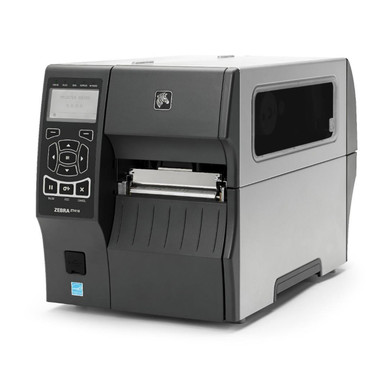
Bryan-based technicians specialize in Zebra thermal printers but service a wide range of brands used by local businesses. Common Zebra repairs include printhead errors on ZT410 and ZT420 models, paper jam faults on ZD420 units, and communication failures on GX430t printers. Other supported brands include TSC, Honeywell, Citizen, SATO, and Avery Dennison.
Check Repair Status and Plan Ahead
Staying informed during a repair is easy. Calling your service representative at 512-379-7445 allows you to confirm technician dispatch, get progress updates, and schedule follow-up visits. Maintenance agreements are also available for businesses that want priority dispatch, discounted parts and labor, quarterly inspections, and free cleaning visits. These plans are ideal for high-volume environments like warehouses, clinics, and distribution centers.
Trusted by Businesses Across the Brazos Valley
Local companies across Bryan, College Station, Wellborn, Kurten, Snook, Millican, Somerville, Hearne, Wheelock, Caldwell, Lyons, Gause, and Anderson rely on local technicians for minimized downtime, expert technical knowledge, and transparent pricing. Choosing a local provider means faster response times, technicians who carry common parts, free diagnostics, and support for preventive care programs.
Frequently Asked Questions About Thermal Printer Repairs in Bryan, TX
What is the typical response time for thermal printer repairs near Bryan, TX?
The average response time is 4 hours. In some cases, technicians may be able to arrive even sooner, depending on the current schedule and your location.
Will the technician have the parts needed to fix my thermal printer?
Bryan-based technicians carry the most commonly used thermal printer parts, which allows most repairs to be completed in a single visit without waiting for shipments.
How can I check the status of a thermal printer repair?
The easiest way is to call your Bryan-based service representative directly at 512-379-7445. They can confirm dispatch, share repair progress, and schedule any needed follow-up visits.
Do you offer maintenance agreements for thermal printers?
Yes. Several maintenance options are available to help businesses save money and keep their thermal printers in top condition. Calling 512-379-7445 connects you with a specialist who can recommend the right plan.
What does thermal printer repair cost in Bryan, TX?
Repair pricing depends on the make, model, and specific problem. Free estimates are available by calling 512-379-7445 with your printer details.
Where can I download the latest software and drivers for my thermal printer?
Drivers are available directly from the manufacturer’s website for your specific printer model.
What are the hours of operation for thermal printer repair in Bryan, TX?
Service is available Monday through Friday from 8 AM to 5 PM.
Final Thoughts on Keeping Your Thermal Printers Running Smoothly
Thermal printer downtime does not have to mean lost productivity for your business. Recognizing early warning signs, performing routine printhead cleanings, using high-quality supplies, and scheduling preventive maintenance all go a long way toward avoiding emergency repairs. When issues do arise, having a trusted local technician with a 4-hour average response time and stocked parts makes all the difference.
The next step is simple. Call 512-379-7445 to schedule a free diagnostic, request a repair estimate, or discuss a custom maintenance plan tailored to your operation. Local experts are ready to help you keep your labels printing clearly and your business moving forward.